I am using OpenPHT on windows7/10 and am having a problem with the buffer size capping out at 100MB. No matter how high I set the % buffer setting it won’t buffer more than 100Mb. Is there an .xml or config file in windows I can see if there is a hidden max buffer size somewhere? I only see three .xml files (guisettings.xml, plesfilermanager2.xml, and profiles.xml) Those don’t seem to have what I’m looking for.
if not present, create advancedsettings.xml and add the following;
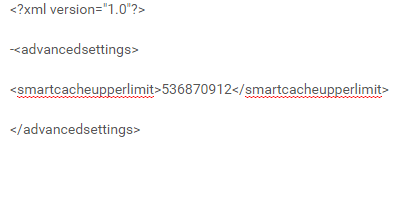
This should be 512mb cache size… Personally, there is no benefit in doing this.
can i ask - what are you trying to accomplish by doing this?
cheers
Maybe he uses at remote location with dodgy internet connection.
@smoothsensation please provide an xml from a media file experiencing the issue.
Just here to confirm this. I have been playing around with advancedsettings.xml all day and it hasn’t once worked like it was supposed too. It seems to stop consistently around 100 MB and I’ve tested on a variety of TV shows and movie files.
Here is another thread unanswered where the issue was still present per the 1.6.2. Even though the linked thread, in the linked thread, has an answer marked, the very last post makes me believe it was never truly resolved.
See my post above - the editor wasnt accepting my xml code - I made a screenshot.
This works 100% on 1.7.1
Thanks for fixing that code in your post @nielsvdp
I will check it out this evening after work. Could you expand on what it is and how it works a bit? I googled smartcacheupperlimit and it only brought me back to this thread. FYI, here were the commonly-recommended xml settings I was using, and didn’t notice any change per my attached logs. The cache was being set to 73248968 bytes in both cases.
1 2097152000 20
I got it from Nedthenerd somewhere buried in this forum. I was hoping it would do something, but it doesnt really - seeking doesnt go faster.
It basically caches forward for 512megs with my setting - so in short you have 512meg of buffer so you can shutdown the server, but the movie keeps playing.
Maybe its a good setting for low bandwith connections or bad wireless connections.
