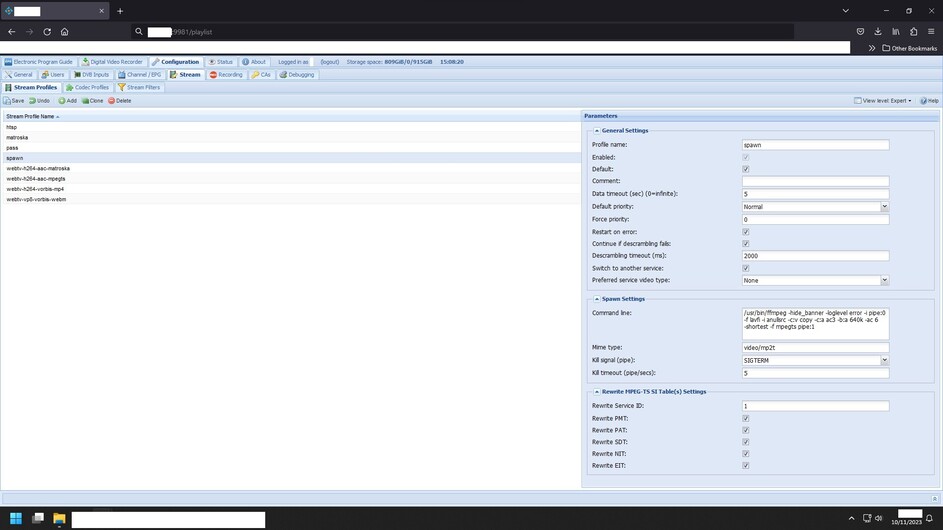
I keep revisiting this and it won’t ever work for me this way. TVHeadend forums seem to suggest this maximum timeout setting for networks only applies to recording and not restreaming to xteve or Emby and that this couldn’t work as described by Sixxnet. What doesn’t make sense is how @sixxnet could think it works if it doesn’t. I’m hanging on to hope that it could work this way because it wouldn’t surprise me if people on the TVH forum are wrong about the software.
So to anyone using TVHeadend this way, please test this to confirm if you have time. Play a stream and kill the connection somehow and see if TVH will try another stream.
In Ubuntu, I’m using “netstat -tupn” to find the IP of the stream server then killing it with “sudo ss -K dst stream-server-IP”
Is this possibly not a good method of testing the failover?
What actually happens is that this setup works to failover to another stream URL if the initial connection times out but not an already active connection. TVH disregards the timeout set in “Edit Network.” TVH waits for the dead connection however long you set in the spawn or pass profile settings without trying another network then it just gives up. I’ve tested this with the current version and one from 3 years ago and my findings match what the TVH forums suggest, that there is no failover logic in TVH.
@sixxnet If you are still around, could you try testing the lost connection behavior to be absolutley sure it fails over to another network?
If you assign multiple services to a single channel TVheadend will failover in a predetermined order. If you use my modded TVheadend it will failover in a random order.
Switch to another service needs to be enabled in the stream profile being used by the user for this to even work and you need more than one service assigned to a channel. It is failover verbatim.
You need to set the data timeout in the stream profile because TVheadend needs to know how long to wait until it decides a stream is dead and proceeds to switch service.
I’ve tried that. I’ve emptied the config folder and recreated the docker image dozens of times and I haven’t seen an active stream switch to another source. Each time I go through every single post.
I even tried getting the provider to stop the stream from the panel and TVHeadend just waits until it times out, then it “unsubscribes” the stream.
I’m stuck between taking your word that it could work and taking the word of TVH forum. I believe you over them but I can’t understand what could possibly be the difference that makes it work for you.
Have you ever tried testing it by disrupting an active stream?
To be clear, if I make two m3u files and each has 1 channel in it. Both are the same channel but from different sources. I make two networks from the m3u files and follow your directions word for word. If I stream the channel from TVH and the first channel URL won’t start, it will fail over to the second. If I stream the channel and it starts and plays, then the connection is lost, it does not fail over in any circumstance I can reproduce in any version of TVH I have tested.
I tried using IPTV Network instead of IPTV Automatic Network. That eliminated the need for m3u files. No changes with that. You are using TS and not HLS for the stream, right?
Maybe it’s that it works to failover if it gets a 404 from the server (as you mention in the other thread), but it doesn’t work the way I’m killing the stream from shell. The reason I want to see it work by simulating a failure is that it didn’t ever work for me in practice and I want to know what I’m doing to break it.
There’s is some sort of TVH voodoo I must be missing.
A bit off topic but can any tell me why iptv works much better with tvheadend than simply using xteve, telly or threadfin? On android, the stream always suddenly ends if I don’t use tvheadend.
I’ve tested every check and uncheck, timeout… Everything I can think of. I’ve seen TVHeadend try other services when a stream fails on start, but once it’s streaming and I stop that connection, it does not fail over with any combination of settings I can fathom. Hopefully I’m overlooking something.
Change SIGTERM to SIGKILL and try that. That’s the only thing different in mine.
Remeber though, TVheadend will cycle the channels in a pre-determined order without my mod but that shouldn’t stop it from switching service during the data timeout.
That’s what I assumed, and it does work that way on the start of a stream which, alone, is a feature referenced on their forum. But if it doesn’t fail over after the stream is running then the spawn profile is transcoding audio and remuxing for no reason.
In any case, I really appreciate your time. I tried SIGKILL and it still just runs to the end of whatever timeout I set in the spawn profile and stops.
If I get to the bottom of this I will return here to update.
No, don’t set a timeout? Dunno what you’re doing but the data has to actually be detected as not flowing as coming from the provider so just do killall -9 ffmpeg in the terminal to kill the streams.
The issue is that when the data stops, TVH waits until the end of whatever timeout you set in the profile and then “unsubcribes” and the stream stops without trying the failover.
However, it did work one time and I can’t tell why. When it works you see this in the logs:
“[ DEBUG]:service: m3uA.m3u - TestChannel/Service01: Status changed to [Graceperiod expired] [Data timeout]”
I have no idea why it won’t do this consistently or barely at all. Now that I’ve seen it work I’m going to try older versions of 4.3 to see if this function broke along the way.
With a timeout of zero in the ‘stream profile’ you are using, TVH will hold the service open endlessly with no data, and it won’t try another service. With a timeout set in the stream profile, TVH has tried another service 1 time out of probably 100 tests.
Just set the timeout to 5 seconds and killall -9 ffmpeg in the terminal will make it switch. If you hover over ‘switch to another service’ it literally says what it does and if it’s worked before then it’s correct. The channels need more than one service assigned. If you see it keep trying the same service over and over again that’s because TVheadend tries services in a predetermined order and Plex is resetting the connection which makes it start over which is why I modded it to randomly select one. I also modded some timeouts in the source code to get it working stable. Use my mod.
Make sure you checkout to the randomization branch in git before compiling tvheadend_mod OR
If you’re using docker/podman just build my container and import. Checkout to the streamlink branch in that case before building the container.
This thread I go into great detail helping another person get it going along with many others who have contacted me about it.
if you’re scared to use my source then do a diff between TVheadends repo and mine to see the changes or look at my commits.
“killall -9 ffmpeg” stops the stream after whatever timeout I set, with no attempt at failover.
I started this thread because I’ve followed your instructions from scratch several times and the only times TVH has tried to failover as intended, are unexplainable. That other thread is closed or I would have posted there. The server is just an intel desktop running Ubuntu, but I’ve tried on another machine too back when I first saw your posts… Gave up because I didn’t have time for finding the issue and came back to it.
Have you tested your setup recently and are you on an old version by any chance? If you check that thread, I was one of the primary people interacting. I don’t think anyone ever actually tested the setup by causing a stream failure, and I only did because I noticed it didn’t seem to work as described.
It seems like your setup works by timing out and stopping the ffmpeg audio transcode session when the connection fails. Then the client tries to reconnect so TVHeadend opens a new stream. Since you have randomized the priority of the sources, it may or may not land on a different source for this new stream and appear to be a failover when it’s really a new session. That could certainly be effective but then I don’t see a reason to transcode sound since you are killing the ffmpeg session and starting a new one anyway.
Bro, it fails over with normal TVheadend. The reason it’s not for you is because Plex is resetting the connection and it’s starting over. sixxnet already told you this.
PLEX is resetting the connection because that’s what FFmpeg does and Plex uses FFmpeg. If you use a player that isn’t going to reset the connection so fast you’ll see it fail over. As you said, You’ve seen it fail over once or twice and that’s just timing so IT IS set up correctly.
I modded this for the very reason that Plex resets the connection very fast which causes TVheadend to start over/try the same source/the first one in line because it’s in a pre-determined order determined by various channel parameters you can set inside TVheadend.
There is nothing more.
Use my mod. It works great. You’ll be happy and you’ll never think about this dumb-ass problem again LOL. TRUST ME when i say I already fought with this long time ago,
I literally read the source code to implement these changes I know exactly how it works.
I don’t use these forums AT ALL for any reason so I’m outta here. Plex as a PERSON has ■■■■■■ with my mental health more than I wish to deal with. They’re ass*****. Good luck.
I’m using VLC, is there a client that I can test this out with? I don’t want my sources to be random, I prefer it to be prioritized.
And again, I only started testing this setup because it wasn’t failing over with Emby.
I appreciate the mod and the explanations from you both. I’ll try the mod, it’s just that I don’t want random.
If I remember correctly the service would fail over correctly with regular TVH. If I cut the internet to the machine and then try to stream it will show it fail over when not being able to connect to the provider stream. Reason because it’s not receiving any 404 errors etc from the stream provider which causes the connection to reset. If there’s no internet those errors can’t come through. My memory could be wrong it’s been a long time.
Try it without internet and watch the dashboard in TVH or cut the internet in the middle of a stream. It’s tricky which is why I randomized it.
See the problem with all this is TVH was originally made for DVB-S, DVB-S2, DVB-C, DVB-T, DVB-T2, ATSC, ISDB-T, SAT>IP which doesn’t work exactly the same as IPTV/HDHomeRun so it’s complicated.
I’ve tried it all and still can’t get TVH to failover unless it’s at the start of a stream request. Just on the record for other people who try this setup and notice it doesn’t fail over, I don’t want them to be totally gaslit. I don’t see any point in using the spawn profile and transcoding audio since the failover is actually just stopping the stream and Plex asking to restart it.
Edit: Will report back if I do see it work.