I have an LG C2 panel and an NVidia Shield Pro running a Plex server.
My daughter has a newer version of my LG TV and a new NVidia Shield Pro. She is not running a Plex server, just using the Shield as Plex client.
She is remote to me and I have set up my server so that she can access it. But here’s the problem: Files that I can play natively are sometimes being transcoded (by me) for playback for her setup. If I tell my Plex server to never transcode, then the file never starts on her end. It just shows a spinning circle.
As I said, the hardware is identical. Her hardware is capable of direct playing these formats and mine DOES direct play them. So why does hers want to transcode them?
BTW, I watch what’s going on using the Plex app for Windows. I can see when she starts a show and if it’s direct play or transcoding. It does try to direct play first.
Also, I have encoded all of these files myself using Handbrake.
I’m happy to try any suggestions!
Most clients - by default - restrict THEMSELVES from running at full “original quality” videos when they are “remote”. So when a remote client requests a video from a server, they will most likely transcode the file because they requested no more than a certain bitrate video. I don’t know what that amount is.
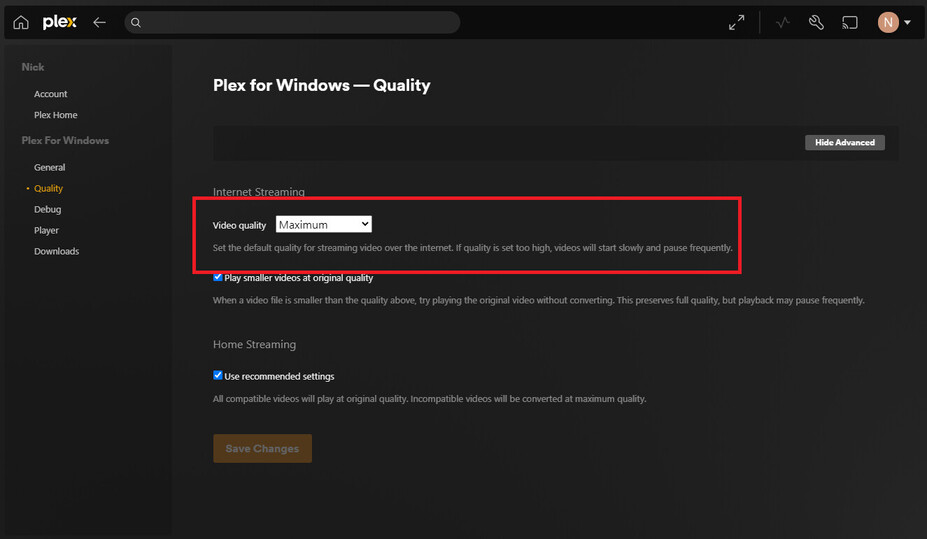
Go to the shield itself, load up the Plex app, then look in its settings. You will want to look for something related to quality, and you want to change remote quality to “maximum” or “original” quality.
For reference, the setting you would change on the Plex-For-Windows app is this:
I do not have a screenshot of the shield’s setting menu right now… I’ll see if I can’t find a picture for you.
Might have found one. Look for this section, and ensure that the “Remote Streaming” option (third from the left in the picture) is set to “Maximum”.
If this doesn’t fix it, your server itself can also restrict remote streams to a certain bitrate as well, despite what the client asks for. I’ll show you where to look for that if the client setting was not the issue.
Thank you for that suggestion. What you posted is from the server side, no? I checked and the server is set up just as you have shown in the screenshot.
No.
Remote Streaming quality is a client setting.
Launch the Plex app on the Shield.
Scroll down to Settings.
Edit: Server side settings are in Settings → Remote Access
Internet upload speed and Limit remote stream bitrate
Got it. Sorry about my confusion. I’ll make sure the remote Shield is set the same way and let you know.
Thank you.
Also, make sure Adjust Automatically = OFF.
Enabling it can result in transcoding.
Disabling transcoding does not force direct play.
If Plex decides the video must be transcoded, and transcoding is disabled, it will not play. The client should eventually display an error message saying “the server is not powerful enough to transcode the video” (or very similar).
Thank you both. The default for REMOTE STREAMING is not Maximum. Once we changed it, most things started working as expected.
Thank you!