kesawi
September 11, 2024, 9:43am
2
Ubuntu 24.04.1 w/6.8 kernel has demonstrated functionality with tonemapping on my 7700K.
This is on a Ubuntu VM with the iGPU passed through under Proxmox 8.2.2. Would expect it to work if Ubuntu was bare metal.
EDIT: Post updated to include requested details:
Ubuntu Version: 24.04.1
Kernel Version: 6.8.0-44-generic
GPU model (or CPU if using an iGPU): Intel i7-7700K iGPU
PMS version including build e.g. 1.41.0.8992: Version 1.41.0.8992
Input Codec (highest bitrate) → Output codec and bitrate: 24.9Mbps HVEC 4K HDR10Plus → 14.1Mbps H264 1080p SDR
2 Likes
So I am running an N100 with Plex on bare metal 22.04.04. I’m being asked by the OS to upgrade. What is the expected outcome if I upgrade to 24.04.1?
1 Like
upgrade and find out for yourself. or dont upgrade and wait for the n100 to be listed under 24.04.xx as a cpu that is confirmed functioning properly. Chuck has a n100 so i’m sure he will add it when he thinks its functioning well enough on 24.04. there are other issues people are reporting with that release so i think most people are advising against upgrading until more kinks have been worked out.
ChuckPa
September 11, 2024, 4:53pm
5
IMHO,
Why should you be the guinea pig?
3 Likes
For those with meteor lake chips (Core Ultra 125h, 155h, etc.) I’m interested in your results with hardware HDR tone mapping. My bug thread on the visual oddities I see is here:
Server Version#: Version 1.41.0.8930
Player Version#: Plex Web Version 4.136.1, Plex for Mac Version 1.100.1.221-94aa83fb
Sample File : Sony Swordsmith 4K HDR Demo
System: ASRock NUC-Box – Intel Core Ultra 125H
OS: Proxmox 8.2, running Kernel 6.8.12-1-pve
Plex Context: Running in an LXC container based on Ubuntu 22.04.04 with iGPU passed through.
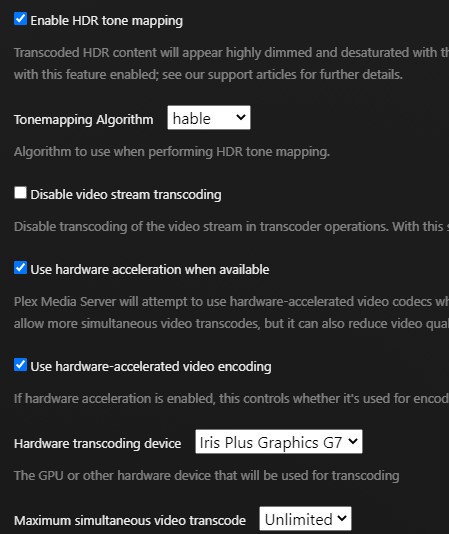
Transcode Settings:
Enable HDR tone mapping: True
Tonemapping algorithm: Mobius
Use hardware acceleration when available: True
Use hardware-acce…
Woke up today and noticed that now my Ubuntu instance shows as 22.04.05 LTS - updated everything and I’m on HWE as that’s necessary for 12th gen or later Intel CPUs, hence currently on Kernel 6.8.0-40-generic
Quickly tested to transcode an HEVC Main 10 file to H264 and Hardware Transcoding works perfectly fine.
As @ChuckPa suggested probably should stay on 22.04 LTS channel for now.
Perhaps the only confusing bit is from here: https://ubuntu.com/kernel/lifecycle
I guess the currently supported kernels in 22.04 LTS are either 5.15 or 6.8 for HWE, while 6.5 is EOL.
I’m running:
Ubuntu 24.04.1
CPU 14700k
Played it to my MacBook Air M1 running Sonoma 14.6.1, and Safari Web Browser
These settings in Transcoder
Resulted in this transcoding
And just in case it helps - this was the intel gpu top tools output
3 Likes
ChuckPa
September 12, 2024, 11:26pm
9
@conanius
Do you have another GPU installed or just the Intel CPU?
ChuckPa
September 13, 2024, 6:09am
10
I have fully updated:
Ubuntu 22.04.5 LTS
Kernel and lsb
[chuck@lizum ~.2001]$ uname -a
Linux lizum 6.8.0-40-generic #40~22.04.3-Ubuntu SMP PREEMPT_DYNAMIC Tue Jul 30 17:30:19 UTC 2 x86_64 x86_64 x86_64 GNU/Linux
[chuck@lizum ~.2002]$ cat /etc/os-release
PRETTY_NAME="Ubuntu 22.04.5 LTS"
NAME="Ubuntu"
VERSION_ID="22.04"
VERSION="22.04.5 LTS (Jammy Jellyfish)"
VERSION_CODENAME=jammy
Given I have a Nvidia RTX2000, I will be upgrading to the 560-open drivers in the next day or two
[chuck@lizum ~.2000]$ nvidia-smi
Fri Sep 13 02:07:08 2024
+-----------------------------------------------------------------------------------------+
| NVIDIA-SMI 550.107.02             Driver Version: 550.107.02     CUDA Version: 12.4     |
|-----------------------------------------+------------------------+----------------------+
| GPU  Name                 Persistence-M | Bus-Id          Disp.A | Volatile Uncorr. ECC |
| Fan  Temp   Perf          Pwr:Usage/Cap |           Memory-Usage | GPU-Util  Compute M. |
|                                         |                        |               MIG M. |
|=========================================+========================+======================|
|   0  NVIDIA RTX 2000 Ada Gene...    On  |   00000000:01:00.0  On |                  Off |
| 50%   73C    P0             68W /   70W |    3186MiB /  16380MiB |    100%      Default |
|                                         |                        |                  N/A |
+-----------------------------------------+------------------------+----------------------+

+-----------------------------------------------------------------------------------------+
| Processes:                                                                              |
|  GPU   GI   CI        PID   Type   Process name                              GPU Memory |
|        ID   ID                                                               Usage      |
|=========================================================================================|
|    0   N/A  N/A      7854      G   /usr/lib/xorg/Xorg                            371MiB |
|    0   N/A  N/A      8035      G   /usr/bin/gnome-shell                          132MiB |
|    0   N/A  N/A      9096      G   ...bian-installation/ubuntu12_32/steam          3MiB |
|    0   N/A  N/A      9288      G   ./steamwebhelper                                3MiB |
|    0   N/A  N/A      9318      G   ...atal,SpareRendererForSitePerProcess        253MiB |
|    0   N/A  N/A      9548      G   ...ps/common/X-Plane 11/X-Plane-x86_64       2368MiB |
+-----------------------------------------------------------------------------------------+
[chuck@lizum ~.2001]$
ChuckPa
September 13, 2024, 7:01am
12
Thanks! I’ll update the table in the first post.
Even when disabling simpledrm on 24.04 using initcall_blacklist=simpledrm_platform_driver_init kernel option, HDR tone mapping is still broken on GeminiLake Refresh (UHD605).
My 24.04.1 LTS system is working fine. Plex running on bare metal. using Iris Plus integrated graphics. no other GPU.
Is transcoding on non-HDR content working at least? That was broken before.
I don’t have any HDR content in my library and I’m on Gemini Lake (J5005) too.
2 Likes
ChuckPa
September 13, 2024, 6:17pm
17
HW transcoding with SDR content on GLK is 100%.
EDIT: The primary focus here is HDR working (based on complaints). I have a
1 Like
no worries - I think you missed removing the ? - or is there something else I can test?
Only HDR tone mapping is broken on GLK Refresh (GPU reports hang). If it is disabled transcoding 4K HDR HEVC is fine.
1 Like
ChuckPa
September 14, 2024, 4:05am
20
@felixbuenemann
Yes, that’s been known for quite some time now.
The challenge, if possible, is to find a solution.
If you look at the forum, you’ll find an announcement which may mitigate tonemapping entirely for most everyone.
@ChuckPa perhaps you could add instructions to what users should post when confirming if something is working, Plex screenshots and intel_gpu_top or whatever you know makes sense.
Hence, you could add to the OP that users have reported:
i7-7700k
i7-14700k
i5-1035G7
All working with 24.04.01 w/6.8.0 kernel
Also, there’s a typo I guess, as right now the OP shows that -14xxx desktop CPUs have both a question mark and a green check mark!
1 Like
)



 symbol if it was completely broken
