Plex Media Server hardware transcoding not working ubuntu 24.04

Server Version#: Version 1.41.4.9399 (Linux)
Player Version#: Version 1.107.2.300-7093f413 (Mac)

I recently migrated Plex Media Server from Synology to a mini PC running Ubuntu 24.04. The mini PC has an Intel n150 CPU which should support hardware transcoding.

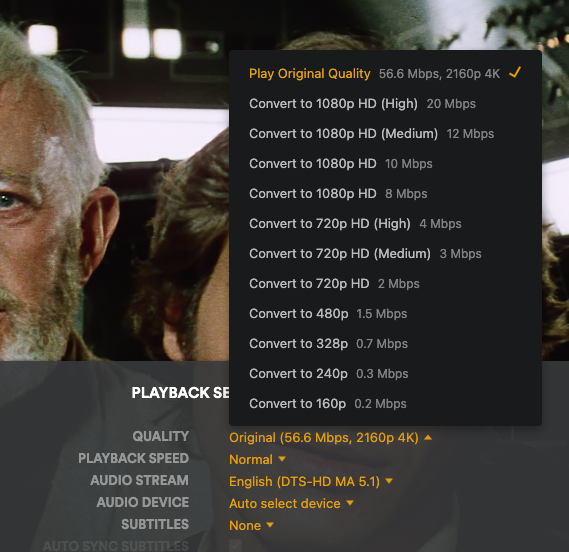
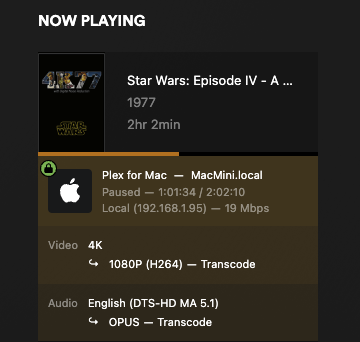
However, even though the GPU is selected under the transcoder settings, Plex only transcodes in software. intel_gpu_top also reports all engines as idle during transcoding.

I’m sure I must be doing something wrong, but I don’t know what.

I did upgrade the kernel to get support for the GPU in Linux.

Any help is appreciated.

Plex Media Server Logs_2025-01-27_22-11-48.zip (2.2 MB)

Which kernel?

Another person with an N150 updated to 24.10 and it detects the hardware: Intel N150 Hardware Transcoding on Ubuntu LTS 24.04.1 LTS - #9 by chris.round

24.10 has the 6.11 kernel: Canonical Releases Ubuntu 24.10 Oracular Oriole

I updated to kernel version 6.12.3-061203-generic

I think the the hardware is being detected. Both during install (i915 found), and in the Plex application (it has a dropdown option for “Intel Alder Lake-N [Intel Graphics]”).

I ran the command suggested by @ChuckPA in the other thread:
$ echo /sys/module/i915/drivers/pci:i915/::.
/sys/module/i915/drivers/pci:i915/0000:00:02.0

I think that means that it’s being seen by the kernel correctly.

I’m guessing it could be a permissions issue, but I’ve already set the Plex Media Server folder ownership to plex:plex and set it to the permissions to 755.

I also made plex a member of the video and render groups as I saw that fixed the issue for someone else.

Edit to add: this is my first time running a Linux box since 1999 (and that was a simple RedHat mail server), so please assume that I know nothing.

Edit: I rolled back the kernel to 6.11 (and removed/reinstalled PMS) to see if it would fix things. The issue persists.

I noticed that dev/dri has the GPU listed as card1, rather than card0. Could this be the issue?

$ ls -la /dev/dri
total 0
drwxr-xr-x 3 root root 100 Jan 28 10:12 .
drwxr-xr-x 20 root root 4720 Jan 28 10:42 …
drwxr-xr-x 2 root root 80 Jan 28 10:12 by-path
crw-rw----+ 1 root video 226, 1 Jan 28 10:36 card1
crw-rw----+ 1 root video 226, 128 Jan 28 10:36 renderD128

im fedora i juste update my package and transcoding with hevc with nvidia stop working. but on fire tv that work but not on browser or plex app on pc. i discovers 2 new option for hevc transcoding add from last update i think problem come with that.

@ExHongKonger

Check the group which owns /dev/dri and make sure plex is a member of that group.

The card0/card1 issue was caused by the Linux kernel changing (again). The solution we have now with ‘card1’ is a Canonical change and they handled it in 22.04 by writing a series of udev rules for drm.

PMS can deal with card0 or card1 (or card2 -haha)

[chuck@lizum ~.2000]$ ls -la /dev/dri
total 0
drwxr-xr-x   3 root root        160 Jan 26 20:11 ./
drwxr-xr-x  23 root root       5880 Jan 26 20:16 ../
drwxr-xr-x   2 root root        140 Jan 28 12:43 by-path/
crw-rw----+  1 root render 226,   0 Jan 26 20:11 card0
crw-rw----+  1 root render 226,   1 Jan 26 20:11 card1
crw-rw----+  1 root render 226,   2 Jan 28 12:43 card2
crw-rw----+  1 root render 226, 128 Jan 26 20:11 renderD128
crw-rw----+  1 root render 226, 129 Jan 26 20:11 renderD129
[chuck@lizum ~.2001]$

card0 = the desktop VGA
card1 = the UHD 770
card2 = the Nvidia RTX 2000 card

The Alderlake’s 770 and Nvidia work correctly but you must SELECT it in transcoder’s settings.


I upgraded to 24.04.1 last night.

This is my Xeon + P2200 machine.

[chuck@lizum ~.2000]$ gog ls -laR /dev/dri
/dev/dri:
total 0
drwxr-xr-x  3 root root        120 Jan 28 02:30 .
drwxr-xr-x 19 root root       5400 Jan 28 02:30 ..
drwxr-xr-x  2 root root        100 Jan 28 02:30 by-path
crw-rw----  1 root render 226,   0 Jan 28 02:30 card0
crw-rw----  1 root render 226,   1 Jan 28 02:30 card1
crw-rw----  1 root render 226, 128 Jan 28 02:30 renderD128

/dev/dri/by-path:
total 0
drwxr-xr-x 2 root root 100 Jan 28 02:30 .
drwxr-xr-x 3 root root 120 Jan 28 02:30 ..
lrwxrwxrwx 1 root root   8 Jan 28 02:30 pci-0000:07:00.0-card -> ../card1
lrwxrwxrwx 1 root root  13 Jan 28 02:30 pci-0000:07:00.0-render -> ../renderD128
lrwxrwxrwx 1 root root   8 Jan 28 02:30 pci-0000:0d:00.0-card -> ../card0
[chuck@lizum ~.2001]$ 

Notice how it now maps out

Also notice the group should be render on Ubuntu (how I coded it in the native installer)

[chuck@glockner rules.d.2002]$ cat 60-plex-hw-transcoding.rules 
SUBSYSTEM=="drm", GROUP="render" , MODE="0660"
[chuck@glockner rules.d.2003]$ 

If you still have ‘video’ then I wonder if udevadm --trigger hasn’t fired
-or-
plex:plex is not a member of groups video and render
(I add plex to both groups in the native app)

@ChuckPa
I double checked and plex:plex is a member of groups video and render

$ groups plex
plex : plex video render

The GPU is selected in transcoder settings

I believe you may be correct when you say udevadm --trigger hasn’t fired as the group is still set to video when I use ls -laR on /dev/dri. Could this be because I migrated the installation from Synology?

How do I force it to fire? I tried udevadm trigger, but didn’t notice any difference in the end result.

sequence;

  1. Check for:
    /lib/udev/rules.d/60-plex-hw-transcoding.rules

  2. sudo udevadm --trigger

You should see /dev/dri change to group render

[chuck@glockner ~.2003]$ ls -la /dev/dri
total 0
drwxr-xr-x  3 root root        120 Jan 28 02:30 ./
drwxr-xr-x 19 root root       5400 Jan 28 02:30 ../
drwxr-xr-x  2 root root        100 Jan 28 02:30 by-path/
crw-rw----  1 root render 226,   0 Jan 28 02:30 card0
crw-rw----  1 root render 226,   1 Jan 28 02:30 card1
crw-rw----  1 root render 226, 128 Jan 28 02:30 renderD128
[chuck@glockner ~.2004]$ 
[chuck@glockner ~.2004]$ dpkg -l | grep udev
ii  libgudev-1.0-0:amd64                   1:238-5ubuntu1                          amd64        GObject-based wrapper library for libudev
ii  libudev1:amd64                         255.4-1ubuntu8.4                        amd64        libudev shared library
ii  python3-pyudev                         0.24.0-1                                all          Python3 bindings for libudev
ii  sg3-utils-udev                         1.46-3ubuntu4                           all          utilities for devices using the SCSI command set (udev rules)
ii  systemd-hwe-hwdb                       255.1.4                                 all          udev rules for hardware enablement (HWE)
ii  udev                                   255.4-1ubuntu8.4                        amd64        /dev/ and hotplug management daemon
[chuck@glockner ~.2005]$

This makes me also ask if you’re using the HWE on ubuntu ?

@ChuckPa Thanks for your help! Embarrassingly for me, I didn’t know what HWE was until I looked it up after reading your post. I’m still not 100% sure, but if I run hwe-support-status --verbose I get the following response:

Your Hardware Enablement Stack (HWE) is supported until May 2029.

Which I think means that it’s enabled.

When I open /lib/udev/rules.d/60-plex-hw-transcoding.rules I see it contains only one line:

SUBSYSTEM==“drm”, GROUP=“video” , MODE=“0660”

Note: this is also showing the video group, not render

sudo udevadm --trigger returns udevadm: unrecognized option '--trigger'.

Using sudo udevadm trigger (without the dashes), after changing the GROUP in /lib/udev/rules.d/60-plex-hw-transcoding.rules to render, does change the /dev/dri group change to render. As seen below:

/dev/dri:
total 0
drwxr-xr-x 3 root root 100 Jan 28 10:12 .
drwxr-xr-x 20 root root 4720 Jan 28 10:42
drwxr-xr-x 2 root root 80 Jan 28 10:12 by-path
crw-rw----+ 1 root render 226, 1 Jan 28 16:06 card1
crw-rw----+ 1 root render 226, 128 Jan 28 16:06 renderD128

/dev/dri/by-path:
total 0
drwxr-xr-x 2 root root 80 Jan 28 10:12 .
drwxr-xr-x 3 root root 100 Jan 28 10:12
lrwxrwxrwx 1 root root 8 Jan 28 10:12 pci-0000:00:02.0-card…/card1
lrwxrwxrwx 1 root root 13 Jan 28 10:12 pci-0000:00:02.0-render…/renderD128

Unfortunately, transcoding still seems to be software only.

So, I’ve uploaded another log file.
Plex Media Server Logs_2025-01-28_16-17-49.zip (3.9 MB)

My apologies.

The command is sudo udevadm trigger
There is no -- in Ubuntu udev.

I’m really confused why your machine comes up with video when mine comes up with render

If you want to try changing it, you only need to edit the group name in the
/lib/udev/rules.d/60-plex-hw-transcoding.rules file to be render and run sudo udevadm trigger to make it effective.

You will need to restart PMS after doing so.

I’m even more troubled that the N150 isn’t working but the N150 might not have UHD graphics.

Compare this:

https://www.intel.com/content/www/us/en/products/sku/241636/intel-processor-n150-6m-cache-up-to-3-60-ghz/specifications.html

GPU Name Intel® Graphics

Compared to my N100 which is

https://www.intel.com/content/www/us/en/products/sku/231803/intel-processor-n100-6m-cache-up-to-3-40-ghz/specifications.html

GPU Name‡ Intel® UHD Graphics

What happens if you try 1080p H264 ?

If you want to try changing it, you only need to edit the group name in the
/lib/udev/rules.d/60-plex-hw-transcoding.rules file to be render and run sudo udevadm trigger to make it effective.

Yes, that’s what I did, and then restarted PMS.

What happens if you try 1080p H264 ?

That option doesn’t explicitly show as a transcode option. Even though I have HEVC optimization enabled.

I have until Friday to return the MiniPC if it’s not capable. The only thing that keeps my trying to get it to work is that I read other people have been successful in doing so.

You do bring up a good point about the UHD graphics I don’t know if this is just a branding issue, or a bigger difference.

Looking at Intel’s website seems to show that the processors have almost identical capabilities:

Another odd thing that I noticed is that the n150 as advertised as Twin Lake, yet my PMS says that it’s detecting an Alder Lake processor. This may just be a matter of updating a definitions table, or perhaps the drivers in the kernel are screwy.

Unless you have any suggestions, I’m going to wipe the box clean and start again (if I get time).

I will speak to the Transcoder engineer about the DeviceID

TwinLake is a new GPU and probably not fully supported.

If you have the opportunity to swap it for a N100, I would recommend it.
While the few extra perf points are nice, you probably want to use it now instead of later :wink:

My N100 works flawlessly. See below.

root@pve:~# grep 'model name' /proc/cpuinfo | uniq
model name	: Intel(R) N100
root@pve:~# 

Acknowledged. I guess this is just a case of early adopter blues.

I will give it one more try. This time I’ll update the kernel before installing Plex and see how that works.

I tried again. Clean install of 24.10.

HW transcoding still doesn’t work, but I did notice a few things:

Firstly, the render group was properly created by the Plex installer and /dev/dri & /lib/udev/rules.d/60-plex-hw-transcoding.rules settings were correct without me having to mess with them.

Secondly, intel-gpu-top is also identifying the CPU as Alder Lake. So it’s not just a Plex issue.

Thirdly, hwe-support-status --verbose now returns the following message:

Only LTS releases have Hardware Enablement stacks

It looks like I’ll be ordering a n100.

24.10 is not a LTS release.

24.04.1 and 24.04.2 are LTS releases (The April releases)

The .10 never is. (October release)

you can go to 24.04 and take it straight up to 24.04.1 LTS with HWE

care to quick try that before the swap? It’ll give you apples-apples comparison to mine

24.04.01 + upgraded kernel to 6.11 to get the gpu drivers.

Sadly, I’m getting the same results.

Although in this release intel-gpu-top now identifies the GPU as it’s CPU type & device ID number, rather than Alderlake_n.

I have an n100 arriving sometime tomorrow.

Then that confirms you do need the 24.04.2 release plus the 6.12 kernel to support the CPU.

That’s unfortunate.

Hi @ChuckPa ,

I’m getting the same issues on the n100 box. No (HW) during transcoding.
Ubuntu 24.04.01
PMS Version 1.41.4.9399

I did notice the following errors in the logs:


When I look up this error online I get lots of references for Docker installs, but my installation isn’t in Docker.

I followed your guide for the migration: Linux Tips - #23 by ChuckPa
This installation was originally on a Synology, is there anything I need to edit in the ‘preferences.xml’ file to get HW transcoding working?

I found it! ‘Preferences.xml’ contained a VaapiDriver="i965" setting. I replaced it with VaapiDriver="iHD" and HW transcoding works now on the n100.

Perhaps there should be a note about this on the guide?

I’m going to try this on the n150 and report back.

@ChuckPa

I can confirm that the Preferences.xml edit above also fixes the problem for the n150.

The n150 GPU is activated:

Thanks for your help in troubleshooting. This should be an easy fix for other folks now.

2 Likes

Outstanding.