Currently with version 2025.24.0 you are unable to change your Plex username. Tested with 3 devices, you always get the error “Api rate limit exceeded”. It works via web interface without any issues, however this particular Plex user has no PC and it takes ages to explain them how to login via chrome.
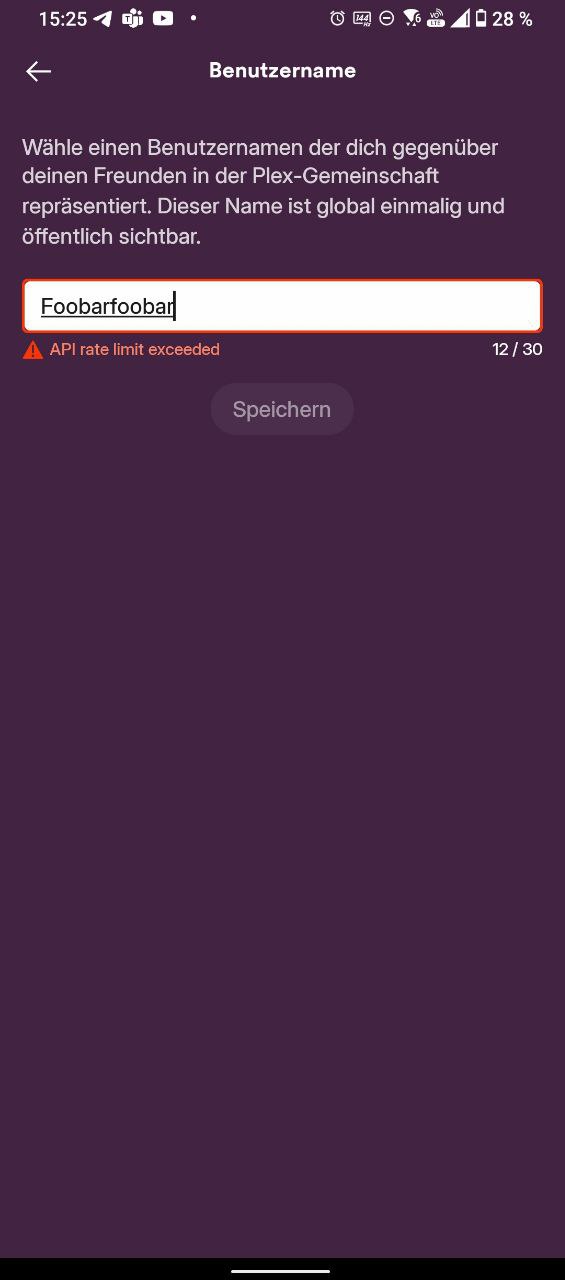
That simply means that the user made too many changes to their account within a small time frame.
Put the app away and let it sit for at least 2 hours.
I know what that means, however I just opened the app (first time for days) and added one single character at the end of it and receive this message.
That can’t be correct… My Plex user installed the app, logged in and tried to change their name → same error.
What are you supposed to do in order to make it work? Or rather, what buttons are you supposed to avoid to not exceed the rate limit when simply opening the app is enough?
It doesn’t matter how minute you deem the change. It is a change and thus, it is counted towards the number of changes that is allowed within a certain time frame. You simply need to wait for the limt to get cleared again.
Tried it with another account on another device → typing one character and the limit is exceed. It seems this API limit is kinda applied to all other requests.
Tried it on yet another device and each character of the new username was a single request as well, so I wasn’t able to change my username to something with more than 8 characters.
So you either have to wait a long time or paste the new username.
It’s kinda difficult to explain that to not experienced users. I can totally see why you have such a rate limit in general (software developer, I include these myself) however it should be increased for certain requests like user name validation while typing.
If it’s really considered as “you have to paste your username in case you want a long name” we can close the topic.
Thank you for your fast replies.
Are you using avpn? The rate limit is determined by the ip address so if you use a common VPN, there may be many requests from the same ip. Turn off the VPN so your regular ip shows up, then turn it back on after the change.
