I have a current plex pass, am using Version 1.14.1.5488, on a newer Win 10 machine, have an internet connection and am unable to see any differences in the new Premium music library that I just tried to create, and the original basic one. I carefully followed the steps in your guide on creating a premium music library. The only difference from your guide that I could discern was at the screen where I was to choose between the Premium library and the basic one. The button next to the Premium selection was not blue, like in the picture, but was grey with a dark dot inside it. Selecting the basic option moved the dark dot into its button, so I figured it was actually selecting something (instead of a non selectable Greyed out option). It simply appears that I am not able to create a premium library. Thoughts?
Steve
Could you make a screenshot of this page?
Make sure to disable any web browser add-ons.
I disabled all browser add-ons, (ad blocker, HTML5 autoplay, HTTPS everywhere), which I had not done previously, but no change.
Thank you,
Steve

The screenshot looks perfectly ordinary. So what happens if you click on Next?
This is the graphic from your instructions. The dot is bright blue, not grey. In any event, when clicking next the program continues to create the “Premium music library” before your very eyes. When finished it is exactly the same as the old one. I tried to see lyrics, nothing. No additional cover art, or bios.

The color of the dot largely depends on the used web browser and the operating system.
How do you determine when the creation of the library is finished?
Creating a Premium library can take several times longer than a regular library.
Please post the Plex XML info of one track in your premium library.
I determined that the library was complete when the twirling activity icon stopped and the library was stable. Just for good measure I let it go overnight incase something was happening in the background
(Attachment 9799.xml is missing)
Please go to the forum to attach files. If you answer per email, attachments won’t reach me.
I was using email because I couldn’t figure out how to send an attachment from the forum. When I figured out that what everyone calls attachments you call uploads, I tried again. You asked me for XML info, so I saved the page you asked for which was an xml file. I tried uploading that, but was told that it was a file type that could not be transferred in this post. In trying to find this thread on the forum, I think that I have stumbled on an answer. In the post titled something like “how do I know if I have a premium Music library” it suggested going to a library, choosing “edit”, and looking for Premium menu choices in “advanced”. I did this and discovered that apparently both of my libraries are Premium. That is why they both appear identical. That brings me back to why I wanted a premium library in the first place, Lyrics. I have tried to get lyrics to display but the lyrics button does not work. The balloon with the note in it is there, but grayed out. My recordings are all off of the original CD in FLAC format. I searched for “Lyrics” in support, but it was really not helpful. what next?
Thanks, Steve
I’d still need the XML.
Please pack it into a ZIP archive. Then drag the zip file into the message editor of this forum.
9799.zip (1.0 KB)
never done this before, hope it works
OK, the XML is looking good. Seems the track has been matched alright.
Is your server located in a country listed in this article: https://support.plex.tv/articles/215238778-automatic-lyrics-from-lyricfind/ ?
Setttings - Server - Agents - Albums - Premium Music
is the line labeled ‘LyricFind’ “checked”?
Yes, I am located in the United States. Lyric Find is checked in the agents.
- activate debug logging (not ‘verbose’!)
- quit Plex Server
- wait 1 minute
- start Plex Server
- wait 2 minutes
- either refresh one album or add one new album into your library
- wait 5 minutes
- fetch log files and attach them here
By “quit Plex server” do you mean to Log out? I could find no other Quit or Power commands
Quit the server using its tray icon
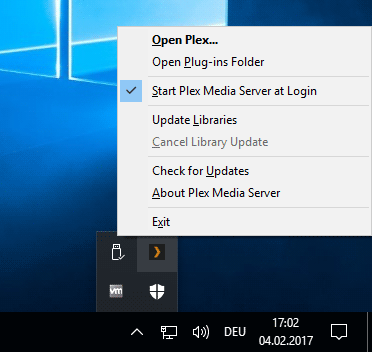
I think that Plex has never been turned off since I initially installed it over a year ago. Hiding the “Off” button in the system tray insured it.
After restarting Plex the Premium services showed up, including Lyrics.
thank you for your assistance
Steve
