I do not believe so. I could be wrong but a couple of the users I converted to home users a while back. They must enter a pin but for their account (m,y preference) but they have their have their histories when at my house and their house.
~Raptor
I do not believe so. I could be wrong but a couple of the users I converted to home users a while back. They must enter a pin but for their account (m,y preference) but they have their have their histories when at my house and their house.
~Raptor
if you only removed it from their home screens that doesn’t disable them. Meaning they could hit MORE and get to them. If they don’t want them at all you/they need to disable it from their account page.
This is a feature you have changed from the last time I traveled to all of their houses (the blunder of a change 2 Christmas holidays ago).
~Raptor
History follows the pin.
Not only each user has their own account, but it’s per device also. I ran into that a while back when a user added another device only to have it appear different (with the same account) as their other identical Roku device.
~Raptor
nothing has changed with webshows. when an app is launched for the first time it asks which libraries and the enabled Online Media Sources the user would like to add to home screen. if they skip past all of it then it will add them all. if those services are disabled (i don’t have TIDAL enabled myself for example so it is not there) it won’t be an option to add to home screen automatically at all. Just an update itself should not have tried to reset the home screen however.
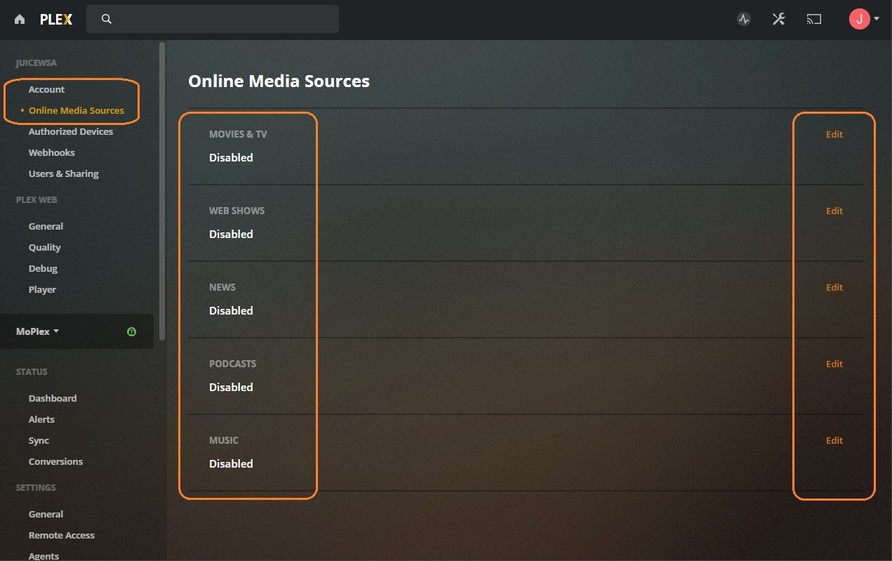
this is a screen shot from the web app but the one on Roku is basically the same.
That ‘User Account’ hasn’t disabled the feature - they’ve only unpinned it.
Once disabled it won’t show at all for any device logged into that account.
That’s the way it works at my house, at least.
Reply to this and JuiceWSA:
The plex web app works entirely different than Roku and other devices/apps. The iPhone app for instance is broke IMO, but since I know how to get around it with the menu and none of my users have complained about this I can deal with it.
There is not a pin/unpin option on the Roku-Plex App, there is a mange hubs but again that was not there 2 holidays ago when I was forced to travel to all of their houses to fix the Plex blunder update.
~Raptor
as juiceWSA mentioned above then you didn’t disable it. You only removed it from the home screen on that device. The only place to disable it completely for any given regular account is for that user account to go to https://app.plex.tv/desktop#!/settings/online-media-sources
That is “MANAGED USERS” ONLY!
I’ll admit with all of the changes Plex is making this appears to be my “real solution”, having everyone cancel their Plex accounts and turning everyone into a manged user on my server!
~Raptor
On Roku when on a Hub hit the star button on remote to get options one of which is to remove that hub
to pin/unpin libraries move left of the library name to select the three dots to get options to unpin library. but what you seem to want is to disable those features completely which is done from account settings
that is correct. You cannot change other users account settings. As I mentioned above. those users need to go to https://app.plex.tv/desktop#!/settings/online-media-sources to change the settings of their account.
Yup - 'cause I did the same thing and so did ‘Aunt Gladys’.
It kept showing up on everything until we went here:
https://app.plex.tv/desktop#!/settings/online-media-sources
and in horror found out it was still enabled. <—this is what it looks like disabled - across the board:
Show that screen, then show an image of the feature on for anything logged into that account - and we got ourselves a bug.

Thanks, I know that. How about I give you this job of explaining this to each of my non-tech users over the phone. You’ll have a blast! 
~Raptor
I offered to have every Plex Employee, Developer, Hat Check Mongrel to give Aunt Gladys a call - but got no takers…

was a managed user then, most of my users are not!
~Raptor
LOL
~Raptor
No, but we did have to get a younger family member to do it for her.
It was a process sprinkled with Drama throughout… but we made it.
I wonder if they realize that by trying to steal our users by providing them with content and recommendations from Plex versus their media server admins, that they are inheriting this problem and thus need to develop a help desk for these 70+ year old users and other non-techies?
~Raptor
The buck stops with the owner of the server, they are responsible for who they share. If a recipient can not fix their issue they need to ask for help, I would have thought that is a sensible arrangement.