You guys have been copying new features from Netflix that you screwed the app. What’s used to work no longer work. There’s no way to keep Library you want to keep private from appearing on Dashboard for all to see. It’s not just Import from iTunes that only works when it wants to. Now everything is upside down.
I can’t share my Plex with other members. I can’t even open Plex in front of anyone as adult contents blend with everything else.
The PC I’ve used as Plex Server has problem and I’m waiting for the company to come change the motherboard. I had to install Plex Server on another PC so I can watch movies on my devices. That’s when I found out how Plex screwed the app.
Long time ago Uncheck “Include in dashboard” was very visible. They don’t even know they removed it. Plex Pass is garbage and worthless now. You get no help and they don’t care. They don’t worry about action taking against them. If this was based in the USA, we would have gotten better services.
When I wasted money on Plex, expense servers, Netflix wasn’t as big as it is now with huge library, and there was no Apple Stream, Hulu as it is now, Disney and so on. Now I can keep my library smaller and the streaming services are cheap and have all the movie catalogues. There’s no need for Plex and expensive servers. 90% of my movies are also in Netflix. No need for huge hard drives as well. Yet, this company cares even less.
Going Plex is too expensive. Better get Netflix or others. They are cheap enough to get a few and save money from buying expensive servers and bad services from Plex. You get to save a lot on expensive electricity bill because you won’t need to keep servers running on 24/7 and battery backups.
If you don’t pin it to the to the home screen its content rows won’t show.
You can also uncheck all rows for a library in the library recommendation management settings.
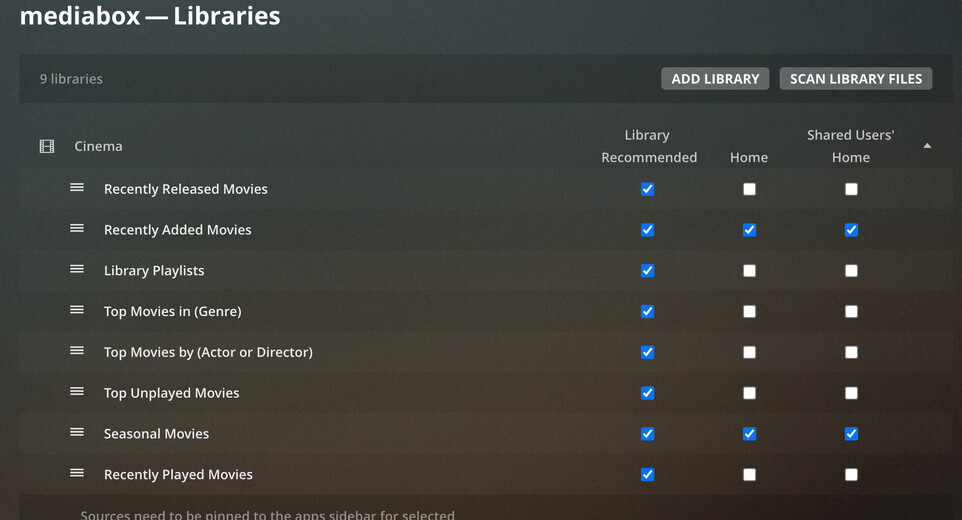
Advanced Library settings > Exclude from Global search.
There are reasons for wanting a Library to be listed in the sidebar (i.e., pinned) without wanting its contents appearing on the home screen (and not just because it might contain adult content). And there are certainly reasons for wanting to exclude content from the home screen without excluding it from the global search. (The reasons being, in both cases, to keep the home screen uncluttered with content that you don’t want front and centre in day to day use, but do want to be able to access easily when required.)

It’ll still show up in the newly combined On Deck/Continue Watching row though, won’t it? There’s no checkboxes for On Deck or Continue Watching, and the support page you linked in your earlier post explicitly says, “The only exception to this is the Continue Watching rows which will always be shown on home screen (with content from pinned sources)”. For now, Plex still seems to be respecting pre-existing “Include in Dashboard” library settings, although as the checkbox for that has now been removed I wouldn’t be surprised if the functionality follows.
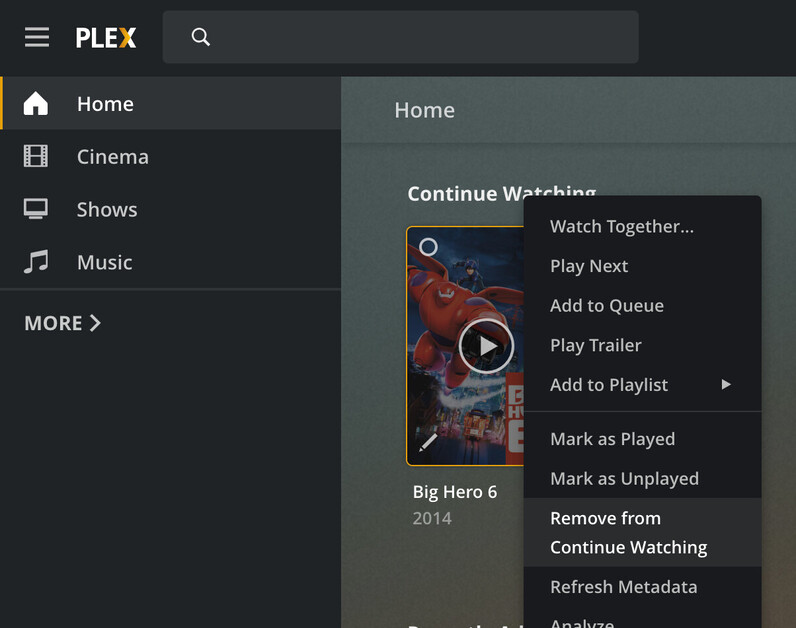
It seems Plex has taken a 1 click setting and turned it into a simple 9 step process doesn’t it? 
I don’t mind the Library being there. I just don’t want the content from appearing in Dashboard. It was very simple to resolve by simply uncheck “Include in dashboard”. That took care of it all.

They are still showing in “Continue Watching” in Dashboard
I already replied to that above.
I unchecked all of it. Go back, refreshed, still in continue watching.
I understand. Please read by reply above. Uncheck "Include in dashboard" Not Found - #8 by BigWheel
You’re right. Continue watching still show up in dashboard. Uncheck things didn’t fix it.
Uncheck “Include in dashboard” was simple and it worked. They screwed the app.
OK, here’s the problem with that: it removes things from Continue Watching everywhere - not just on the home page. I have a library of musical concerts, that I will occasionally watch a bit of without watching the whole thing at once. I feel no urgency to continue watching them, such as I might if I’ve left a film half watched, so they don’t need an in-your-face reminder on my home page. But I still like having them in Continue Watching on the Concerts library page. And I still want the library easily accessible in the sidebar, before you suggest unpinning it.
(Also, I discovered while testing this, if I remove something from Continue Watching it reappears every time I watch a bit more of it.)
Thanks to Plex for restoring this functionality (via the “Exclude from home screen” option in the Library settings) - but how do I exclude “Movies & Shows On Plex” from the Continue Watching row on the home screen? It doesn’t have that option.
You have to unpin it from the left side bar.
I don’t want to unpin it from the side bar. I want to keep it easily available when I want to get at it, but without having it cluttering up my Home screen and specifically my Continue Watching row. Is it all or nothing now? Either put things front-and-centre or hide them away where they’re awkward to get at, no in-between option?
