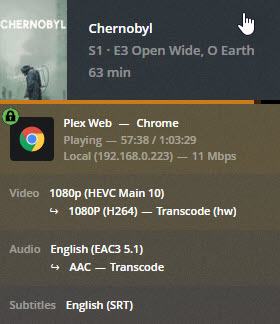
I’m a bit confused about something, so wanted to post for a definitive answer. I have a large library and to save space plus since I have good enough hardware, I use HEVC/x265 encoded titles when possible. This morning, I found that a show I was watching via the web client on a system different than but local to my Plex server was pausing to find that the CPU on the PMS server was maxing out due to the transcoder. The thing is, I have the web client configured to stream at Maximum quality when at home, so shouldn’t it not transcode?
Below are the specs displayed from the dashboard followed by a few other specs. If this is due to the player being web-based, what (if any) players can support direct streaming of HEVC/x265 without transcoding and/or how it when to transcode it determined?
Server Stats
Plex Media Server Version: 1.15.6.1079
OS: Windows Server 2016
CPU: AMD A8-5600K APU 4.30Ghz
RAM: 4gb
GPU: Nvidia Geforce GTX 660 (Installed old GPU to enable hardware acceleration which I have enabled but have since read that it requires an Intel CPU or something like that)
web browser are terrible media players.
the plex web client can’t direct play that content (hevc), so it gets transcoded to something the web player can play (h264).
your server appears to be able to NOT be able to hardware DECODE the hevc, but does appear to hardware ENCODE the 264.
decoding HEVC is the hard part.
also, audio is always cpu decoded so that is another additional load.
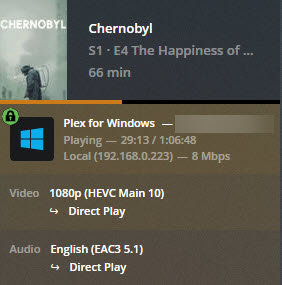
Good suggestion about subtitles, but disabling didn’t change anything. I don’t think it has anything to do with the server as after posting, I tested the Desktop Player which played it and only played audio with a black screen, but didn’t transcode as shown below. Going to test a few more things to see if black screen is persistent. Know that system plays HEVC without issue natively:
Speaking of watching HEVCs, I was able to watch the same episode in VLC without issue on the server, so sure it’s not that the server cannot decode HEVC.
Finally, I find the Desktop Player really buggy as it often stops responding when trying to resume videos which have already started to be watched. I’ve found this across multiple Win10 systems which is why I stick with the web player.
One small note. I found after posting that the prior test with black screen was using the Plex Player from the Microsoft Store. I installed the latest Player from Plex.tv which played it just fine and was a direct stream. Unfortunately, the issues I’ve had with it quitting when resuming already started videos is something I can confirm occurs in the Desktop Player - not the one from the Microsoft Store, but that’s a different issue.
So, overall - is there an (official/non-official) definitive list somewhere showing which players/devices can play/stream HEVC and which require transcoding? If not, anyone know a couple of TV-connected devices which would support it? I share my libraries with my family who mostly use devices like Roku which I’m sure wouldn’t support it so it would be helpful so I can tell them what to get next time they upgrade.
the desktop player is a video application and is compatible with more codecs (ie it can direct play more things) than the web browser player.
the same as for VLC and KODI which often have even greater support for more different codecs and files.
whether or not the system can play hevc natively is irrelevant, it depends entirely on the PLAYER and what it can natively play. different players have different capabilities.
this means nothing, vlc (and kodi) are all standalone video players.
plex (both web and PMP) are client server, where is designed for the server to most of the heavy lifting (ie transcoding on the server when necessary for a lightweight client to play back).
so vlc playing on your desktop, has zero relation to what the plex server can or can’t do on a completely different machine.
I don’t use the desktop player, so unfortunately I don’t have anything to help there other than to check out the settings.
Also the plex desktop player (PMP) has 2 modes, which for whatever reason, work differently.
If you’re looking to purchase a new streaming stick/box, the quickest way to determine HEVC support is to ask, “Does it support 4K HDR?” If the answer is yes, then it supports HEVC.
A short list of devices includes: Current 4K capable Rokus, AppleTV 4K, and the Nvidia Shield.
Recent Amazon FireTV devices also support 4K HDR (Gen3/Cube/4K stick). However, my Cube will not direct play 4K HDR movies using the Plex app, so I personally cannot recommend it (I’ve not tested 1080p HEVC playback w/ the Cube & Plex).
For existing devices you’ll have to look up their technical specifications. Search for “<make/model> tech specs” or something similar.
I’m not aware of a list anywhere. It would be nice, but keeping it up to date would be a full time job. Roku currently sells seven different models of sticks/boxes and Amazon at least three. And this does not include their TVs with their respective software built into the device, historical devices no longer for sale, nor the many AndroidTV boxes available online.
The GTX 660 cannot decode HEVC video, only H.264. You need a GTX 1050 or better.
There are two parts to transcoding: decoding from the original format and encoding to the new format. To fully utilize hardware accelerated streaming in Plex, you need a GPU that can decode HEVC and encode to H.264 (Plex currently transcodes all video to H.264). Your GTX 660 cannot decode HEVC, but it does support encoding to H.264. That is why you only see (hw) on the encode portion of the transcode.
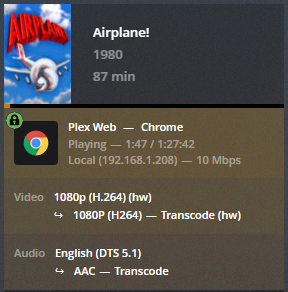
You can test if your current card supports H264 decoding by playing a H264 video and forcing a transcode (during playback select a lower bitrate/resolution). If supported, you will see “(hw)” on both the decode and encode portions of the transcode.