Understanding/inconsistencies in media and payback info

I was browsing through a few different screens to understand what/how my video was playing and I noticed a few differences depending on where I looked:
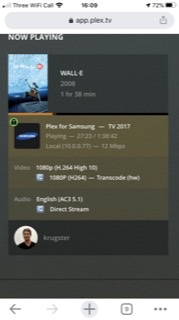
-Plex Dash looks like it is being transcoding to 11Mbps
-The Plex Web dashboard looks like it is transcoding to 12Mbps
-playback info in my player app (native Samsung) reports transcoding from 3.8Mbps -> 11.4Mbps. How/why is it transcoding “up”?
-Plex Web reports using +/- 10Mbps of bandwidth…which value should that correspond to and does that count the reading from file into the server and/or sending to the player?
-The player also says the quality is playing at “5.4Mbps (Original)”
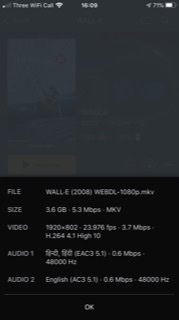
-The file/media info is also oddly rounded/truncated in different ways: Plex Dash says the file is 5.3 Mbps and video is 3.8Mbps, but Plex Web shows it as 5396kbps and 3789kbps respectively. I know it’s a minor distinction, but makes it confusing for the user to see the values represented differently.
-I see the height as 802 and the coded height as 816… what’s the difference? And then how can it be 1080p if it’s not actually that height (because it’s letterbox right?)

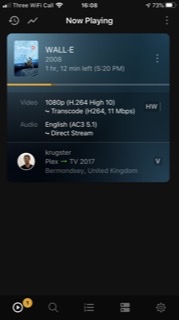
image image image image image image

They’re just rounding differently.

Because the file uses 10 bit color information, which is not compatible with your client. Therefore it must be transcoded.
And the client apparently has ‘automatic quality’ activated, which allows the server to dynamically adapt the bitrate to the network connection’s abilities.
That it uses a higher bitrate is a good thing, because every transcoding step is reducing quality (because H.264 et. al. are “lossy” codecs).
To keep the visual quality at least on a comparable level, you’ll have to pick a higher target bitrate – particularly if the source bitrate is rather low like in this example.

It’s probably lying. Unfortunately I cannot enlarge your screenshot to see what it actually shows.

It has to do with how the H.264 codec is encoding video. It uses a basic grid of 8x8 pixels.
802 cannot be divided by 8, but 816 can. So it encodes 816 pixels high, but the player cuts the additional 14 pixels off during playback.

Because the 1080p video format is actually “fullHD”, which is defined by a boundary box of 1920 by 1080 pixels. Your file has a width of 1920 pixels, therefore it fits into this boundary box.
It cannot fit into the smaller 720p boundary box, because this one is only 1280 by 720 pixels.

This topic was automatically closed 90 days after the last reply. New replies are no longer allowed.