Server version: Version 1.40.0.7998
Player version: Version 1.87.2.87-87488d5a
Started receiving the following error message when watching TV show episodes. I’ve noticed the error on both Mac OS and Windows using the Plex app.
The following info pops up in the logs;
Feb 23, 2024 23:52:38.000 [140514133584696] ERROR - [Req#33990/Transcode/2c4a89c5-3e73-4093-bcc1-2fa3f0f76170/e6d17635-dde7-4382-b288-18941fd98218] [eac3_eae @ 0x7ff6c02814c0] EAE timeout! EAE not running, or wrong folder? Could not read '/var/packages/PlexMediaServer/shares/PlexMediaServer/AppData/tmp/pms-5f4ecc94-9215-444a-a2f2-ecbfe62b8e47/EasyAudioEncoder/Convert to WAV (to 8ch or less)/2c4a89c5-3e73-4093-bcc1-2fa3f0f76170_27776-0-1768.wav'
Feb 23, 2024 23:52:38.001 [140514103868216] ERROR - [Req#339a4/Transcode/2c4a89c5-3e73-4093-bcc1-2fa3f0f76170/e6d17635-dde7-4382-b288-18941fd98218] [eac3_eae @ 0x7ff6c02814c0] error reading output: -5 (I/O error)
Feb 23, 2024 23:52:38.002 [140514143988536] ERROR - [Req#339a5/Transcode/2c4a89c5-3e73-4093-bcc1-2fa3f0f76170/e6d17635-dde7-4382-b288-18941fd98218] Error while decoding stream #0:1: I/O error
I recently started dabbling with ErsatzTV, and to make it work in Plex i had to disable Direct Stream. (Direct Stream ON; I can’t watch my personal TV channels. Direct Stream OFF; I can watch my personal TV channels perfectly fine without any issues).
I’m wondering if that could be the issue. Though… When watching things that are Direct PLAY (and run perfectly fine), I still am getting these error messages. The above error message happened while watching an episode via Direct Play.
Any idea what could cause this and how I could fix the error message?
disable all scanning for now
All scanning? So both these? (the only ones I have enabled for scanning)
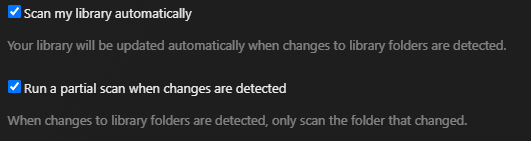
How is the scanning related to the issue?
All scanning, including metadata updates. Don’t forget your scheduled maintenance section too as that performs periodic scanning, unless nobody uses your plex during those hours.
It’s not something that necessarily happens only during scanning hours though. My plex was not doing any scanning earlier this evening when the error occurred.
How can I resolve the issue, aside from just disabling all scanning? Is there an actual solution, or do I have to wait for a new update?
I’m trying to understand the error message and how to resolve it, not just turn everything off and blindly follow steps… I’m sure there must be a reason as to why the error now suddenly pops up.
I have never had this error before. Nothing has changed regarding the server, nor the players, except setting up ErsatzTV but that shouldn’t really make a difference I think in this case.
Errors related to the EAE binary usually have to do with the general /tmp folder in some way.
See TrueHD audio transcoding BUG = error not enough space - #2 by OttoKerner for a few things to check.
Gotcha. Upon reading that, I thought that maybe a reboot of my NAS would help (to clear the RAM). That wasn’t the case. I do have 8GB RAM in my NAS, though I’m not sure if that’s the issue or not.
I deleted the EasyAudioEncoder folder as mentioned, and rebooted Plex, but that didn’t help.
Regarding this;
The second possibility has to do with how Dolby audio is processed in Plex. It has to use the external “EAE” binary. Which in turn is using the general /tmp folder to work in. So this location must be mounted without the noexec flag.
I’m thinking, considering I’m watching Mork & Mindy which has no Dolby audio whatsoever, that it won’t be related to this error message. Am I wrong for thinking that way?
Regarding the inotify bit; I haven’t added anything new to my TV show NAS (apart from today) for a week or so, and I did not have any errors pop up until earlier this week. I also don’t think I can do this on my NAS without voiding the warranty, as I assume this means I’ll have to get access to certain aspects of the NAS that would void the warranty?
I cannot tell from the title what kind of audio codec is used.
What does the Plex media info say about these files?
Which type of NAS is it?
This show in particular is using an AAC codec for the audio.
My NAS is a DS916+ from Synology.
I am assuming for now that this is the same issue that’s being discussed in this thread: Plex webUI Playback Error on refresh - #92 by Atomatth
Please wait for mentioned fix.
In the meantime, use an alternative app, like Plex HTPC or the Kodi add-on P4K.
That’ll do it! Thanks 
I can handle the errors for a few more days, not the worst problem to have. 
Thanks for the help!


