Is this stopping hardware transcoding? From what I can tell (i’m pretty new to troubleshooting these things) plex says it’s starting a transcode on my gpu but it just isn’t. I’ve verified a dozen different ways that it has access to all of the files it needs and the gpu is detected and available in the docker container. I’m out of ideas on how to get this working. Any assistance would be appreciated. If I should start a new thread for this issue just lmk.
I moved your post here.
When you look in the server logs,
- The GPU card is detected
Aug 10, 2025 19:14:07.150 [22412873657144] DEBUG - [GPU] Got device: NVIDIA TU104 [GeForce RTX 2080 SUPER], nvidia@unknown, default true, best true, ID 10de:1e81:1462:c724@0000:2b:00.0, DevID [10de:1e81:1462:c724], flags 0xe8
- Transcoder does not see a GPU so it software transcodes
Aug 10, 2025 19:14:21.519 [22412583476024] DEBUG - [Req#bd/Transcode] Starting a transcode session dt8n2mpevv8qw9o0d7nmg6p9 at offset -1.0 (state=3)
Aug 10, 2025 19:14:21.519 [22412583476024] DEBUG - [Req#bd/Transcode] TPU: hardware transcoding: enabled, but no hardware decode accelerator found
Aug 10, 2025 19:14:21.520 [22412583476024] DEBUG - [Req#bd/Transcode] [Universal] Using local file path instead of URL: /media/movies/Ratatouille (2007)/Ratatouille 2007 1080p BRRip x264 AC3 DiVERSiTY.mkv
Aug 10, 2025 19:14:21.520 [22412583476024] DEBUG - [Req#bd/Transcode] TPU: hardware transcoding: final decoder: , final encoder:
Aug 10, 2025 19:14:21.520 [22412583476024] DEBUG - [Req#bd/Transcode/JobRunner] Job running: FFMPEG_EXTERNAL_LIBS='/config/Plex\ Media\ Server/Codecs/46f74ab-560174306fe167a5978a79dd-linux-x86_64/' X_PLEX_TOKEN=xxxxxxxxxxxxxxxxxxxxxxxxxxxxxxxxxxxxxxxxxx "/usr/lib/plexmediaserver/Plex Transcoder" -codec:0 h264 -codec:1 ac3 -ss 0 -noaccurate_seek -analyzeduration 20000000 -probesize 20000000 -i "/media/movies/Ratatouille (2007)/Ratatouille 2007 1080p BRRip x264 AC3 DiVERSiTY.mkv" -map 0:0 -codec:0 copy -filter_complex "[0:1] aresample=async=1:ochl='stereo':rematrix_maxval=0.000000dB:osr=48000[0]" -map "[0]" -metadata:s:1 language=eng -codec:1 aac -b:1 256k -f dash -seg_duration 5 -dash_segment_type mp4 -init_seg_name 'init-stream$RepresentationID$.m4s' -media_seg_name 'chunk-stream$RepresentationID$-$Number%05d$.m4s' -window_size 5 -delete_removed false -skip_to_segment 1 -time_delta 0.0625 -manifest_name "http://127.0.0.1:32400/video/:/transcode/session/dt8n2mpevv8qw9o0d7nmg6p9/66b98c7c-1f3d-4d52-b349-79039a42189e/manifest?X-Plex-Http-Pipeline=infinite" -avoid_negative_ts disabled -map_metadata -1 -map_chapters -1 dash -start_at_zero -copyts -vsync cfr -y -nostats -loglevel quiet -loglevel_plex error -progressurl http://127.0.0.1:32400/video/:/transcode/session/dt8n2mpevv8qw9o0d7nmg6p9/66b98c7c-1f3d-4d52-b349-79039a42189e/progress
- Go get into the console and look at /dev/dri (This is where things go askew)
# My Unraid machine running Plexinc docker
# ls -la /dev/dri
total 0
drwxr-xr-x  2 root root         80 Jun 30 17:27 .
drwxr-xr-x 14 root root       3220 Jun 30 17:27 ..
crwxrwxrwx  1 root video1 226,   0 Jun 30 17:27 card0
crwxrwxrwx  1 root video1 226, 128 Jun 30 17:27 renderD128
# grep video /etc/group
video:x:44:
video1:x:18:plex
#
Below is what I’m seeing. it does look a little different than yours. Anything stand out as wrong to you?
[root@UnraidServer /]# ls -la /dev/dri
total 0
drwxr-xr-x 3 root root 100 Aug 10 19:14 .
drwxr-xr-x 6 root root 460 Aug 10 19:14 ..
drwxr-xr-x 2 root root 80 Aug 10 19:14 by-path
crw-rw-rw- 1 root root 226, 0 Aug 10 19:14 card0
crw-rw-rw- 1 root root 226, 128 Aug 10 19:14 renderD128
[root@UnraidServer /]# grep video /etc/group
video:x:985:
[root@UnraidServer /]#
AI said I should change the group to video but that didn’t seem to fix it. Below is what I’m at currently, gotta get to work but I can take a look when I get off if you have any suggestions.
root@UnraidServer:~# ls -la /dev/dri
total 0
drwxrwxrwx 3 root root 100 Aug 10 17:56 ./
drwxr-xr-x 18 root root 3720 Aug 10 18:03 ../
drwxrwxrwx 2 root root 80 Aug 10 17:56 by-path/
crwxrwxrwx 1 root video 226, 0 Aug 10 17:56 card0
crwxrwxrwx 1 root video 226, 128 Aug 10 17:56 renderD128
root@UnraidServer:~# grep video /etc/group
video:x:18:sddm
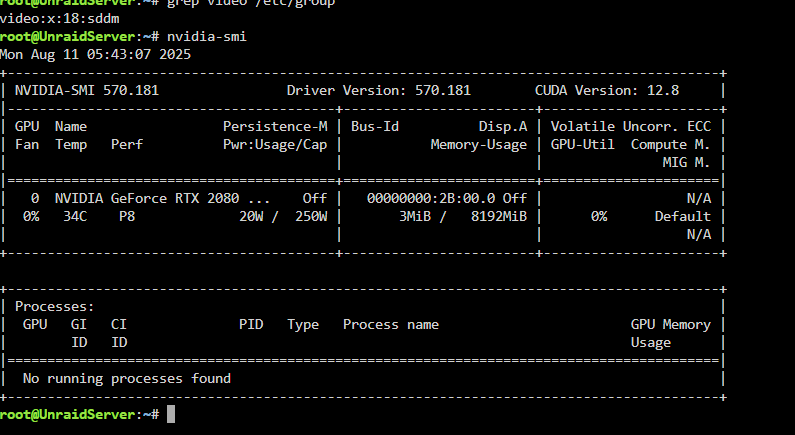
As a test , make the container privileged. (That’s how I run it)
I think I fixed, I wasn’t using the official plex app on unraid, I stumbled across that and it worked right away. Not sure what the difference was, it was the same plex version and same setup on my end but it is working now so we’re all good. Thanks for the assist.
