Video preview thumbnail generation fails with certain Blu-ray rips (NOT re-encoded)

Now this begs the ultimate question but I think it’s just been answered by exclusion.

Is this Plex or FFMPEG core?

If I am understanding here, this is a FFMPEG problem since it can be created or avoided dependent on FFMPEG involvement in the process ?

(Please forgive me if I’m slow… I’m the OS guy and learning video as I go)

From what Volts has discovered with ffmpeg’s behaviour (in the other thread), I’d say it’s it’s likely to be that.

I assume Plex is either built on ffmpeg or relies on it directly, but obviously without any source code to look at, it’s impossible to tell how tightly it’s tied in.

No? But also absolutely? I’m confused by your question.

@Raelworld did what you asked, using MKVToolnix to remux the file he ripped. The same errors occur. Many other versions of that test have been performed.

So, no. Files that haven’t been processed by FFmpeg are experiencing this failure in Plex.

When Plex extracts thumbnails for VPT/BIF generation, that’s Plex’s version of ffmpeg in action. FFmpeg + Plex Frosting. When you launch the Plex Transcoder, it says “Hi, I’m ffmpeg!”

% ./Plex\ Transcoder 
ffmpeg version 1.6-5f603a2168-2 Copyright (c) 2000-2019 the FFmpeg developers
  built with Plex clang version 8.0.1 (revision: 102) (based on LLVM 8.0.1)

So I’m not sure what you’re asking. I referenced using ffmpeg to remux and/or truncate files because it’s a trustworthy tool for those actions. And because Plex is built around ffmpeg so there shouldn’t be any surprises with how it handles streams and containers.

I’m pretty sure that the problem is how the Plex Transcoder extracts thumbnails from H.264 streams, in the very specific way that it is being called to do so.

Initially I called the Plex Transcoder directly and verified it was failing to extract thumbnails from these H.264 streams.

I switched to using ffmpeg by itself for most troubleshooting because it was simpler and is more accessible to most people.

So, yes, I definitely think it’s an issue with FFmpeg, in that it’s the core engine of the Plex Transcoder.

Here’s where I have a disconnect.

In the case of both these videos,

  1. As-given Exorcist test file - won’t play as given unless I force the bitrate change. It will not DirectStream .
  2. The same is true of Robocop test file.

Running both through my MKVToolnix.

  1. Rewrite the container
  2. Strip the attachments

Produces:

  1. Exorcist still does not DirectStream unless force transcoded.
  2. Robocop launches immediately after MKVtoolnix strips the attachments.

Where does this fit into the puzzle because DirectStream means there is no FFMPEG involvement.

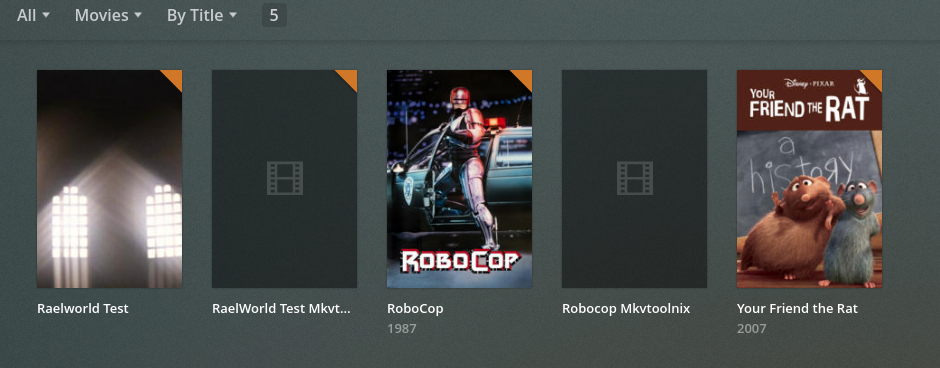
Curiously, this is what I get which shows yet another apparent contradiction.

ps: Yes, that’s my 11 minute test file in that library.

I like rats.

Plex’s bitrate estimates for files truncated by dd can be really nuts, when it goes off of the file header vs. the stream itself. I think it gets better once deep analysis processes the file, but I haven’t dug into it…

301 kbps, lol.

But that said, I can Direct Stream both of the original test files immediately after adding them, even in a web browser.

I just got off the phone with a friend of mine.
He has RoboCop. For some unknown reason, I cannot find / never purchased it.

I’m going to run over, deliver some OTA television I get for him ( He lives too far out for cable and gets terrible TV reception ) in exchange for borrowing the disc to test with.

I will be back in about 90 minutes.

1 Like

I’m off to bed soon (2am here), but just to say this. The problem with ffmpeg or Plex’s version of it is, very specifically, when it’s used to generate video preview thumbnails. That is the only thing causing an error, and we suspect it’s down to a bug in the way that ffmpeg expects certain frames to be present in the file. In some files these frames aren’t there or are in an unexpected order depending on how they have been encoded - and sometimes this encoding method is used on commercial discs.

These “problem” files are otherwise fine, whether or not they’re DirectStreaming (it does perfectly for me BTW), or making chapter thumbnails, or just playing. The container - MKV, MPG4, whatever - doesn’t matter. it’s irrelevant. It’s just that specific use when using ffmpeg, or Plex’s version of it, to make video preview thumbnails which is failing.

1 Like

That’s awesome. I’m pretty sure it needs to be the recent “Arrow” release, at least, I think most of the files @Raelworld found were from “Arrow” Blu-ray releases.

https://arrowfilms.com/product-detail/robocop--director-s-cut-blu-ray/FCD1934
https://arrowfilms.com/product-detail/robocop-steelbook-blu-ray/FCD1919

If he has something else, obviously you need Robocop in your collection anyway …

Never underestimate the bandwidth of a station wagon full of tapes.

Yep, three Arrow discs, and every bit of video of them including extras create this same error. Also, I want to watch RoboCop again now… the original, of course.

Last words before I actually depart (had to get keys, wallet, and sneakers)

  1. There is a FFMPEG bump in the works – no word on when that might be due to other in-flight work for the transcoder of higher priority.

  2. I agree container doesn’t matter (that would be a major decoder fault)

  3. I will see what I can get by taking upstream FFMPEG and recompiling / substituting the static version in place. (you can’t mix libs but static switching of the whole thing will work for short tests only because PMS needs the feedback )

Godspeed you all! falls into bed

I got the disc, ripped it, and put it into PMS.

  1. Plex got the first level thumbs immediately
  2. Overnight, Plex created the chapter thumbs (JPG files) for this and for my WHOLE system as I had instructed it.
  3. There were no errors.

To help with diagnosis, I have a present for all :wink:

Here is a sample of my rip. (750 MB)
https://drive.google.com/file/d/1CWhlxRU0QVynR69caCVsV6cGR1MuuzZt/view?usp=sharing

Here is what you should find:

[chuck@lizum mmg.503]$ ffmpeg -i ChuckPa-Test.mkv 
ffmpeg version 4.2.4-1ubuntu0.1 Copyright (c) 2000-2020 the FFmpeg developers
  built with gcc 9 (Ubuntu 9.3.0-10ubuntu2)
  configuration: --prefix=/usr --extra-version=1ubuntu0.1 --toolchain=hardened --libdir=/usr/lib/x86_64-linux-gnu --incdir=/usr/include/x86_64-linux-gnu --arch=amd64 --enable-gpl --disable-stripping --enable-avresample --disable-filter=resample --enable-avisynth --enable-gnutls --enable-ladspa --enable-libaom --enable-libass --enable-libbluray --enable-libbs2b --enable-libcaca --enable-libcdio --enable-libcodec2 --enable-libflite --enable-libfontconfig --enable-libfreetype --enable-libfribidi --enable-libgme --enable-libgsm --enable-libjack --enable-libmp3lame --enable-libmysofa --enable-libopenjpeg --enable-libopenmpt --enable-libopus --enable-libpulse --enable-librsvg --enable-librubberband --enable-libshine --enable-libsnappy --enable-libsoxr --enable-libspeex --enable-libssh --enable-libtheora --enable-libtwolame --enable-libvidstab --enable-libvorbis --enable-libvpx --enable-libwavpack --enable-libwebp --enable-libx265 --enable-libxml2 --enable-libxvid --enable-libzmq --enable-libzvbi --enable-lv2 --enable-omx --enable-openal --enable-opencl --enable-opengl --enable-sdl2 --enable-libdc1394 --enable-libdrm --enable-libiec61883 --enable-nvenc --enable-chromaprint --enable-frei0r --enable-libx264 --enable-shared
  libavutil      56. 31.100 / 56. 31.100
  libavcodec     58. 54.100 / 58. 54.100
  libavformat    58. 29.100 / 58. 29.100
  libavdevice    58.  8.100 / 58.  8.100
  libavfilter     7. 57.100 /  7. 57.100
  libavresample   4.  0.  0 /  4.  0.  0
  libswscale      5.  5.100 /  5.  5.100
  libswresample   3.  5.100 /  3.  5.100
  libpostproc    55.  5.100 / 55.  5.100
Input #0, matroska,webm, from 'ChuckPa-Test.mkv':
  Metadata:
    title           : RoboCop
    encoder         : libebml v1.4.0 + libmatroska v1.6.0
    creation_time   : 2020-07-28T06:47:59.000000Z
  Duration: 00:03:44.52, start: 0.000000, bitrate: 29291 kb/s
    Chapter #0:0: start 0.000000, end 224.516000
    Metadata:
      title           : Chapter 01
    Chapter #0:1: start 405.113022, end 405.113022
    Metadata:
      title           : Chapter 02
    Chapter #0:2: start 847.555022, end 847.555022
    Metadata:
      title           : Chapter 03
    Chapter #0:3: start 1052.551489, end 1052.551489
    Metadata:
      title           : Chapter 04
    Chapter #0:4: start 1600.515556, end 1600.515556
    Metadata:
      title           : Chapter 05
    Chapter #0:5: start 2068.024267, end 2068.024267
    Metadata:
      title           : Chapter 06
    Chapter #0:6: start 2432.805333, end 2432.805333
    Metadata:
      title           : Chapter 07
    Chapter #0:7: start 2715.337600, end 2715.337600
    Metadata:
      title           : Chapter 08
    Chapter #0:8: start 2986.650311, end 2986.650311
    Metadata:
      title           : Chapter 09
    Chapter #0:9: start 3468.131311, end 3468.131311
    Metadata:
      title           : Chapter 10
    Chapter #0:10: start 3701.239178, end 3701.239178
    Metadata:
      title           : Chapter 11
    Chapter #0:11: start 4105.184378, end 4105.184378
    Metadata:
      title           : Chapter 12
    Chapter #0:12: start 4559.888644, end 4559.888644
    Metadata:
      title           : Chapter 13
    Chapter #0:13: start 4966.544889, end 4966.544889
    Metadata:
      title           : Chapter 14
    Chapter #0:14: start 5633.961644, end 5633.961644
    Metadata:
      title           : Chapter 15
    Chapter #0:15: start 5824.902378, end 5824.902378
    Metadata:
      title           : Chapter 16
    Stream #0:0(eng): Video: h264 (High), yuv420p(progressive), 1920x1080 [SAR 1:1 DAR 16:9], 23.98 fps, 23.98 tbr, 1k tbn, 47.95 tbc (default)
    Stream #0:1(eng): Audio: dts (DTS-HD MA), 48000 Hz, 5.1(side), s32p (24 bit) (default)
At least one output file must be specified
[chuck@lizum mmg.504]$ 

This was done with MakeMKV and MKVtoolnix-GUI

  1. MakeMKV took the entire disc
  2. MkvToolnix - clipped out everything I didn’t want

I find this process easier and it does actually seem to be a bit faster since the DVD reading doesn’t require any additional processing .
I built an ffmpeg from git-master today. Same behaviors.

I included other info on the ffmpeg ticket.

#8820 (skip_frame nokey skips everything but IDR frames (H.264)) – FFmpeg

1 Like

I downloaded the ChuckPa-Test.mkv sample. First, yay for Robocop!

But sadly, that’s a different source disc. The H.264 stream is encoded differently.

The ChuckPa-Test.mkv sample:

% mediainfo -f ChuckPa-Test.mkv | egrep "Reference frames|bit rate|Buffer size"
Format settings, Reference frames        : 4
Format settings, Reference frames        : 4 frames
Maximum bit rate                         : 28499968
Maximum bit rate                         : 28.5 Mb/s
Buffer size                              : 30000000 / 30000000

The problem robocop.mkv sample. The number of H.264 reference frames is different, and that’s an encode-time setting. It can’t be changed after.

% mediainfo -f robocop.mkv | egrep "Reference frames|bit rate"
Format settings, Reference frames        : 3
Format settings, Reference frames        : 3 frames
Maximum bit rate                         : 38000000
Maximum bit rate                         : 38.0 Mb/s
Buffer size                              : 30000000

Those settings are similar to the other problem test.mkv / exorcist3.mkv sample:

Format settings, Reference frames        : 3
Format settings, Reference frames        : 3 frames
Maximum bit rate                         : 38000000
Maximum bit rate                         : 38.0 Mb/s
Buffer size                              : 30000000

I don’t believe that the number of reference frames or the bit rate are the cause of the problem. Those are just indicators that the H.264 streams are from different sources.


The ChuckPa-Test.mkv appears to have been encoded with closed GOP and plenty of IDR frames.

Did my ripping the file and providing known example help define this?

It looks like it did and is what I was thinking yesterday.

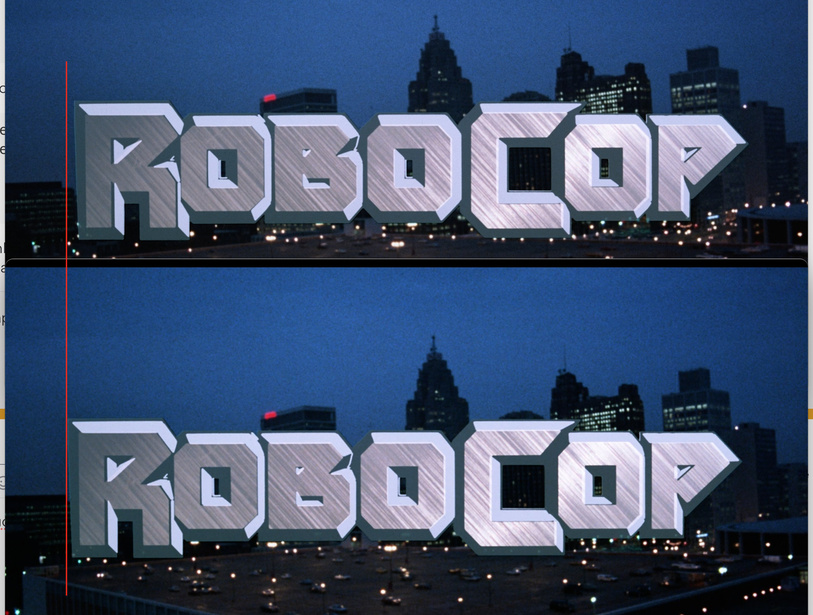
The ChuckPa-Test.mkv source is also matted differently on disc.

The Robocop logo zooms in on screen and then stays for a few seconds. The horizontal alignment is different between the two.

The color/contrast/detail is also different between them.

This just shows that it’s a different retail Robocop disc. So sadly it doesn’t demonstrate much.

Edit: Actually it demonstrates how much better the newer release is. It has significantly more detail and is less noisy. :slight_smile:

Where I’m going with “demonstrate”…

  1. This is at the master encoding - FFMPEG level
  2. I don’t see how this can be a Plex issue.
  3. I do agree that FFMPEG upstream needs to handle such cases.
  4. Given I can DirectPlay my rip on my iPad, I can speak to HOW it was ripped matters a great deal.

True?

Screenshot from 2020-07-28 12-11-33

1 Like

if the source encodes are different (different masters/mastering), then the results of rip can’t really be compared equally.

1 Like

Is there anything else I can do here?
This looks to be at a level far above my skillset (e.g. master-level video encoding for production)

What I was able to verify, what little it may seem matter, is that with this encoding, Plex was able to generate the chapter thumbs correctly.