Title says it all, but let me give a quick background. First, I am coming from the old XBMC days on the original XBox. I went thru ripping all my movies to ISO and most TV Shows to their episode in MPG years ago. I never had any delay or hesitations on any movie. Now, granted, that was before Blueray. The server has basically 15 of the WD 1TB on an UnRaid machine that was fast for its time when I set up. As I recall it was a intel duo core with plenty of ram. Now fast forward. I set the Plex server up on my current MacBook for now to get things going. My plan is to install the Plex Media Server on the unraid once I determine how things work. We have 150 meg on the internet, but for now ALL of this is just on my local network and hardwired, not wifi. The player is one of the new Apple TV 4K with the 64 megs of ram.
So far I’ve been working on the tv stuff which are .mpg and they have been playing fine. I haven’t started the iso conversion just yet. But I did recently get a few new movies, including a few blueray. Tonight we watched some of the tv mpg files and they were fine. Then we decided to try one of the newly ripped to mkv bluerays. It just kept starting and stopping every 10 seconds or so. I reset everything and no difference. Nothing else was running on the Mac, is was not scanning and no network traffic but the movie. So I gave up and decided to play one if the newly ripped to mkv regular DVD’s. At first it studdered then was fine, except an occasional internet connection message in the upper right corner of the projector screen. Then after about 30-40 mins it started stopping, run for a second, stop, etc. I also started getting messages on screen that my network was not fast enough. Never has been an issue before. I’d have to stop the movie and then let it resume and was good for another 30 mins. In the past, my iso files of standard dvds ran fine on the network and my internet speed was just 10-12megs. We have been at 150 for over 6 months now with no issues. When it was shuddering I check internet speed and it was running about 45, which is less that the 150 but still a lot more than I had before. And besides, since this is all streaming on my local network, internet speed should not matter.
So when do I start diagnosing the problem? Is the MacBook not fast enough to transcode? Since going from MKV to the AppleTV. I assume it’s having to transcode to mpg. Is it an issue of MKV format that the ISO containers didn’t have? I really don’t understand the regulars dvd resolution stopping and starting but then run fine for 30 mins. What kind of speed do I need for the Plex Server to get able to handle blueray?
The server is down stairs and we watch up in the media room, so no way to see what it’s showing on PMS so I’ll look at the logs tomorrow. I don’t remember if I ripped to the X265 or not will recheck. Since we are in the Apple ecosystem I’ve debated taking everything to M4P but was going to try and stay with MKV.
Apple TV should direct play most things, but not any hd audio like truehd or dts-has-ma.
I don’t remember if atv can direct play old mpeg2/dvd or xvid content, but normally with any non-ancient cpu should be able to transcode that.
The dashboard is viewed via web browser @ https://app.plex.tv/desktop/#!/ using the instructions above, you can use a phone or tablet to monitor while watching tv.
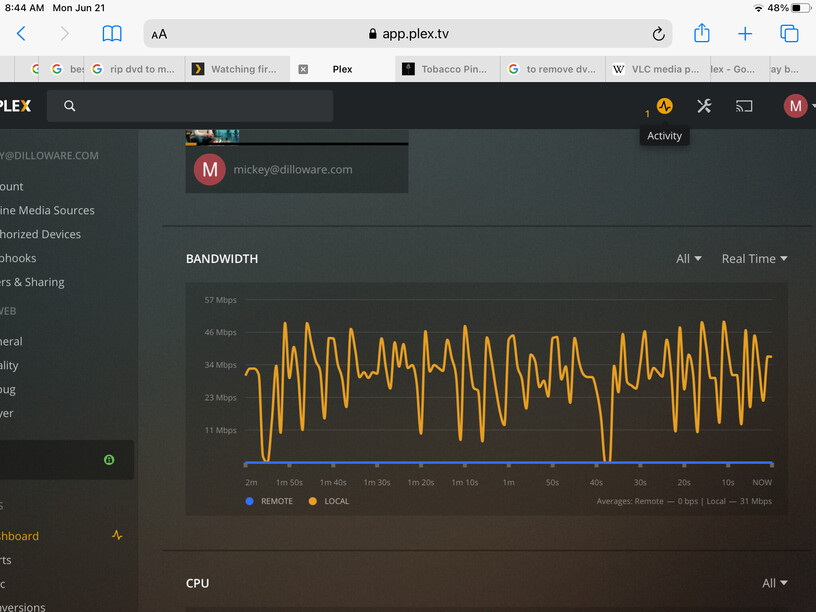
I tried to run the same movie on my iPad which of course is wifi. It ran fine. It does show it as 1080p/H264. Interestingly enough, when playing from my ATV4K(2021) it only shows 1080p but why not the H264? So I went up stairs and it still starts and stops. Here is the graph when running on the ATV4K. Every dip corresponds to a stutter.
Goes full blast filling the client buffer (ALL Clients play from a buffer - otherwise a stream would be constantly loading) - then plays a bit - then goes full blast again.
The bigger the bit rate, the more times the buffer has to be loaded.
Note:
It’s very possible WiFi would be faster than wired - IF there’s a solid connection to 5G.
Huge Bit Rate files may sometimes saturate the available bandwidth.
Also Note:
Huge Bit Rate files reported at, say: 70Mbps - could easily peak past 100Mbps.
The file simply may be too fat to fit inside your pipes.
Get bigger pipes in that case.
Is the file in Direct Play?
Show the Dashboard above - and the CPU below.
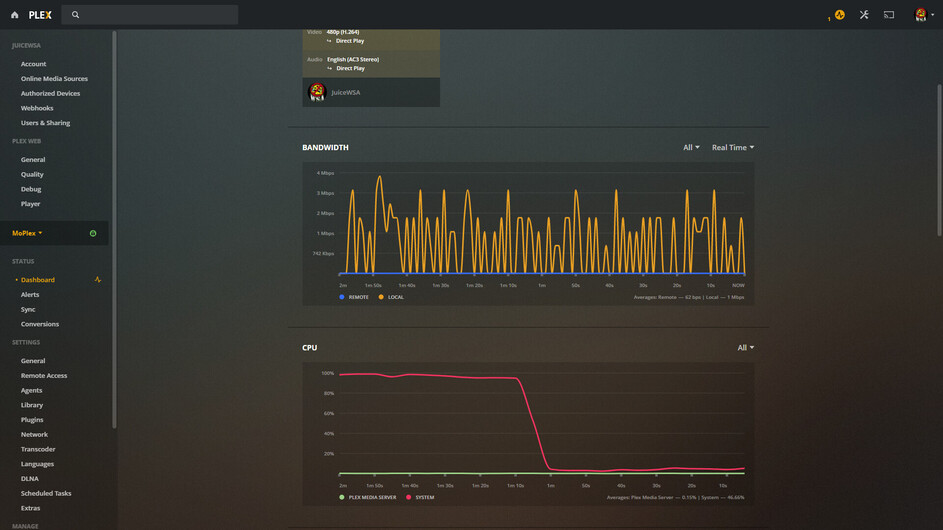
Here’s a small Rocky and Bullwinkle episode with almost no bit rate to speak of, but it still loads the buffer at 100Mbps, then plays from the buffer:
I had a Handbrake Job that just ended. The CPU was up against the wall while that was going on, but a Direct Play Cartoon coasts along unnoticed. After the buffer runs out - my stream looks just like yours - except way smaller:
My image shows 100Mbps max bandwidth (about the best I can get out of that wired connection to my Roku Ultra) and all I can see of yours is about 50Mbps.
The same file, played on my FireTV 4K Stick with 5G WiFi - almost 150Mbps.
My 5G WiFi is faster than wired - big time:
@JuiceWSA: (The odd use of 5G to describe your wifi aside…) the issue for the OP is not that the network bandwidth starts up and stops, it’s that this also seems to be associated with the video itself stopping and buffering. So they are concerned that somehow the network bandwidth is shutting down every few seconds, which causes their stream to stop playing as well. Yes, under normal performance for a lot of us, that looks accurate. But for this issue it sounds like a red herring, since the problem is the video itself buffering.
Re-reading your posts Mickeyk, there are some gaps in information I’d like you to clarify. If you point at the video in Plex and click the triple dots, you can choose “get info” to get all kinds of data on the video. Copy all the text starting with the word “Media” and paste it here.
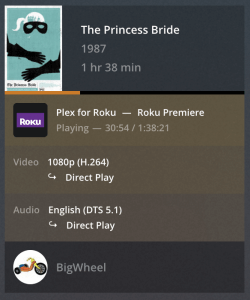
Also, please attach a screenshot of Plex Dashboard → Now Playing while streaming from the Apple TV. The part that shows if the video & audio are direct playing, etc. Toggle the button to the right if necessary to show the details.
What’s odd about it?
5G WiFi is faster than Wired.
I’ll let @FordGuy61 explain why he’s got a WiFi Access Point behind his TV…
I don’t need one of those - the Stick and the Router are 5 feet apart and can see each other - visually…lol
Normally, when the client requests more from Plex to fill the client buffer - Plex can deliver it fast enough to prevent gaps in the experience - unless there’s a traffic jam somewhere. The client may be running out before more can get there.
When Rocky and Bullwinkle request more from Plex - the client buffer doesn’t have to wait around for it. a 1Mbps stream can whistle down a 150Mbps pipe while spinning a cane.
A 70Mbps file can’t exactly whistle down a 50Mbps pipe spinning anything. In fact, the math to me indicates by the time the client requests more - it’s already too late… maybe. We need more info.
We also want to see what the server is actually doing with the file via Dashboard details. The CPU graph may also reveal something and we need to see what the stream is made of to get the actual bit rates we’re dealing with.
I don’t believe I’d heard the GHz band used (I assume that you mean your band is 5GHz) to describe the speed of your wifi. Especially as the band has been around for quite some time and has nothing to do with the speed itself. 802.11a used this band and had speeds up to 54 Mbps, but that is fairly ancient tech. The use of “5G” by itself should be used to refer to the Cellular Broadband network technology, which is currently being implemented to replace 4G wireless.
Back to topic: I suppose if the OP is doing something else in the local network that also spikes, it could lead to network bandwidth loss for plex, but it’d have to spike and ebb exactly like we see there in the OP’s network monitor. They are wired in, and it tends to spike at around 54Mbps, which indicates they are likely on at least a 100mpbs pipeline. Heck, mine spikes that high all the time as well, even though most videos are 1/10th the bitrate (5 or less), so it looks like normal behavior for a local network.
The issue is that the OP claims each dip in network is also associated with a pause/buffer on the video players’ side, which is not normal. It’s good to point out to the OP that the graph looks normal, but also let them know it’s not likely the culprit since it is normal behavior for the graph.
What is unfortunate is that more information that might be relevant for this issue happens to be juuuuuuuuuuust out of reach in both up and down directions, but they were cropped out of the image. laughs. I’d like to know, as FordGuy pointed out, what the server is doing to the video file (transcode vs directplay), but also like to see the CPU usage which was just below the network chart. Last night I was doing a lot of intro-detect and thumbnail processing on my Synology NAS for a show I added, which usually thrashes the CPU. Normally, that doesn’t matter much, but I happened to use my phone to watch a vid, which I think needed a transcode, which needed CPU, which was all used up, so I was getting a lot of buffering too.
So I’d like to see
If transcoding is happening (for whatever reason)
What codec the video is in (can help inform us why it might be transcoding)
If the CPU is occupied with other tasks (or simply insufficient for transcoding a BR-disc bitrate in real time)
Whether there is any other network activity (50-100 Mbps worth of data constantly going or pulsing on and off) that might be choking Plex.
Duration 24:37
Bitrate 40710 kbps
Width 1920
Height 1080
Aspect Ratio 1.78
Video Resolution 1080p
Container MKV
Video Frame Rate 24p
Audio Profile ma
Video Profile high
Part
Duration 24:37
File Land (2021).mkv
Size 24.87 GB
Audio Profile ma
Container MKV
Video Profile high
Codec H264
Bitrate 35455 kbps
Language English
Bit Depth 8
Chroma Location left
Chroma Subsampling 4:2:0
Coded Height 1088
Coded Width 1920
Frame Rate 23.97599983215332 fps
Height 1080
Level 4.1
Profile high
Ref Frames 4
Scan Type progressive
Width 1920
Display Title 1080p (H.264)
Extended Display Title 1080p (H.264)
Codec DCA
Channels 6
Bitrate 3541 kbps
Language English
Audio Channel Layout 5.1(side)
Bit Depth 24
Profile ma
Sampling Rate 48000 Hz
Title Surround 5.1
Display Title English (DTS-HD MA 5.1)
Extended Display Title Surround 5.1 (English DTS-HD MA)
Codec DCA
Channels 6
Bitrate 1509 kbps
Language English
Audio Channel Layout 5.1(side)
Bit Depth 24
Profile dts
Sampling Rate 48000 Hz
Title Surround 5.1
Display Title English (DTS 5.1)
Extended Display Title Surround 5.1 (English DTS)
Codec AC3
Channels 2
Bitrate 192 kbps
Language English
Audio Channel Layout stereo
Sampling Rate 48000 Hz
Title Stereo
Display Title English (AC3 Stereo)
Extended Display Title Stereo (English AC3)
Codec PGS
Bitrate 13 kbps
Language English
Display Title English (PGS)
Extended Display Title English (PGS)
View XML
Interesting. it’s a 40 Mbps H.264 with PGS subtitles. That’s a pretty hefty video to transcode on the fly. And depending on the player, it might not support the subtitle, which requires the subtitle to be burned into the video which can run even slower.
If you are using the subtitle, try disabling it for now, and let us know how the video performs.
I may have found the issue. I check the ATV and it is on wifi. I know the cat5 is plugged in but there may be an issue down the line so that is what I will be checking today. Then I’ll report back.
Pretty sure I found the issue. The ATV was in wifi mode. I switched to another cable and it went to Ethernet. I then started to play the movie and got thru all the previews and part of the movie and no stopping and starting. Now on you the next issue. Thanks to all that inputted.