WebTools-NG: Cannot copy view state

I’m trying to do a View State Copy in WebTools-NG, but it won’t work.

My server is on a Debian Linux system. My desktop is a Mac. I just yesterday downloaded the latest version of WebTools-NG and put it on my Mac. (My Debian media server does not have a GUI, so I can’t run it on there.) I run the program, sign in and it recognizes my Plex server. Then I pick Plex Media Server, then View State Copy. I pick my main account as a source and my only other account, a managed one, as the destination, then click “Copy.” I get a message like this:

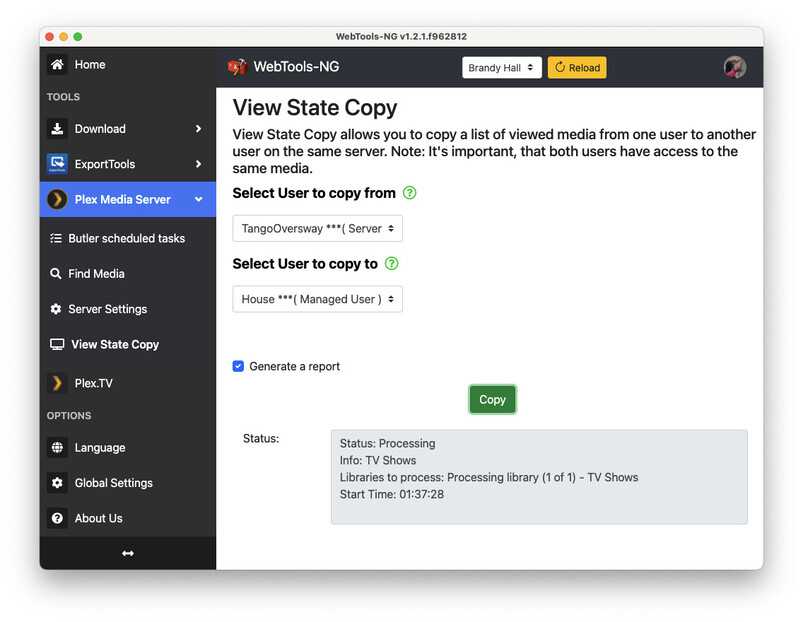
Status: Processing
Info: TV Shows
Libraries to process: Processing library (1 of 1) - TV Shows
Start Time: 00:18:18

And that’s it. I changed the log level to debug and the log is at the end of the post. It looks like the DB is reporting a problem with the request sent to it.

What can I do to copy the view state from one user to another? This is the one task I need to do and the reason I downloaded this program. It looks like there’s a bug (although I realize I may need to change a setting or something). If there’s a way to just get into the DB and run a few queries by hand, I’m okay with that, too. I just want to get this copied to the new user.


[2023-11-05 00:00:42.781] [verbose] Show Rel Notes
[2023-11-05 00:00:42.781] [debug] Fetching Github Release Note
[2023-11-05 00:00:42.785] [verbose] [Home.vue] (UpdatePresent) Check for updates enabled
[2023-11-05 00:00:42.785] [debug] [wtutils.js] (Releases) Checking for Github updates
[2023-11-05 00:00:42.786] [info] [wtutils.js] (ExportDirPresent) Checking ExportPath
[2023-11-05 00:00:42.787] [info] [Home.vue] (CheckExportDir) ExportDir OK
[2023-11-05 00:00:43.164] [debug] [plextv.js] (fetchPlexServers) Response from fetchPlexServers recieved
[2023-11-05 00:00:43.519] [verbose] [wtutils.js] (Releases) Found release version v1.2.1
[2023-11-05 00:00:43.527] [verbose] [wtutils.js] (Releases) Found beta version v1.2.1.fbd58dc
[2023-11-05 00:00:43.527] [verbose] [Home.vue] (UpdatePresent) Github releases {“beta”:true,“rel”:true,“betadate”:“2022-12-04”,“reldate”:“2022-12-06”,“betadateFull”:“2022-12-04T21:04:55Z”,“reldateFull”:“2022-12-06T22:30:15Z”,“relver”:“1.2.1”,“relname”:“1.2.1”,“relurl”:“https://github.com/WebTools-NG/WebTools-NG/releases/tag/v1.2.1",“betaver”:“1.2.1.fbd58dc”,“betaname”:"1.2.1 (BETA)”,“betaurl”:“Release 1.2.1 (BETA) · WebTools-NG/WebTools-NG · GitHub”}
[2023-11-05 00:00:59.693] [debug] [wtutils.js] (hideMenu) Start menu check for pmsButler
[2023-11-05 00:00:59.696] [debug] [wtutils.js] (hideMenu) Menu returning false
[2023-11-05 00:00:59.697] [debug] [wtutils.js] (hideMenu) Start menu check for pmsDVR
[2023-11-05 00:00:59.697] [debug] [wtutils.js] (hideMenu) Menu returning true
[2023-11-05 00:00:59.697] [debug] [wtutils.js] (hideMenu) Start menu check for pmsFindMedia
[2023-11-05 00:00:59.697] [debug] [wtutils.js] (hideMenu) Menu returning false
[2023-11-05 00:00:59.698] [debug] [wtutils.js] (hideMenu) Start menu check for pmsLibMapping
[2023-11-05 00:00:59.698] [debug] [wtutils.js] (hideMenu) Menu returning true
[2023-11-05 00:00:59.698] [debug] [wtutils.js] (hideMenu) Start menu check for pmsSettings
[2023-11-05 00:00:59.699] [debug] [wtutils.js] (hideMenu) Menu returning false
[2023-11-05 00:00:59.699] [debug] [wtutils.js] (hideMenu) Start menu check for pmsViewState
[2023-11-05 00:00:59.699] [debug] [wtutils.js] (hideMenu) Menu returning false
[2023-11-05 00:00:59.699] [info] PMS Created
[2023-11-05 00:00:59.700] [debug] serverCheck is none
[2023-11-05 00:01:06.221] [info] [Headers.vue] (selected) Selected server: Brandy Hall
[2023-11-05 00:01:06.222] [verbose] [plextv.js] (checkServerConnect) Checking address for server: Brandy Hall
[2023-11-05 00:01:06.222] [verbose] [plextv.js] (checkServerConnect) Checking: https://172.16.7.4:32400
[2023-11-05 00:01:06.241] [verbose] [plextv.js] (checkServerConnect) Address https://172.16.7.4:32400 is alive, so check if local
[2023-11-05 00:01:06.242] [verbose] [plextv.js] (checkServerConnect) It’s a local server, so need to check if correct one
[2023-11-05 00:01:06.242] [verbose] [plextv.js] (checkServerConnect) Local server found as: https://172.16.7.4:32400
[2023-11-05 00:01:06.242] [info] [plextv.js] (checkServerConnect)Returning valid address as: https://172.16.7.4:32400
[2023-11-05 00:01:27.083] [info] [ViewState.vue] viewState Created
[2023-11-05 00:01:27.092] [info] [viewState.js] Start getUsers
[2023-11-05 00:01:27.093] [debug] Getting users from plex.tv
[2023-11-05 00:01:27.323] [debug] Response from fetchUsers recieved
[2023-11-05 00:01:27.324] [verbose] Users added to store
[2023-11-05 00:01:27.578] [debug] [viewState.js] Response from getServerToken recieved
[2023-11-05 00:01:27.588] [info] [viewState.js] Start getShareList
[2023-11-05 00:01:27.799] [debug] [viewState.js] Response from getShareList recieved
[2023-11-05 00:01:36.558] [info] [viewstate.js] (getLibs) Starting getLibs
[2023-11-05 00:01:36.559] [info] [viewstate.js] (getLibs) Both users not yet selected, so exit
[2023-11-05 00:01:38.654] [info] [viewstate.js] (getLibs) Starting getLibs
[2023-11-05 00:01:38.656] [debug] [viewstate.js] SrcUsr is owner
[2023-11-05 00:01:50.949] [info] [viewstate.js] Starting copyViewState
[2023-11-05 00:01:50.950] [info] [viewstate.js] (getLibs) Starting getLibs
[2023-11-05 00:01:50.951] [debug] [viewstate.js] SrcUsr is owner
[2023-11-05 00:01:50.952] [info] [viewstate.js] Starting getUsrTokens
[2023-11-05 00:01:51.173] [debug] [viewState.js] Response from getUsrTokens recieved
[2023-11-05 00:01:51.200] [info] etHelper (getFileName) OutFile ET is /Users/hal/Documents/WebTools-NG/Plex Media Server/View State Copy/Brandy Hall_TangoOversway-House_2023.11.05_12.01.51.csv.tmp
[2023-11-05 00:01:51.203] [info] Added CSV Header as: undefined
[2023-11-05 00:01:51.203] [info] [viewstate.js] (walkSourceUsr) Walking SourceUsr
[2023-11-05 00:01:51.205] [info] [viewstate.js] (processWatchedList) Process Watched list
[2023-11-05 00:01:51.205] [info] Getting amount of watched items
[2023-11-05 00:01:51.226] [error] [viewState.js] (getAmountOfWatched) getAmountOfWatched: “Bad Request

400 Bad Request

Are you not able to read that?

Both users must be on the same machine, not two different machines.

Or to put it another way, both users must use the same account.

You can copy between family members, who live in the same house and use the same server as part of your Plex home, but you cannot copy to a friend/user you share your server with.

This is a limitation within Plex and it cannot be circumvented as far as I am aware, or at least the Plex API does not currently support it.

Both users are on the same server. I have only ONE Plex server, the one I specified was running on Linux. I’m using WebTools-NG from a Mac, so that’s on a different machine (since I have no GUI running on servers).

Is there a problem accessing the Plex server on one computer by running WebTools-NG from another computer? Since it logs in with my email and password and IDs the server I’m using by name and lists the two users I have on my one server, that makes me think I’m only using one server with both of them on it. (Also, when I select the two users, the only library it mentions in syncing is the one library the 2nd user currently has access to.)

Okay, I’m not completely clear what you mean by both users must use the same account. Maybe I’m a bit confused about the difference between users and accounts. I have one account that I’ve been using up until now, but then, using that account, I created a managed user. Those are the only two users (or accounts) on my server. When I go to View State Copy, those are the only two names listed in the drop-down lists for selecting a source user and a destination user.

Apologies, I thought you were choosing users on different accounts/different machines.

In that case, first select your server (top of page) then enter View State Copy.

If you are already in View State Copy and you have no server selected, it wont work.

Make sure Generate a report is checked.

Select one user name to copy from and the other user name to copy to.

Let me know what the report states please and if it is successful or not.

Speaking as a former reading teacher, with an emphasis on learning styles, that’s the kind of thing that’s really easy to mis-read. I make that kind of mistake often. I was talking about two machines, so it’s easy to see that and think I’m also talking about two servers.

I deleted the log file, then started the app and signed in, picked my server at the top of the window, and went to View State Copy and picked my users:

Then I click on the green “Copy” button and I get this (more info in the status area):

That’s all that ever happens. I have the same entry in my log file as the last one (see at the bottom). (I didn’t realize, on my first post here, that I had to escape the HTML tags that were included in the log when I pasted it in. I took care of that this time, so you can easily see the last log entry, which is a simple HTML page, reporting what looks to be either an HTML or SQL error. There is a blank line, to make reading the log easier, before I clicked “Copy.”

Where is the report located and would there be one if the entire process wasn’t complete? The log does specify a file “OutFile ET” and gives me a location on my Mac’s drive. When I check that file, it’s just this column names, like this:

“Library”,“RatingKey”,“Title”,“View Count”,“View Offset”,“User Ratings”


[2023-11-05 01:34:13.219] [verbose] Show Rel Notes
[2023-11-05 01:34:13.219] [debug] Fetching Github Release Note
[2023-11-05 01:34:13.224] [verbose] [Home.vue] (UpdatePresent) Check for updates enabled
[2023-11-05 01:34:13.224] [debug] [wtutils.js] (Releases) Checking for Github updates
[2023-11-05 01:34:13.225] [info] [wtutils.js] (ExportDirPresent) Checking ExportPath
[2023-11-05 01:34:13.226] [info] [Home.vue] (CheckExportDir) ExportDir OK
[2023-11-05 01:34:13.640] [debug] [plextv.js] (fetchPlexServers) Response from fetchPlexServers recieved
[2023-11-05 01:34:13.709] [verbose] [wtutils.js] (Releases) Found release version v1.2.1
[2023-11-05 01:34:13.709] [verbose] [wtutils.js] (Releases) Found beta version v1.2.1.fbd58dc
[2023-11-05 01:34:13.710] [verbose] [Home.vue] (UpdatePresent) Github releases {“beta”:true,“rel”:true,“betadate”:“2022-12-04”,“reldate”:“2022-12-06”,“betadateFull”:“2022-12-04T21:04:55Z”,“reldateFull”:“2022-12-06T22:30:15Z”,“relver”:“1.2.1”,“relname”:“1.2.1”,“relurl”:“https://github.com/WebTools-NG/WebTools-NG/releases/tag/v1.2.1",“betaver”:“1.2.1.fbd58dc”,“betaname”:"1.2.1 (BETA)”,“betaurl”:“Release 1.2.1 (BETA) · WebTools-NG/WebTools-NG · GitHub”}
[2023-11-05 01:34:23.704] [info] [Headers.vue] (selected) Selected server: Brandy Hall
[2023-11-05 01:34:23.706] [verbose] [plextv.js] (checkServerConnect) Checking address for server: Brandy Hall
[2023-11-05 01:34:23.706] [verbose] [plextv.js] (checkServerConnect) Checking: https://172.16.7.4:32400
[2023-11-05 01:34:23.722] [verbose] [plextv.js] (checkServerConnect) Address https://172.16.7.4:32400 is alive, so check if local
[2023-11-05 01:34:23.722] [verbose] [plextv.js] (checkServerConnect) It’s a local server, so need to check if correct one
[2023-11-05 01:34:23.722] [verbose] [plextv.js] (checkServerConnect) Local server found as: https://172.16.7.4:32400
[2023-11-05 01:34:23.722] [info] [plextv.js] (checkServerConnect)Returning valid address as: https://172.16.7.4:32400
[2023-11-05 01:34:26.458] [debug] [wtutils.js] (hideMenu) Start menu check for pmsButler
[2023-11-05 01:34:26.459] [debug] [wtutils.js] (hideMenu) Menu returning false
[2023-11-05 01:34:26.462] [debug] [wtutils.js] (hideMenu) Start menu check for pmsDVR
[2023-11-05 01:34:26.463] [debug] [wtutils.js] (hideMenu) Menu returning true
[2023-11-05 01:34:26.463] [debug] [wtutils.js] (hideMenu) Start menu check for pmsFindMedia
[2023-11-05 01:34:26.463] [debug] [wtutils.js] (hideMenu) Menu returning false
[2023-11-05 01:34:26.464] [debug] [wtutils.js] (hideMenu) Start menu check for pmsLibMapping
[2023-11-05 01:34:26.464] [debug] [wtutils.js] (hideMenu) Menu returning true
[2023-11-05 01:34:26.465] [debug] [wtutils.js] (hideMenu) Start menu check for pmsSettings
[2023-11-05 01:34:26.465] [debug] [wtutils.js] (hideMenu) Menu returning false
[2023-11-05 01:34:26.465] [debug] [wtutils.js] (hideMenu) Start menu check for pmsViewState
[2023-11-05 01:34:26.465] [debug] [wtutils.js] (hideMenu) Menu returning false
[2023-11-05 01:34:26.466] [info] PMS Created
[2023-11-05 01:34:29.130] [info] [ViewState.vue] viewState Created
[2023-11-05 01:34:29.132] [info] [viewState.js] Start getUsers
[2023-11-05 01:34:29.133] [debug] Getting users from plex.tv
[2023-11-05 01:34:29.347] [debug] Response from fetchUsers recieved
[2023-11-05 01:34:29.349] [verbose] Users added to store
[2023-11-05 01:34:29.584] [debug] [viewState.js] Response from getServerToken recieved
[2023-11-05 01:34:29.590] [info] [viewState.js] Start getShareList
[2023-11-05 01:34:29.796] [debug] [viewState.js] Response from getShareList recieved
[2023-11-05 01:34:34.909] [info] [viewstate.js] (getLibs) Starting getLibs
[2023-11-05 01:34:34.912] [info] [viewstate.js] (getLibs) Both users not yet selected, so exit
[2023-11-05 01:34:37.929] [info] [viewstate.js] (getLibs) Starting getLibs
[2023-11-05 01:34:37.930] [debug] [viewstate.js] SrcUsr is owner

[2023-11-05 01:37:28.223] [info] [viewstate.js] Starting copyViewState
[2023-11-05 01:37:28.225] [info] [viewstate.js] (getLibs) Starting getLibs
[2023-11-05 01:37:28.227] [debug] [viewstate.js] SrcUsr is owner
[2023-11-05 01:37:28.230] [info] [viewstate.js] Starting getUsrTokens
[2023-11-05 01:37:29.049] [debug] [viewState.js] Response from getUsrTokens recieved
[2023-11-05 01:37:29.095] [info] etHelper (getFileName) OutFile ET is /Users/hal/Documents/WebTools-NG/Plex Media Server/View State Copy/Brandy Hall_TangoOversway-House_2023.11.05_1.37.29.csv.tmp
[2023-11-05 01:37:29.099] [info] Added CSV Header as: undefined
[2023-11-05 01:37:29.099] [info] [viewstate.js] (walkSourceUsr) Walking SourceUsr
[2023-11-05 01:37:29.102] [info] [viewstate.js] (processWatchedList) Process Watched list
[2023-11-05 01:37:29.102] [info] Getting amount of watched items
[2023-11-05 01:37:29.125] [error] [viewState.js] (getAmountOfWatched) getAmountOfWatched: “<html><head><title>Bad Request</title></head><body><h1>400 Bad Request</h1></body></html>”

Thanks, it seems we are both having a bad day … lol

I can see from the log that getAmountOfWatched is failing. That may be due to recent changes in Plex.

Unfortunately, I cannot address that and I will have to consult Tommy (the author) on whether or not that is the issue.

Tommy is extremely busy with his new Plex duties, so he may not have the time to tackle the issue straight away.

There is a method of extracting view states directly from the Plex database using SQLite 3, but that may also fail in light of recent updates to Plex, so I would be reluctant to recommend that.

The only other way I can think of to do it at this point, would be to make a note of what has been watched and then manually transfer it to your other user.

Tedious and time consuming, but if you really need it …

Would you kindly submit an issue report here please:

This just triggered a memory (so easy to forget small things!). I do have one update I’ve downloaded (I think it was last week) and I just forgot to install it to update Plex. (First update - so I had to double-check what I had to do to update, didn’t have time and forgot I had not done that.)

So, basically, it sounds like it’s probably an SQL error and likely wouldn’t work if I accessed the data directly. Where is the DB located so I can load the file in and look it over? I’m thinking I can make a backup of the DB (is it one file or multiple files?), then I might be able to manually add the amount watched values for the 2nd user. Also, I notice the column titles include a few things I’m not so sure I care about, such as “RatingKey” and “User Ratings” I haven’t paid attention to if anything I have even has ratings or rating keys and I haven’t done a thing with rating any videos at this point. So I was thinking selecting and inserting, with the name change, might do it - and if not, I have the original DB backed up and can fall back to that.

I don’t want to get into that. My wife and I have a number of shows on my server that we’ve been watching, plus shows I’ve watched myself (plus a lot of BGTV - BackGround TV - that I leave on while working, and all those are all older comedies that I’d have to go through and mark watched). So, yeah, that’d be a big pain.

I’ll update the server tomorrow and see what happens - and report it here. If it’s still a problem on the updated server, I’ll file a bug report.

Check out this page if you want to play with the database:

https://support.plex.tv/articles/201154527-move-viewstate-ratings-from-one-install-to-another/

Just be aware, it is very easy to corrupt things and as I stated, there may be issues/changes in Plex that have effected things.

Using a backup is the best course of action and yes there are several database files, but the main one should be listed in the article linked above.

The server version 1.32.5.7349 has a bug, that prevent viewstate copy

Please upgrade to latest version of Plex Media Server

Ref: [BUG] Can't copy view state copy: loading forever · Issue #692 · WebTools-NG/WebTools-NG · GitHub

I got lucky!

I didn’t have time to try this out when I thought I would, but today I upgraded Plex and a number of other packages with apt. For those reading this for help, my server is on Debian and I looked at the latest update download page and there was version 13.8.xxxx available, but not a package for Debian. When I installed Plex, I had added a repository for it and when I checked, the latest on there was 13.7.xxxx. I was already overdue for updating that server, so I ran sudo apt update, then sudo apt upgrade and it upgraded Plex, along with 222 other packages.

On updating, I ran WebTools-NG and tried it. There was no problem at all with copying the Viewed State to the 2nd account at all.

Done and it worked - see above about version numbers and using Debian vs. Ubuntu.

That is good news, thanks for letting us know :slight_smile:

Now you can enjoy Plex that little bit more … lol

Cheers :slight_smile:

You have no idea what a difference this makes for me!

I need what I call BGTV (BackGround TV) while working - old TV shows. Now I can have an account just for that, where all the old comedies are marked “Watched” so I can leave them on shuffle whenever I need that. (Still have to add that account.)

I also have times when autistic individuals are here and I have TV shows on my server that they like, so I can do the same for them. (Still have to add that account.)

And then there’s the shows my wife and I watch - so that’s another account. (Not getting into the guest account, but that’s pretty obvious.) Using my main account as a base, it’s a lot easier to set up all of these accounts now.

This leaves only 3 frustrations with Plex - and two are fixed now (except for iOS and TVOS devices - turning off the 15 second delay between videos and bypassing the 2 hour “doze” limit). One, I suspect, is a bug - the TV schedule grid on Apple TV does not keep up with the current time. (I posted about that - got no response, and was going to report it as a bug, but I’m not sure if it’s on the server or an Apple TV client bug.)

Plex is great and I am now enjoying two brand new Fire TV 4K Max sticks which also added Local TV channels that I was not able to watch because of a poor antenna and reception area, so I kinda know what you mean.

By the sound of things, you need to set up an account or five … lol :stuck_out_tongue:

I am not an Apple person, so I will leave you to deal with those and I wish you luck with them.

I hope you get them sorted. :slight_smile:

This topic was automatically closed 90 days after the last reply. New replies are no longer allowed.