Hello I have a problem about TrueHD Atmos,
Indeed, I got the lastest version of Plex on my shiled TV pro (2019) and when I play TrueHD atmos audio from HEVC mkv it doesn’t work, my plex is continuously charging with error message.
But If I play DTS-HD MA, DTS, EAC3 or AC3 from the same movie or others it works well!
Can anyone help me ? Similare problem for others on Shield TV Pro?
Profile 5 MKV works perfectly on iPhone Infuse, but not Plex. So Infuse is translating somehow dvhe → dvh1
Profile 7 means for sure 7 MEL, as FEL can’t be supported (12bit layer missing and also not visible on the current market TVs)
Profile 8 means 8.06 right? because 8.04 is just w/HLG base layer (the videos captured via iPhone 12, for example) and this eg. is managed by Infuse as DV. But 8.01 is w/HDR base layer, and eg. Infuse can’t see as DV, but will fall back to HDR. Profile 8.06 is not mentioned by Infuse team, so I don’t expect it will be supported as DV compatible (for sure it will fall back to HDR). Interesting to see how Plex manages 8.01, 8.04 and 8.06.
I would suggest to add also another column with Firestick 4k.
What about sharing an excel file with the audience?
Eventually, there are some quirks depending of the client. IDK how we can handle that.
One example is, if you have a DTS track on a Dolby Vision mp4, that is supported by LG TVs, transcoding of the video happens, instead of only audio. and you lost Dolby Vision. Also, since Plex transcoder is not yet able to support Profile 5, it will be get green-tinted. The same happens of image-based subtitles.
I wish, the Plex Team can implement Image-Based Subtitles, and Right ASS/SSA rendering on all of the Plex Clients. And correct transcoding. Instead of burdening all to the transcoder. I’m guessing is pretty low on their priority list.
I have only MKV files … any way to change the container from MKV to MP4 without losing quality? then I’ll use mp4dovi to modify some DV 5 from dvhe to dvh1 and I’ll test Plex on my iPhone. Funny, Infuse is doing something similar automatically.
What is Profile 8.06? That’s strange syntax with the 0. I’m not aware of an official 8.6 either. Are people smushing profile 7 (which is actually 7.6) into 8 and making up a new thing they call 8.6?
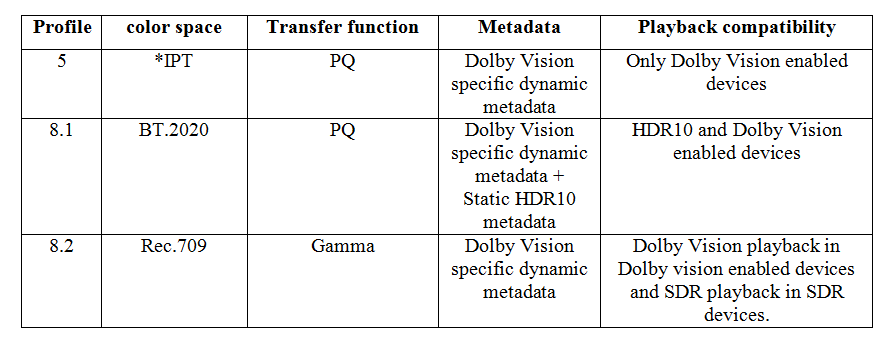
These are the allowed cross-compatibility IDs for Profile 8:
Profile 8.1 uses an HDR10-compatible BL
Profile 8.2 uses an SDR-compatible BL
Profile 8.4 uses an HLG-compatible BL
Is it possible you are conflating Profile with Level?
Profile is the technology used by the encoding. Level is the bandwidth of the stream - dimensions * framerate * bitrate.
Level 06 is common. That can accommodate 4K @ 24fps.
Have you tried mp4muxer with --dvh1flag on your device, @mpiva? I’m curious how it works on non-Apple devices.
Where did you come up with -inter 240? The default is 0.5s; how did you identify that this was helpful? Not questioning it, just curious about your diagnostic process.
is this a MKV current limitation? How is Infuse able to manage dvhe MKV DV 5 correctly? I see perfectly with my iPhone 12 (and it’s not HDR fallback, I see the differences in shadows/lights)
Actually never tested with the --dvh1flag, without it, I never have an issue with the LG playing it (not iphone/ipads). Maybe my sources always have the dvh1 tag. IDK really.
About the interleave, some scene releases as mp4, and some of my own remuxes, played badly on the LGs, having audio skipping, all the time. So my first thought was the buffer of the plex client or the LG player, was too small to accommodate the stream. Started playing with the interleave, and that resolve the issue, That number is totally arbitrary, I just wanted to reduce the interleave, and that number just solved the issue. But again 240, is maybe too big if your remux is multi-audio. Currently, I’m using 120, and so far so good. At least on the LGs.