Are those settings the appropriate settings for roku ultra? Or something I have just to play around with?
Normally I keep the Roku Plex settings with the basics: Original quality on LAN, 4mbps for remote, 4.1 maximum level (I’ve never needed to go above that), direct-stream enabled, and direct-play automatic. Those normally work fine for everything, but it transcodes lossless audio.
At the moment I’m not sure which (if any) changes are necessary. I’ll be curious what @Achilles also finds in testing tonight.
Generally this is the right choice(s) if you’re an out-of-the-box user and just want to play your library without messing with things on the backend.
However, if you have the appropriate playback equipment and don’t want any of the transcoding, given that your streaming device & audio setup can handle the files you have (container, audio & video codecs), then direct play is the way to go, you truly get to experience the file as you have it without any transcoding.
Direct stream is helpful if you equipment can handle the video codecs, but not the audio codecs or vice verse.
Direct Play vs Direct Stream Plex link - HERE
Re. Remote playback - I generally have this set to original and/or max as my server setup has the ability to handle this, and I also share my library with about 12 friends and family members. However, limiting your remote quality can be useful when you know your setup cannot handle transcoding and when your upload speed is low, always worth checking speedtest.net.
Re. 4.1 Max H.264 level is generally the most you need as most files you’ll have won’t go above this. However, I covert 99% of my files into my specifications and there are some files that I’ve uped the H.264 level from 4.0 or 4.1 to 5.0 & 5.1. Generally I do this with my collection items as I want the highest quality video codecs for those specific files, this is about 10% of my library, so for me it’s worth it to tweak the Roku video playback settings to 5.1 vs the recommended 4.0.
This also comes up if your playback device can handle the codecs, but not the container. So if a device can’t handle an MKV (for example), it’ll change the container to MPEG-TS (usually!) and then direct stream both audio and video. I’ve had that come up a few times depending on the device.
1 Like
Agreed, and this is why I generally force direct play on all the items in my library because I know my devices, TV & Audio setup can handle almost anything that I have and will direct play it without a hitch.
I recommend that you test this in order to achieve true direct play on your audio codecs for TrueHD files.
Just tried your exact settings. Here are the results:
- DTS-HD MA: Tautulli shows direct-play of DCA 7.1, but the receiver shows it’s actually only receiving the DTS core.
- TrueHD: Tautulli shows direct play of TrueHD, but the receiver doesn’t get any audio (it’s still on PCM from the Roku).
There’s a chance this is specific to my Roku. It’s definitely the JBL-headphone model, I went back through my e-mail and checked the order to make sure. I have a different Roku Ultra I may be able to try later.
I’m now curious: Does your Vizio sound bar actually have a DTS-MA notification? Is it possible it has actually been playing DTS core this whole time, but there was no way for you to know?
There is a way for me to know, through the Vizio app and to be fair, I don’t calm to be an audio expert but am assuming that with all my settings, and the ability of my soundbar/TV that when Tautulli shows DTS-MA 5.1 is direct playing then it should be able to, right?
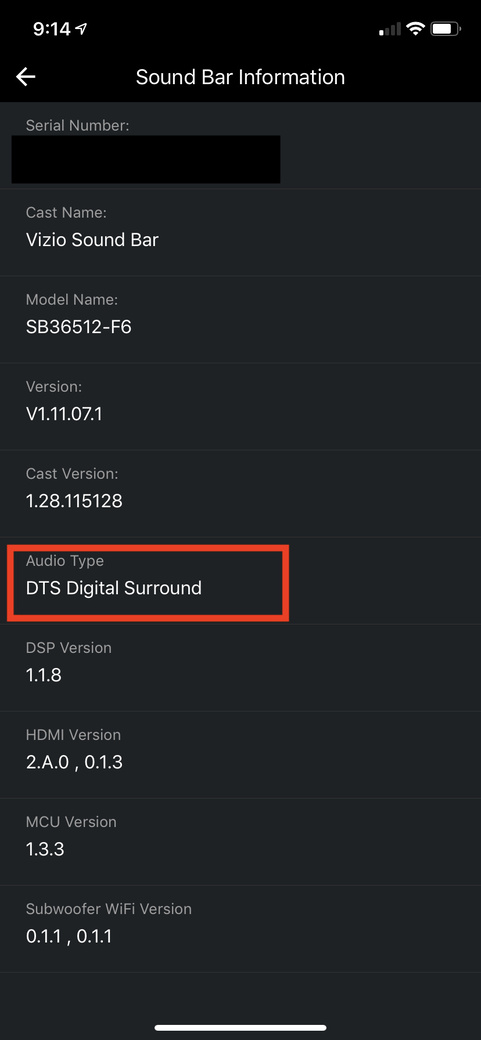
You may be more proficient at this then I am, so here’s my screenshots.
When playing DTS-MA 5.1 file, I get this in Tautulli:

My soundbar shows this:
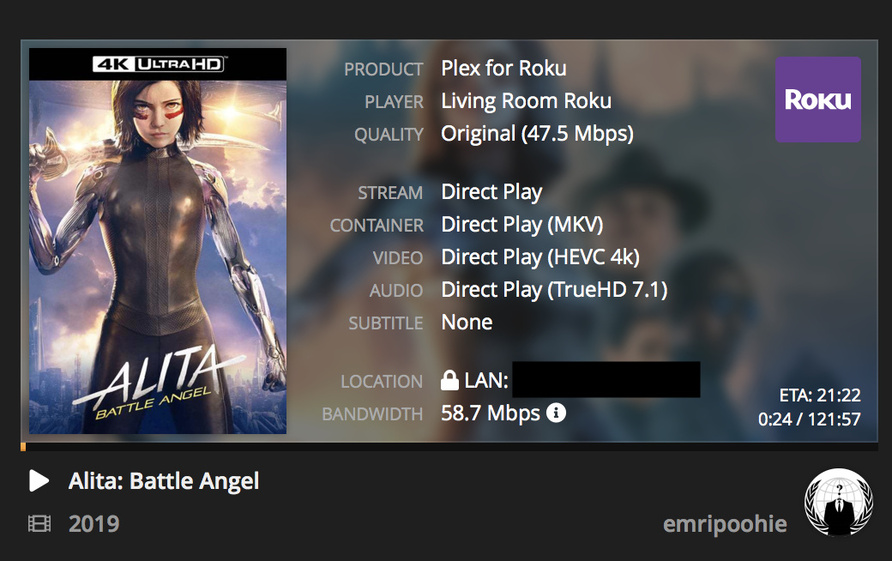
When playing TrueHD 7.1 file, I get this in Tautulli:
My soundbar shows this:
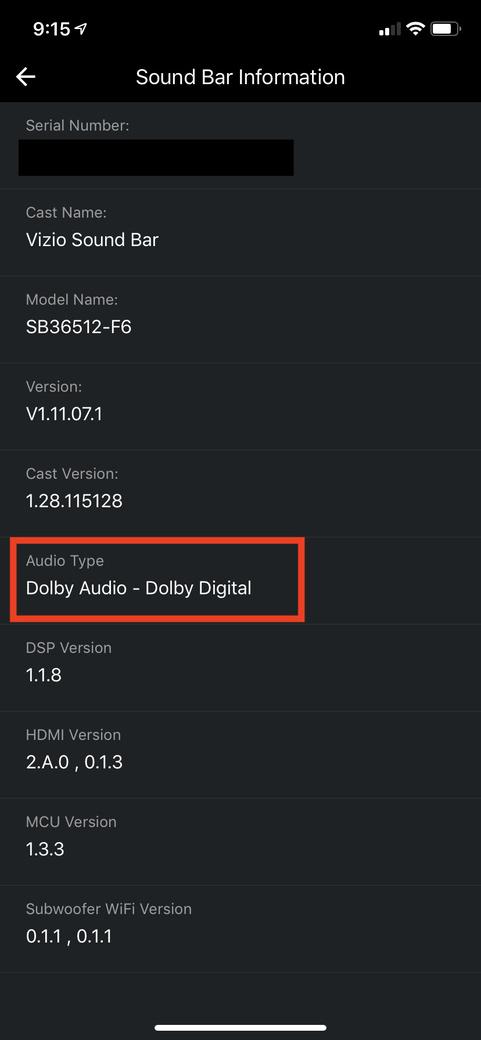
In both cases, it looks like it’s playing the core 5.1 audio track (DTS and Dolby) but not the full HD MA or TrueHD.
It wasn’t until today that I realized Tautulli seems to show “Direct Play DCA-MA” even if it’s only passing core DTS audio over HDMI. I’d never tried forcing direct play before so I hadn’t seen it in action.
I have a feeling that the other reports I’ve run across (like on Emby) are correct: Roku claims the Ultra passes through full MA and TrueHD, but is really just passing core audio.
(I’m being pulled away but can come back in a few)
That is the case right now. Chatting with the devs.
2 Likes
Switched the Roku HDMI connection from TV to directly into the soundbar and still getting the same results via the Vizio App.
Good life lesson, don’t trust all the technology and it’s lies 
2 Likes
This really is a problem though, because it means Roku is falsely advertising their capabilities (or they’re at least not working correctly from within Plex, but the Emby threads make me think the problem is widespread).
1 Like
I ran into same issue.
Install the 32-bit version of 3.4.7.3.
Is there anyway to set the plex server to transcode to ac3 for my playback on a ps4. It transcoded to aac which is not accepted by my sonos sound system and loses the surround sound.
I have the processing power to do a live transcode and would prefer to not have to pre-transcode my movies.
… and completely wasted your time - unless creating files that won’t play is something you wanted to do…:
for H.264 levels above 4.0 do not make one bit of difference, but I encode at 4.1 because most everything that falls off the truck into my Plex libraries is 4.1. My OCD controls that effort - I am not responsible for my uncontrollable actions… lol
1 Like
Not sure what you mean when you say creating files that won’t play??? Clearly mine play just fine at level 5.1, see below:


For you on that particular device/client, perhaps with some fiddling, they very well may direct play. If I wanted to play them on any of my devices I’d need to trick Plex into playing them or they’d transcode.
The point is a Falcon in ‘Rat-Zoom’ mode may be able to detect a difference in 4.0 vs 5.1, but organisms limited to bi-pedal locomotion don’t have the visual acuity necessary to benefit from such ‘improvements’.
No, I dare say as far as Human Beings are concerned the difference you achieve by upping your level to 5.1 can really only be seen on the expensive piece of equipment you might measure the difference on.
Next Year, when Plex wipes out whatever we’re using to watch 8K on to replace it with a Shield - maybe - but not today.
5.1 level has more to do with the HEVC profile standards for 4K Blurays
2 Likes
You’ve lost me and yourself on this post my friend  .
.
I’m not sure where you’re getting that it doesn’t make much of a difference. Everyone has different equipment that can or cannot handle such codecs. It might not be making a difference on your end but it does on mine, specifically around frame rate, info as follows:
H.264 Level 4.0 can handle the following:
- 1,280×720@68.3
- 1,920×1,080@30.1
- 2,048×1,024@30.0
H.264 Level 5.1 can handle the following:
- 1,920×1,080@120.5
- 2,560×1,920@51.2
- 3,840×2,160@31.7
- 4,096×2,048@30.0
- 4,096×2,160@28.5
- 4,096×2,304@26.7
If you don’t even look at anything else above 1,920x1,080p, you’ll notice the frame rate on 4.0 is total of 30.1 vs 5.1 which is 120.5, that is a 300% difference. Add that on top of the max bitrate of 50,000 vs 240,000, then you’re looking at a big difference.
Link for reference - HERE
Eyes might be deceiving but numbers don’t lie 
1 Like
Very well…
Enjoy all that extra quality level 5.1 provides (absolutely none).
May your travels be free of incident…
1 Like
