Why do I see shows that I have watched in the Recently added TV Shows Tab - If I have watched the show I really don’t need a reminder that it was Recently Added - Especially 3 to 5 times.
At least there should be a button to ‘Do not show this item Again’ There are 50 shows - most of them show up multiple times. And as I said above ‘If I have watched the show I really don’t need a reminder that it was Recently Added’
Also the Same Show shouldn’t be shown separately - they should all be under I title!
Recently Added is exactly that. It only looks at when things were added, it doesn’t care about watched status. It will group episodes together if they are added within 48 hours (I think) of each other. Otherwise, it will list each episode.
If Recently Added is not useful to you because you watched it before you got it can always remove it from Home screen.
that should only be an issue if it gets matched with a different agent. Folks often forget to refresh all metadata when changing library agent to update old files metadata . so new file is matched with new agent with but old was matched with old
The most recent stuff is first. Different folks can have different opinions on what is “recent”. We used to limit it but since those rows are paged ( not loading the entire thing at once) there. Also prevents the row from being empty if things were not added since X number of date units .
Recently added is useful to me in most cases and I’m not interested in removing it
I can see not wanting to remove things that you’ve watched because maybe somebody else in the house or someone you’re sharing a server with hasn’t, but you should have that option too.
I just want the option to manually remove the occasional series or movie that pops up I don’t want there just like you can with continue watching. There is only 6 spots visible in the recently added row on my TV. I don’t want it filled up with things that have been on my server for years just because I changed a files format or location.
Am I misunderstanding what this does?
In any case, I just refreshed the metadata again manually for both libraries with the same agent as a test. Copied a show, pasted it in the folder for the new library and it immediately popped up in the recently added.
Ironically it remembers the watched episodes of that series. How does it know I watched 3 episodes of this show 6 months ago if it was “recently added” 10 minutes ago? It knows you watched 3 episodes but it also removes it from the continue watching row
You then have to go in to the last episode watched, mark it as unplayed, then played again to get it back in the continue watching row.
This same migration method does work “sometimes” and I’m not sure why. This is a hassle no matter whether it’s my error or not.
If removing the recently added row completely is a suggestion, this must be harder to accomplish from a dev standpoint than I would expect.
Because your play history remains even if you delete files. play history tracks movies like Batman Begins, not which unique file you have of that movie
So the file was in another library before? Recently added is recent to an individual library afaik, not recent to the server…
Yes the show was in one library (SD Content) and now that I’m upgrading it’s quality it’s being put in the regular HD library. This also happens for me in my New TV/New Movies libraries when I move them to my main TV/Movie libraries
I’ve recently eliminated the New TV section and disabled the regular movie library from the home screen recently added for this exact reason. Now if I have a movie from 2015 I’d like in the recently added it won’t display on the home page
If you’re saying this isn’t designed to work for a transfer from one library to another it just means the argument for being able to manually remove things from recently added is probably a good idea
I recently separated my stand-up comedy tv specials and docuseries from my regular docuseries libraries because as I add more media it justifies its own library. It didn’t make much sense to me to have a George Carlin docuseries next to a serial killer docuseries.
My recently added home row is now 30 shows deep of shows that have been on my server for years.
I realize some people make collections and use custom filters for these types of things but the people I share with are elderly and I need to make it as simple to find things as possible. If they can’t see it, it doesn’t exist.
I have to imagine this exact scenario but with different specifics for a lot of people who have highly personalized servers
When most recent shows items several years old, its not recent. It can’t be that hard to at least give us an option to limit “what is recent” like we can with “on deck”.
Recently Added in the order they ere added to a library period. not when they were watch or anything else. All you would be doing is cutting off the end of the row which you could just not scroll that far to.
Married with Children Season 5 doesn’t even show on my download list which goes back 8+ months. I don’t consider 1997 recent that’s 25 years.
I don’t consider that recent? Originally broadcast from April 5, 1987, to June 9, 1997 I don’t consider 1997 recent that’s 25 years. I realize some people might find it useful, but really they need to see EACH separate episode that the search engine found listed separately?
If you go to “TV Shows” ‘Start Watching’ it shows some of my shows with 196 episodes to watch - Could you imagine if it listed EACH episode individually ?
The row is recently added to the library, not when the show or movie was created. If I buy an old painting and bring it home and put it in my living room it is a recent addition to my living room.
Start watching is shows you have not watched yet and to hit play on it it starts with episode 1. Like I have not seen any of The Office and it shows up in the row because I may want to start watching it one day.
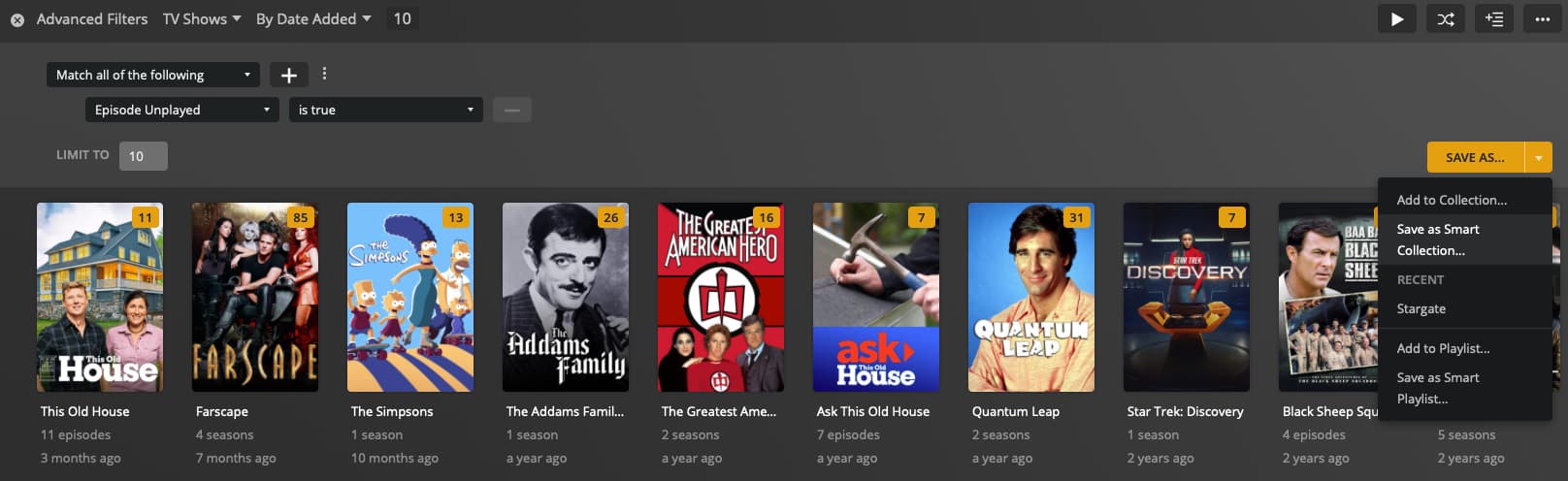
Note that Advanced filters is chosen, showing TV Shows, sorted By Date Added (ascending). The filter itself is configured to only display shows with unplayed episodes, and it is limited to 10 total. Any of that can be changed.
You can then set that to be visible on your Home screen:
Since this is a smart collection, as you view episodes in the show and its unplayed episode count drops to zero, the show will be removed from the hub.
There are other ways you could create the collection, for example to show the individual episodes. Or with different sorting (by release date, for example). But the newly-created collection, and the hub derived from it, will be dynamic; once the criteria for an item are no longer met, it will drop off.
Thanks Again for the Info - That seems to be exactly what I was wanting and it is REALLY powerful. I’m sure I will find out more ways to finesse my searches, but this is great!! Thanks Again !
Could it not be possible to add the funktion “Remove from Recently added” in the Recently added section to remove them from there?
Added under right-click on the three vertical dots for example.
Note: This already exists in the “Keep Watching” section, so the function is not impossible to implement.