My daughter is streaming content from my PMS to her streaming device remotely. I have copied all MKV wrappers to MP4, so the remote streaming would be more consistent. I did not expect to see the following when I checked on a stream she was watching in real time.
How exactly did you do that?
Completely unnecessary - probably - but we’ll see.
Let’s see a MediaInfo report for the file - like this one:
General
Unique ID                                : 168575318066824706111240669651971576466 (0x7ED26CE0213D8892BC878EDF0B979292)
Complete name                            : G:\TV - Sci-Fi\Tales From the Loop\Season 01\Tales From the Loop - S01E01 - Loop.mkv
Format                                   : Matroska
Format version                           : Version 4
File size                                : 558 MiB
Duration                                 : 54 min 19 s
Overall bit rate                         : 1 436 kb/s
Encoded date                             : UTC 2020-04-03 15:11:49
Writing application                      : Lavf58.26.100
Writing library                          : Lavf58.26.100
ErrorDetectionType                       : Per level 1

Video
ID                                       : 1
Format                                   : AVC
Format/Info                              : Advanced Video Codec
Format profile                           : High@L4.1
Format settings                          : CABAC / 4 Ref Frames
Format settings, CABAC                   : Yes
Format settings, Reference frames        : 4 frames
Codec ID                                 : V_MPEG4/ISO/AVC
Duration                                 : 54 min 19 s
Bit rate                                 : 1 050 kb/s
Width                                    : 1 280 pixels
Height                                   : 720 pixels
Display aspect ratio                     : 16:9
Frame rate mode                          : Variable
Color space                              : YUV
Chroma subsampling                       : 4:2:0
Bit depth                                : 8 bits
Scan type                                : Progressive
Stream size                              : 398 MiB (71%)
Writing library                          : x264 core 157 r2935 545de2f
Encoding settings                        : cabac=1 / ref=3 / deblock=1:0:0 / analyse=0x3:0x113 / me=hex / subme=7 / psy=1 / psy_rd=1.00:0.00 / mixed_ref=1 / me_range=16 / chroma_me=1 / trellis=1 / 8x8dct=1 / cqm=0 / deadzone=21,11 / fast_pskip=1 / chroma_qp_offset=-2 / threads=12 / lookahead_threads=2 / sliced_threads=0 / nr=0 / decimate=1 / interlaced=0 / bluray_compat=0 / constrained_intra=0 / bframes=3 / b_pyramid=2 / b_adapt=1 / b_bias=0 / direct=1 / weightb=1 / open_gop=0 / weightp=2 / keyint=240 / keyint_min=24 / scenecut=40 / intra_refresh=0 / rc_lookahead=40 / rc=2pass / mbtree=1 / bitrate=1050 / ratetol=1.0 / qcomp=0.60 / qpmin=0 / qpmax=69 / qpstep=4 / cplxblur=20.0 / qblur=0.5 / vbv_maxrate=62500 / vbv_bufsize=78125 / nal_hrd=none / filler=0 / ip_ratio=1.40 / aq=1:1.00
Language                                 : English
Default                                  : Yes
Forced                                   : No
Color range                              : Limited
Color primaries                          : BT.709
Transfer characteristics                 : BT.709
Matrix coefficients                      : BT.709

Audio
ID                                       : 2
Format                                   : AC-3
Format/Info                              : Audio Coding 3
Commercial name                          : Dolby Digital
Codec ID                                 : A_AC3
Duration                                 : 54 min 19 s
Bit rate mode                            : Constant
Bit rate                                 : 384 kb/s
Channel(s)                               : 6 channels
Channel layout                           : L R C LFE Ls Rs
Sampling rate                            : 48.0 kHz
Frame rate                               : 31.250 FPS (1536 SPF)
Bit depth                                : 16 bits
Compression mode                         : Lossy
Stream size                              : 149 MiB (27%)
Title                                    : English
Writing library                          : Lavc58.46.100 ac3_fixed
Language                                 : English
Service kind                             : Complete Main
Default                                  : Yes
Forced                                   : No

Text
ID                                       : 3
Format                                   : UTF-8
Codec ID                                 : S_TEXT/UTF8
Codec ID/Info                            : UTF-8 Plain Text
Duration                                 : 50 min 48 s
Language                                 : English
Default                                  : No
Forced                                   : No
I use VideoProc to convert from MKV to MP4, due to the fact that the streaming device my daughter uses does not support Direct Play of MKV.
General
Complete name : Z:\Plex Files\TV Shows\How to Get Away with Murder\Season 06\How to Get Away with Murder - S06E07 - I_m the Murderer.mp4
Format : MPEG-4
Format profile : Base Media
Codec ID : isom (isom/iso2/avc1/mp41)
File size : 2.38 GiB
Duration : 42 min 9 s
Overall bit rate mode : Constant
Overall bit rate : 8 097 kb/s
Movie name : How to Get Away with Murder - S06E07 - I’m the Murderer
Performer : VideoProc
Genre : Video
Writing application : Lavf58.12.100
Comment : How to Get Away with Murder - S06E07 - I’m the Murderer
Video
ID : 1
Format : AVC
Format/Info : Advanced Video Codec
Format profile : High@L4
Format settings : CABAC / 4 Ref Frames
Format settings, CABAC : Yes
Format settings, Reference frames : 4 frames
Codec ID : avc1
Codec ID/Info : Advanced Video Coding
Duration : 42 min 9 s
Bit rate mode : Constant
Bit rate : 7 962 kb/s
Nominal bit rate : 10 000 kb/s
Width : 1 920 pixels
Height : 1 080 pixels
Display aspect ratio : 16:9
Frame rate mode : Variable
Frame rate : 23.976 (24000/1001) FPS
Minimum frame rate : 23.810 FPS
Maximum frame rate : 24.390 FPS
Color space : YUV
Chroma subsampling : 4:2:0
Bit depth : 8 bits
Scan type : Progressive
Bits/(Pixel*Frame) : 0.160
Stream size : 2.34 GiB (98%)
Language : English
Color range : Limited
Color primaries : BT.709
Transfer characteristics : BT.709
Matrix coefficients : BT.709
Codec configuration box : avcC
Audio
ID : 2
Format : AAC LC
Format/Info : Advanced Audio Codec Low Complexity
Codec ID : mp4a-40-2
Duration : 42 min 9 s
Duration_LastFrame : -3 ms
Bit rate mode : Constant
Bit rate : 128 kb/s
Channel(s) : 2 channels
Channel layout : L R
Sampling rate : 44.1 kHz
Frame rate : 43.066 FPS (1024 SPF)
Compression mode : Lossy
Stream size : 38.6 MiB (2%)
Language : English
Default : Yes
Alternate group : 1
I wonder if I need to tweak the settings on the streaming device side??
Yea, that’s probably OK - I mean you can play it, right?
It’s her Remote Quality setting most likely. Let’s find out.
Have her change it to 4K @ 12Mbps <—yes, it’s dam confusing.
I am going to talk with her and get it changed…she should not have to transcode to SD quality. She has plenty of bandwidth!
That’s what we’re shooting for.
Also… as I check mine - …
In the Quality Area:
Automatically Adjust Quality - disabled - for now at least.
Limit Cellular Data - well, is she on WiFi? It won’t matter, Otherwise it will.
Remote Streaming: 12Mbps, 1080p (Medium) ‘my foot’ - but set it there.
Home Streaming - Max - in case she comes to visit - or has a server of her own.
Music Quality - Original
Use Low Quality on Cellular: Well? We know what to do, right?
That should change things.
Let us know how.
Yes she is on WiFi. I had her make a few tweaks like:
Set Reduce Motion to On
Set Remote Streaming to 12 meg
Adjust Automatically to On
Refresh Rate Switching to On
Resolution Switching to On
It made a bit of difference but still transcoding. Please see new attached.

Some additional information is that this is NOT a Fire streaming device. This is a smart TV with a Plex app!
Automatically Adjust Quality - OFF
Reduce Motion - has no effect on a remote stream - that’s cosmetic for the menus.
Refresh Rate Switching - OFF
Resolution Switching - OFF
Ur killin youself, Man.
Don’t jump ahead.
Ok lol…
Well, that’s different.
Make those changes above and report back.
Ok here it is after shutting down the settings I jumped too far with!

Is this the best I can expect from a remote stream?
Dunno… let’s continue.
It would be easy for 8Mbps to peak past 12Mbps.
Change Remote Quality to - higher - the next notch.
In her app - we’re gonna see if she has:
Display Information - On
Enable New Player - Off
If so, make those happen, play the file and have her bring up the OSD and read what it says about the transcode. What does it say?
Also - make sure YOU aren’t limiting the Remote Stream.
Server/Settings/Remote Access.
Remove any limits - for now.
Estimate Correctly your upload bandwidth and enter that.
I edited your images cover up your WAN address. Don’t share that publicly if you can avoid it.
1 Like
Sorry
@BigWheel - savin’ bacon in hit and runs…
(the caped crusader - and - gone… whoosh)

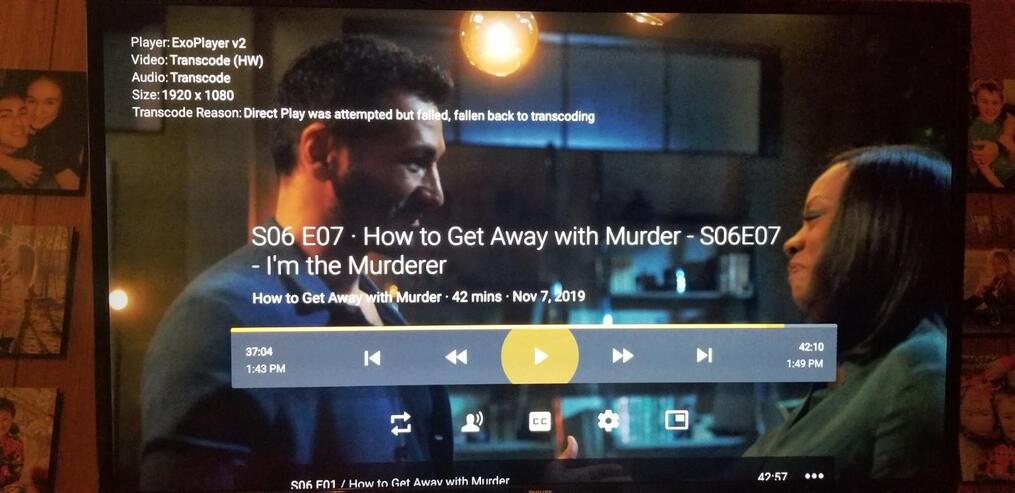
Did you bump up the quality a notch higher than 12?
Are you limiting quality?
What is your upload bandwidth again?
I am having her bump up the remote streaming.
So in looking at my PMS I have the following set. Looks like I am limiting to 8 meg?
this picture here says that the tv does not like MP4, its remuxing it back into mkv.
the video is probably being transcoded either due to the bandwidth limit at the client (I set my remote to quality to max).
or if you have a server upload limit set, then that can also cause transcoding if the video requires more than the upload (ie 30mbs bluray stuffed through 10 meg upload)
edit, yes your upload looks good, but that remote stream bitrate will transcode any video that exceeds the 8meg/1080 restriction.
if you want direct play, set that to original (no limit)
