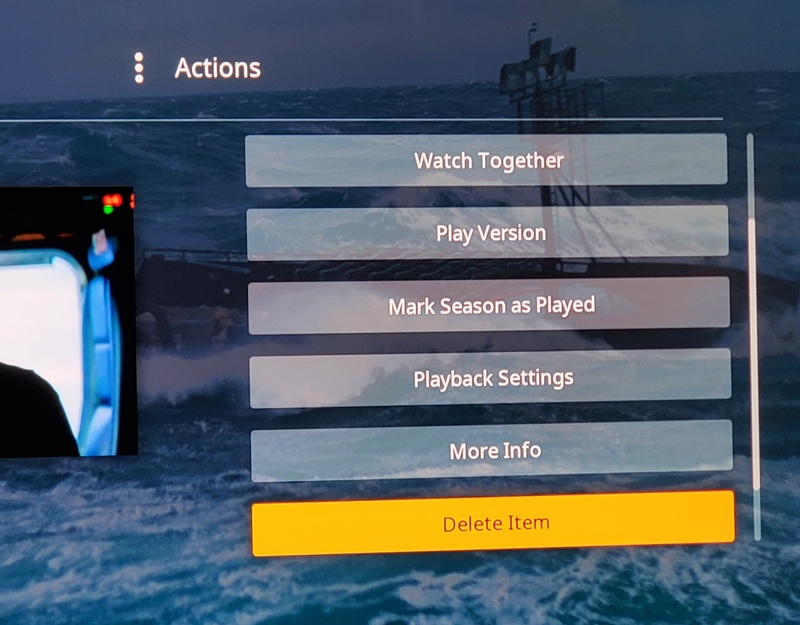
Wouldn’t you agree deleting a show is the most used action in Plex?
You guys rock this product. May I rant for a moment?
/rant
Why is it that as the UI keeps changing, usability test cases are not included to ensure each new feature/bugfix doesn’t change the UI navigation EVERY DAMN TIME.
Watch together.. Cute. Useless to me. Least used feature, but it is the first action available? Why? Because adding new code it is easy to add to the top? You think users might miss the new feature so shove it in front? Come on.
Also, please add a delete show, season, and make deleting a single episode consistent so I don’t have to relearn this every feature/bug update, AND please realize the number of ‘down’ clicks changes depending on where you are in ui and various other variables, so I’ve seen it be first, second, fourth, fifth, sixth even I think. The option depends on various things.. Such as if I have two downloaded versions of a show, now version is at the top, and delete gets pushed down lower. It is just frustrating it keeps changing, no consistency. As I delete a series, I have to look at each press to get it right. For someone disabled, old, or young, can you make it consistent please?
I basically never delete anything from within Plex. The occasions when I delete something are usually from the server’s file manger because I decided to delete an an entire show which I likely won’t watch again.
I use deletion once a month when I download horrible movies for my girlfriend and then I have no reason to leave it there with my precious collections of 70-90’s.
But I have to agree that usability should be taken more seriously. Enabling subtitles for example must be the most used feature after Play, but still, you need to navigate between menus, pretty bad.
Ok, for everyone who ISN’T using a google business account ahem with a seedbox, or a local SAN you can skip this thread. I am talking about TV SHOWS, not movies.
I am NOT talking the scene, I am talking about the majority of the userbase who use the server, have limited space, and once a show is watched, um, unless you are trading it with others, selling viewing etc, why would you keep it when storage costs so much.
So I am the crazy 1%er who actually deletes content. Huh, who would have known I was so lawless.
My thread IS NOT about feature is used the most, but why all new features end up being listed first and WATCH TOGETHER isn’t it, RIGHT??
and why wouldn’t you want the same “up down up down left right left right b a start” so that when you want GOD mode, you can just use muscle memory.
Perhaps I am the only one with 40TB of storage who runs out and is just waiting for Black Friday? i return you to the intent of the thread…
good point, and for movies sure. For TV for a small family with limited storage, you are on the side of keeping watch together and the next new feature to be listed first ?
Ok, since you disagree, what order do you think the above image should have each item? I dont see a sinlge item of use there except delete. and trust me, my whole point is it is IMPOSSIBLE to delete a TV show with 100 episodes and 5 seasons.
“personally i would remove any delete option from the clients, and keep it only in the server admin.” agreed with the caveat that I can enable/disable client side delete. oh wait, it does that now, right?
To start, you’ll have to make sure that the ability to delete media is enabled for your Plex Media Server. This an advanced option is found under Settings > Server > Library.
How would you order the items in the above photograph?
Seems everyone has a laser focus on my wanting "delete’ to be at the top, and yes with a confirmation next. Some seem to be focused on that the Delete should not be there - I didn’t put it there, the Devs did. I use it and I am guessing others do too.
I need it, and like trying to PLAY an item, I would not like that to change with every update. If you don’t use the feature, then let it go? If you want to add your two cents to the order of options in the screenshot above, then great, please do. Otherwise, your opinion has been made perfectly clear, thank you.
The question is this: the order of options above, and if consistency is important between updates, features, bug fixes.
Super horrible experience if your DVR library is different than your permanent resting area and you’re actively recording a show you have past seasons of…
Deletions will reach across libraries for already watched episodes.
The only items I have an auto-delete turned on for are daily shows like late night talk shows and news. Those are set to only keep a certain number of episodes.
“Watch Together” is probably not the most used feature, agreed. I’d put it between “Mark * as played” and “Playback Settings” or after that… Otherwise I think that current order of actions is good as-is. I’d just set auto delete if I was deleting stuff so often.
My biggest gripe is sometimes it will be the third option, other times it is forth, other times other… it drives me nuts when trying to delete multiple episodes.
I think the most logical place to put it is last in the list. Unless the list scrolls around or closes, that would just let you hold the down arrow until it stops, then hit enter. Is there currently something below “delete” now? I can’t tell from the original screen shot.
I’m a huge fan of consistency. Items on the screen or in menus should be assigned a rank, and should always appear in “position X” across all media types.