Server Version#: 1.18.2.2029
Player Version#: any
Plex Media Server Logs_2019-11-18_20-15-08.zip (1.6 MB)
Video:
Server Version#: 1.18.2.2029
Player Version#: any
Plex Media Server Logs_2019-11-18_20-15-08.zip (1.6 MB)
Video:
Your video isn’t really helpful.
You are showing a stream that is direct playing and then showing the task manager and the (I’m guessing console from the settings page). However, that console page is going to constantly be updating with various entries into the log file it outputs from.
You also have 2 other streams that from the video we can’t see if they are transcoding, but if they are, that would account for why your system is transcoding.
Plex doesn’t just transcode the whole file, it does it in stages. It will transcode for x amount of time and then wait for so long before doing more. There is a setting under the Transcoder section of the settings page where that can be changed.
-Shark2k
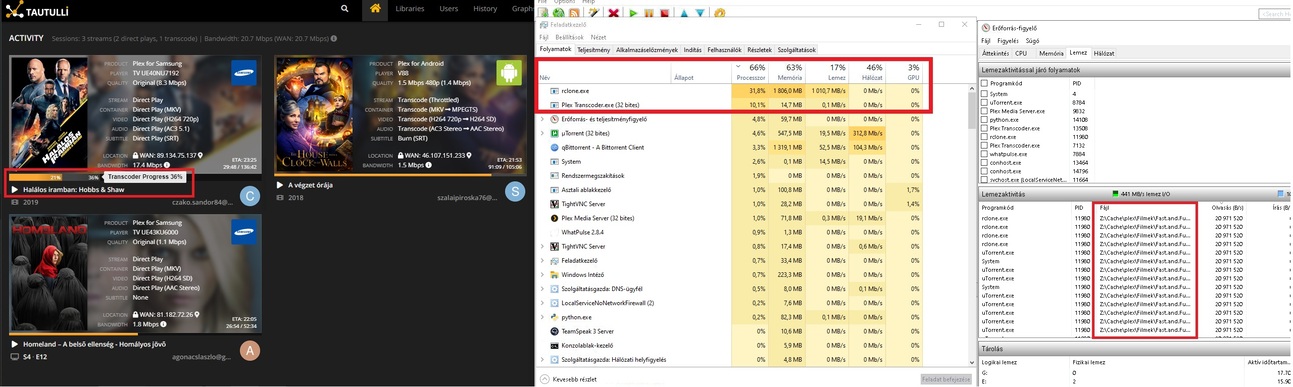
rclone has nothing to do with Plex.
uTorrent has nothing to do with Plex.
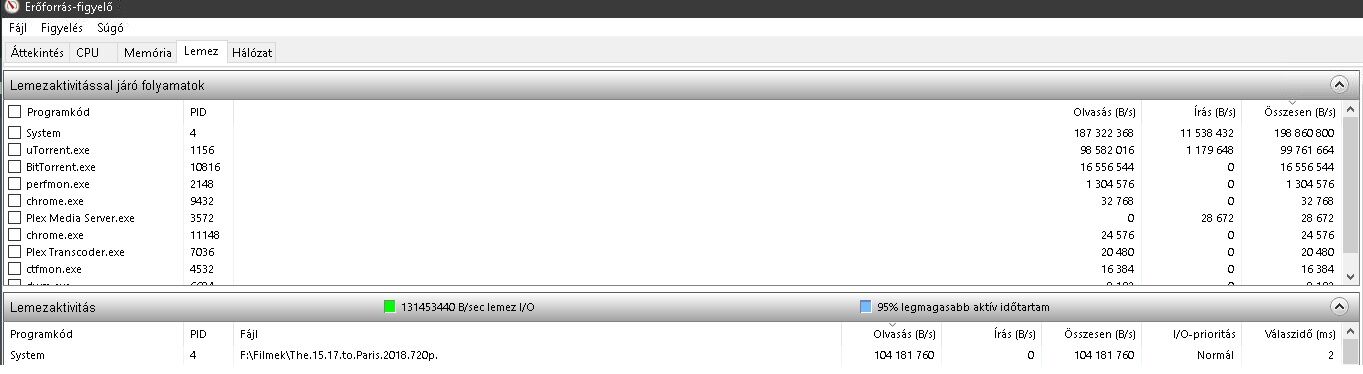
Maybe you made the mistake to download directly into a folder which is being watched by Plex Server?
You must never do this. Always download into a temporary location, which is outside of any folder you may have connected to a Plex library.
Only after the download is finished, you can let the file copy over into a Plex media folder.
I download in qbittorrent -> 1. SSD (500gb) (temporary) -> copy hdd (seed) -> copy gdrive -> rclone (when play movie) cache another 2. ssd (120GB) -> psm server transcode folder 3. ssd (250gb)
Core i5 9500T
3x3TB HDD + 8TB HDD <- all only seed
250GB OS SSD, samsung evo, <- only run windows, programs, plex media server
500GB SSD temporary download folder qbittorrent
Gdrive + rclone + cache (120GB SSD)
When (before i use rclone) i use hdd to plex stream, it was the same sometimes, any movie, any friends, any client
all movie 720p x264 mkv
text.txt (7.5 KB)
New log files
Plex Transcoder Statistics.1.log (8.7 KB) Plex Transcoder Statistics.2.log (8.8 KB) Plex Transcoder Statistics.log (8.7 KB) Plex Transcoder Statistics.log (8.7 KB)
Those are the wrong logs. We need the Plex Media Server log files. The ones you uploaded are for the transcoder and tell you what it’s doing, not why.
Also, please do not provide the screenshots from Tautulli. Provide the info from Plex’s Dashboard.
For Hobbs and Shaw PMS is transcoding the subttile so that is correct. I don’t see the other 2 videos in your logs so I’m not sure what’s going on. From your image it looks to be doing the same for Homeland. The House with the Clock appears like a quality restriction which will force a full transcode. Everything looks fine.
Subtitle wrong in the mkv file?
Not wrong, but the Samsung app cannot direct play SRT subtitles so they have to be converted.
the dashboard is great, but you know what would really help everyone, including support…
if the dashboard provided an explanation or details on what is causing a particular video to transcode.
If you want to save display text, put it in a (?) mouseover text
video > transcoding due to audio stream not supported and subtitles are enabled
audio > trancoding due to audio stream not supported by device
subtitles > transcoding due to SRT subtitles not supported by device
but why again and again re transcode in one playtime?
plex transcode on the fly.
it does not save the transcode for other users.
I’m not sure what that means?
The transcoder does not convert everything at once. It only works on the part that it needs at the time. So it comes on and off, over and over as you play your movie. This is so that the transcode process does not take up your entire CPU so it can do other things.
No-no
See transcoder progress
91%->50%->90%->50%
https://photos.app.goo.gl/CkzKj85HVNcG6en37
(15 sec)
https://photos.app.goo.gl/sNZifjt2uyDkuRR6A
And when transcoder progress restart in tautulli, hdd usage 100% (400+MB/s lol)
PSM transcoder 400MB/s?
or
hdd stream, hdd usage 90MB/s?
sry my english, im from hungary
This is normal transcode
that is RCLONE using the disk
look at your picture the thread say RCLONE for disk use
That’s correct. As I said, the transcoder does not work all at once. It come on, cpu goes up, it pauses, cpu goes down. It repeats this for the entire movie.
Stop mentioning Tautulli. I don’t know what it is looking at so I can’t say if it is correct or not.
When the transcoder is working, it saves the information temporarily onto the hard drive. This will go as fast as your drive can handle. You are also showing 2 different things in your videos. The first video showing the cpu usage only shows 1 stream, so the cpu usage is correct as it comes on and off. Your second video for the hdd usage has 3 videos playing. One of them is a full transcode, not just the subtitle. So you have 3 streams accessing your hard drive at the same time. This can definitely keep your hard drive busy a lot more than if you just had 1 stream. Also, from your first screenshot you posted above, you have 2 bittorrent clients running that are taking up 400 MB/s. From your video, I can’t tell if these are still running so I can’t tell if PMS is causing that.