Server Version#: 1.40.1.8227
Player Version#: Plex-for-Windows 1.92.1.140-8e1f68f5
This has been bugging me for a while, but I finally got around to paying enough attention to when it happens.
Issue: When I move the non-full-screened Plex client player around on my desktop, the tooltips that normally pops up when you hover over a button becomes offset from the button itself. It appears that when you move the window, the player has to adjust the tooltip popup location to reflect the new location of the button in the window. However, after the window is moved, the popup is no longer aligned with the button, and can even disappear entirely depending on the direction the window has been moved and the distance moved.
Reproduction:
- Use the latest Plex-for-Windows client (issue has been around for probably half a year by this point).
- Hover over any button in the video player (Play, FF, etc). Note location of popup relative to button.
- Move window horizontally in either direction.
- Hover the mouse over the same button, notice that the popup is no longer on top of the button.
- Distance the popup is offset from its button by is the EXACT SAME distance the window has been moved on the desktop. This means that the popup location has moved twice as far pixel-wise from its original location, when it should only have moved once as far.


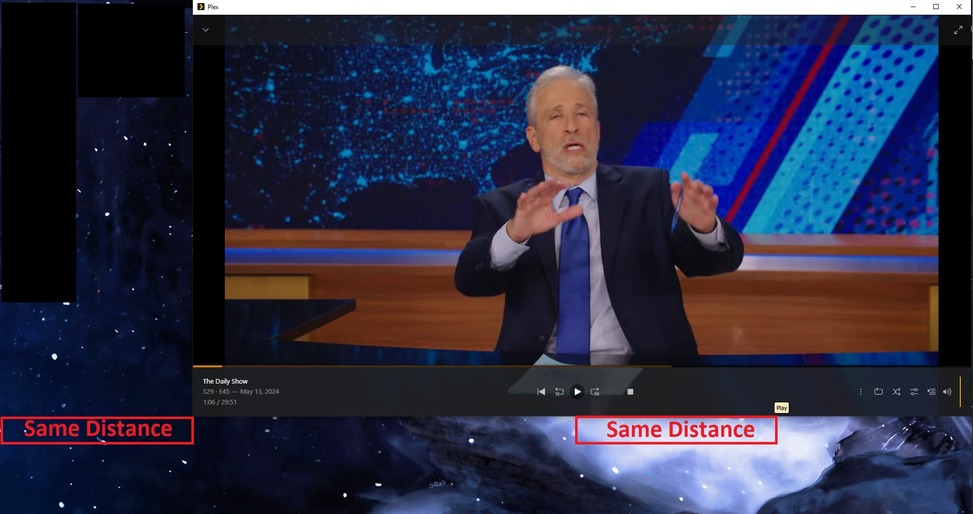
Temporary fix:
Resize window slightly. Even by a pixel, this causes the player to reset all popup location offsets so they are perfectly aligned with the button they represent.
Speculation:
Two possible reasons for the issue:
- The player keeps track of the amount of pixels that the window has moved, and saves the offset. Additionally, the buttons ALSO keep track of how far they have moved, and save this. Both values are added together to determine the new location of the tooltip, which results in double the distance required for the tooltip location.
- Or, the window keeps track of the number of pixels moved since last adjustment, and saves this information. However, when a button is hovered and the popup is generated, the button already knows its current location and sends that to the popup code, and the code then uses the window offset value (which is wrong, since the button already used this value).
Either way, some look at the player code to determine why this value is doubled it required.
This has further issues, in that any window that is changed from windowed-mode to full-screen-mode will have no tooltips. Because the player button controls jump around wildly when you swap from one mode to another, the final location of the buttons at the bottom of the screen mean the tooltip will now have an offset well below the bottom of the screen, and will not appear.
