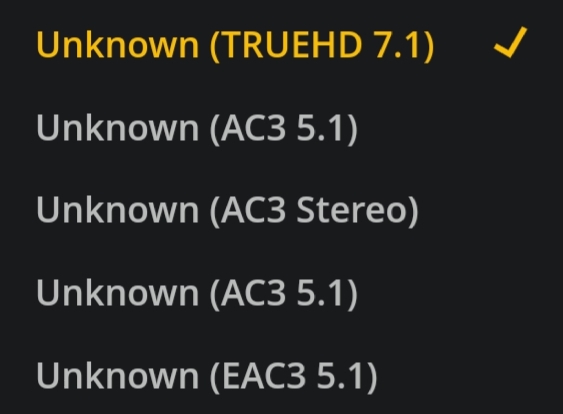
Hello
I recognized this issue also on my ROKU Player - it only Plays the english track. Any idea to solve this? On other Player (e.g. VLC) it Plays the german audio track.
Thx
Roger
I’m having this issue with syncing my anime TV shows to my iPad too. It’s syncing the English commentary track, which I believe is track 3, and I need to to sync the Japanese audio track, which is track 2. I select the correct track before I sync, but it still syncs the wrong track. The subtitle track synced just fine. I don’t want my default for my Plex server to be set to Japanese audio though, because of normal TV Shows and Movies. If I could change the defaults for just my anime TV Shows and Movies folders that would be perfect! Is it possible to be able to sync every track from a certain show or movie so that you can easily switch between tracks still?
Having exactly the same issue here on the WebOS version on LG TV.
Playing Crouching Tiger UHD with 4 audio tracks (in this order):
Mandarin TrueHD 7.1
Mandarin AC3 5.1
English Directors commentary 1 AC3 2.0
English Commentary 2 AC3 2.0
To avoid transcoding I select track 2 (Mandarin AC3), Subtitles English (text format titles).
The Movie is direct playing, with subtitles and states that track 2, Mandarin AC3 is selected but it plays audio track 3, the first English Commentary! There seems no way for me to select the Mandarin language unless I leave it to play the TrueHD track one - which then transcodes and buffers terribly due to it streaming from a NAS which has low CPU power.
Have you found any workarounds? I’m thinking of just hand breaking the affected movies and removing all other audio tracks. It will take me a week to do lossless X265 but it would be worth it.
This is still an issue in 2019. Trying to play avangers end game on my Samsung TV. I select TrueHD 7.1 audio, it shows as playing 7.1, but its playing the acc 3.0 narrator track.
Works fine on my phone and PC, just will not play on my TV or in my theater.
If you use handbrake, you would have to do direct stream copy. Far simpler to do it in MKVToolnix and faster too. AFAIK there are no fixes only to select the different track until you hear the track you want. No need to remux them.
EG on one of mine I have 7.1 THD then 5.1 AC3 and AC2 commentary. If I select track 2 (5.1 ac3) it plays the commentary. But if I select the commentary track it plays the AC3 5.1.
Plex is simply getting the tracks mixed up. I have only noticed this if:
the first track is TrueHD and
there are at least 3 audio tracks in total.
I have not had this issue if the first track is DTS HD - not to say it doesn’t happen with these but I’ve not noticed it on my movies (but I always play the DTS HD track as my TV supports it extracting core, It does not support THD).
I X265 almost all my content. It takes about 6 hours to do 50min 1080p TV show episode. Brings the size from 6-10GB/ep to 1-1.8GB/ep without any loss of quality(99.999% pixel for pixel identical). I keep a ton of 4k HDR content and most of it is not X265’d yet. I have been keeping all my 4k HDR tv shows and content “raw”.
The movie I am having problems with is has TrueHD 8 as the main audio track. It plays fine on everything but my TV, it claims its playing the TrueHD track but it is the narrator track.
Re-encoding will always lose quality, both H264/X264 & x265 are lossy compressions. Whether you notice it is another matter and very subjective. Though, I was replying to whether changing to x265 would solve your audio selection problem - it won’t. I still have the problem on all my x265 4K mkv files with THD on track 1 and 2 other tracks. I was simply suggesting to try MKVToolnix to remux the video and only the audio streams you want. Will take only a few minutes to do and test, no re-encoding done.
I was talking about removing all other audio tracks and encoding it.
Also it’s not re-encoding I’m using remuxes X265 is lossless with the right settings. In fact they even state in their official papers that you can reduce file size by more then 50% with zero losses. You can compress many things with absolutely no data loss. You are basically blending frames together, you you get rid of duplicated pixels across frames. I have done incredible amounts of study on the subject.
I have also tested it. They are indeed identical, I found the sweet spot at just under identical though. I lose like 10 pixels per million for a 80% reduction in fire size.