X-Plex-Device Invalid Value - Raspberry Pi 4

Server Version#: 1.41.3.9314

I’ve been having quite a few permissions issue that I have been trying to resolve which has prevented my local metadata from being used by Plex. I believe I have now resolved most of my issues, but I am still seeing a repeating error when refreshing my metadata. It looks like every time an item is refreshed, this error is being added to the logs:

[MetadataAgent/tv.plex.agents.series] [HttpHeader] invalid ‘X-Plex-Device’ header value (Raspberry Pi 4 Model B Rev 1.4)

This occurs with both the Movie and TV Scanners, I’m not sure what impact it has. I have been unable to find a way to change the device name, as this does not match the friendly server name or hostname.

Does anyone know what I can do to prevent this error from occuring?

I see the same on my rpi4 and also have music metadata issues.

I’ve also noticed this same error is being raised while watching content by a different function.

[ViewStateSync] [HttpHeader] invalid ‘X-Plex-Device’ header value (Raspberry Pi 4 Model B Rev 1.4)

and when connecting to the webclient.

[MediaProviderManager] [HttpHeader] invalid ‘X-Plex-Device’ header value (Raspberry Pi 4 Model B Rev 1.4)

I’m still not sure what impact it has.

is it a WARN prefix or ERROR?

Error in the color red

That sounds like you are using the web console. Can you grab a copy of your server logs ?

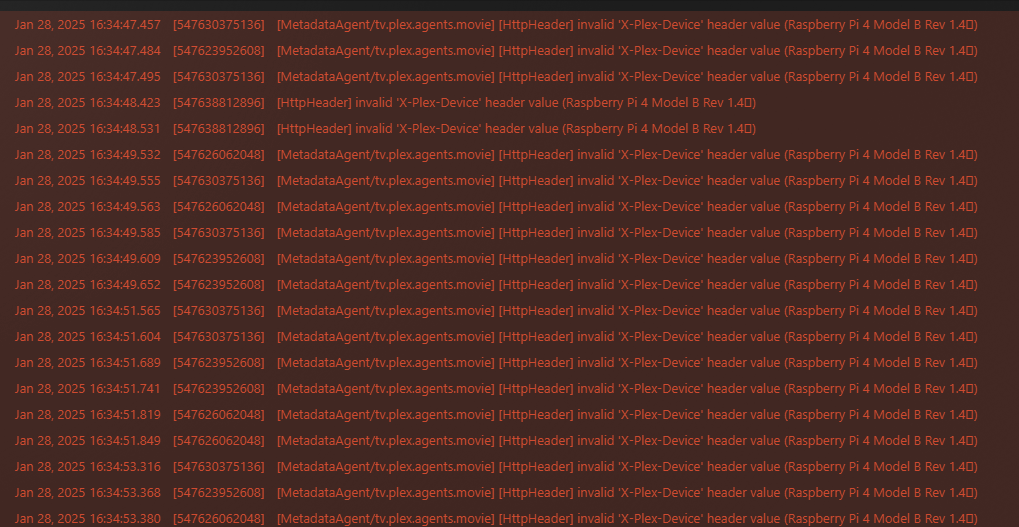
They’re also being raised as errors for me in the web console.
Example:

Here’s a copy of my server logs.
Plex Media Server.log (4.7 MB)

@ChuckPa Any chance you know whats going on here? [Req#63644/ViewStateSync] and [MetadataAgent/tv.plex.agents.series] are throwing [HttpHeader] invalid 'X-Plex-Device' header value (Raspberry Pi 4 Model B Rev 1.4 error messages

I suspect it’s because the model name contains more than one word.

On Synology DS418j, you get this;

chuck@ds418j:~$ get_key_value /etc.defaults/synoinfo.conf unique
synology_rtd1296_ds418j
chuck@ds418j:~$ cd ..
chuck@ds418j:/var/services/homes$ get_key_value /etc.defaults/synoinfo.conf unique|cut -d'_' -f3|sed 's/^ds/DS/;s/^fs/FS/;s/^rs/RS/'|sed 's/^\([0-9]\)/DS\1/'
DS418j
chuck@ds418j:/var/services/homes$

On regular Linux, you get this:

export PLEX_MEDIA_SERVER_INFO_MODEL="$(uname -m)";

which is:
[chuck@lizum debian.2020]$ uname -m
x86_64
[chuck@lizum debian.2021]$ 

Recommend first checking the output of uname -m
If it’s indeed that long string, go into the service file,
Edit this line to make it a single short word

export PLEX_MEDIA_SERVER_INFO_MODEL="$(uname -m)";
export PLEX_MEDIA_SERVER_INFO_MODEL="RPI4";

and try it

I am curious which OS this is running on.

Sorry, should have included it in the initial post. I’m using Rasperry Pi OS (64-bit). I can’t remember what the current version is, but it’s ported off of debian Bookworm.

Here is what os-release returns:

PRETTY_NAME=“Debian GNU/Linux 12 (bookworm)”
NAME=“Debian GNU/Linux”
VERSION_ID=“12”
VERSION=“12 (bookworm)”
VERSION_CODENAME=bookworm
ID=debian
HOME_URL=“https://www.debian.org/
SUPPORT_URL=“Debian -- User Support
BUG_REPORT_URL=“https://bugs.debian.org/

uname -m returns:

aarch64

Regardless, I tried updating the services file anyway and I’m still seeing the same error show up in the logs, so I guess it must be populating from something else.

@Dyogram

May I please have both the Plex/Web DEBUG logs (settings - Plex/web - Debug)
and the server logs ZIP?

– you’ll need to enable the Web debugging first then recreate / capture it.

@ChuckPa
Here are the requested log files:

plex_web_debug.txt (62.3 KB)
plex_desktop_debug.txt (113.8 KB)
Plex Media Server Logs_2025-01-28_16-36-08.zip (3.9 MB)

I’ve also noticed that when I view the console log from the webclient, there seems to be an additional character at the end of the device name is the error messages. The additional character is not displayed in the Plex for Windows client.

This topic was automatically closed 90 days after the last reply. New replies are no longer allowed.
