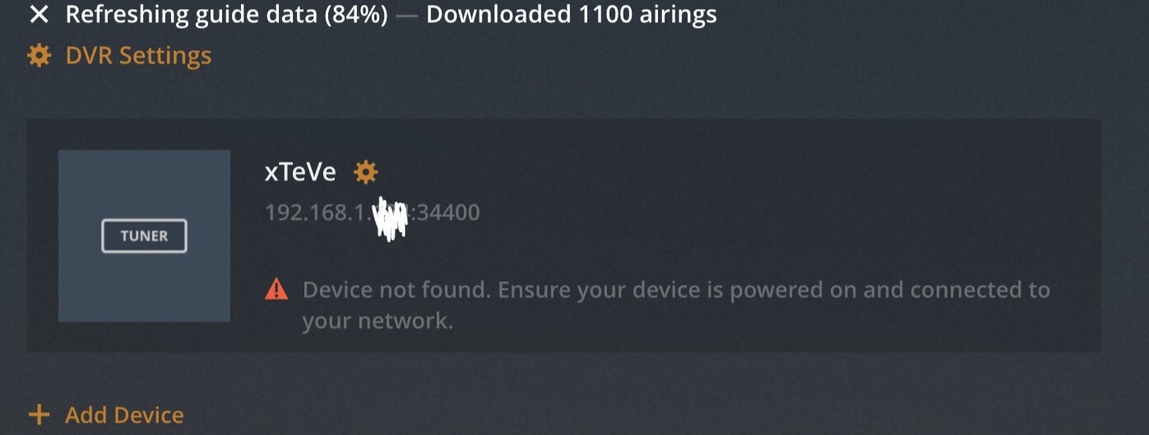
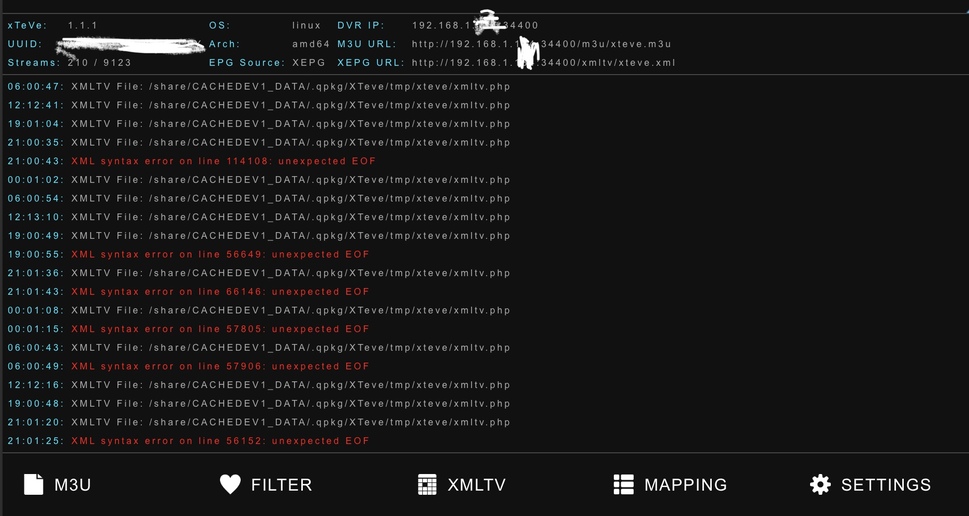
Hmm. Unfortunately, while changing the channel numbers worked in Xteve, and the new channel numbers show up in plex, I can not map the resulting XMLTV file. I deleted the dvr and restarted plex, even rebooted the plex server. Everything time I try and assign the xmltv file , it thinks for a while them tells me its an invalid or missing file. And it seems to crash plex about 50% of the time when it tries to load.
Which XMLTV file do you use in Plex? Those of your provider or those of xTeVe?
Wrong XML encoding. The XML files must be UTF 8 encoded.
Ask your provider if you can change that.
I was using the xmltv file created by xteve as I have a few different sources combined. It appears something with the way xteve was creating the xmltv was off. I was able to resolve this by deleting the json files XTEVE creates and uses to construct the xmltv file. I had to remap the channels again, but when I did it worked.
After my Plex crash, some of my enabled channels would’nt show and showed not available, but after 7hrs later, my guide info channels is fixed. Still using the original xml file. I see them in utf 8.
Here is the original files without being joined together.
iptv xml
https://drive.google.com/open?id=111FhUdCt7dyRtrBntDRaY39TpkjrZ15G
Antenna xml
https://drive.google.com/open?id=1M4lcVkw7xddyXrUbEXJ0C0dwxkecRCUW
Anyone got a good channel guide that works well for them? Looking for one that will give more details and accurate info. For example on sports channels it will give the details of who is playing. And also for TV shows it gives the actual epsiode information and not just generic information for the show. And finally one that has good local channels for the regional ABC, NBC, CBS, etc…
If you have anything working well for you, please let me know.
I am currently experimenting with vaders, xmltvlistings, and Schedules Direct.
Thanks!
The antenna xml is also not UTF 8.
<?xml version="1.0" encoding="ISO-8859-1"?>
If the XMLTV file is broken by your provider, it will not be processed further. xTeVe shows you in which line the XMLTV file is broken.
You can manually start the download by clicking Save in the XMLTV menu
xTeve workings flawlessly here!
Just a couple of questions (sorry if they have been answered previously).
-
xTeve and Plex is running on my home computer. If I watch DVR from work, which IP address will be reported as the one watching by the IPTV provider?
-
If my IPTV provider only allows one simultaneous stream. Is it possible for several users to stream the exact same channel from different IP’s, and it will be reported as one stream to the IPTV provider?
I’m having pretty good results with zap2xml / zap2it.com. It includes lots of details, images, etc. Plex doesn’t handle the sports things quite right though.
Your provider sees the connection from your Plex server. When several people watch the same channel, Plex distributes the stream to the clients. Your provider sees only one connection. Plex alerts you even if you watch more streams than available tuners.
I’m trying out schedules direct with epg123 right now to see how that works. I also got xmltvlistings, but haven’t gotten to them yet.
Do u use linux or windows? trying to figure out the settings to go to UTF8 encoding instead of ISO-8859-1
I’m running on linux.
edit:
Might of found it… my $enc =‘ISO-8859-1’;
How did u get urs to work?
here’s a new error when accepting the new file.
https://drive.google.com/open?id=13B1IQaCThOUI_p1TIeSw9n8UpIJEp_58
[ERROR] xml: “UTF - 8” declared but Decoder.CharsetReader is nil -
I believe it has to do somthing with the pl file bc when I changed it with no spaces, I get this.
[ERROR] XML syntax error on line 13996: invalid UTF-8 -
Only 2 spots that has ISO-8859-1
https://imgur.com/a/u7Mu9sQ
You can’t just change the line to utf-8, you need to change the encoding as well. If you run windows on a machine, the free editor notepad++ allows you to easily change the encoding of a text file.
Kind of gather that but is there a way to do it automatically instead of manually edit and save each time?
I have mine set to download every 24 hrs even thou i can do that every week.
That was kind of the point on adding both files together, even with cat.
When I added my antenna links as a m3u to xteve, says 0 channels, not really surprised there bc there not concurrent streams like iptv is. I have some iptv channels that can’t even stream bc there’s nothing streaming on there end.
edit
On windows, using the exe file, it works, but in linux, it fails.
Great work on xteve! However I unfortunately cannot enjoy its greatness.
I understand Plex can only handle .ts streams but I cannot get any to stream for more than 30secs and they stop. m3u8 streams (of the same provider) keep streaming flawlessly. I know this is not a xteve or Plex problem given I have the same behaviour in VLC.
I am just hoping anyone else had such problems and found a solution?
Dija change ‘stream.m3u8’ to ‘stream.ts’ ? Most providers will accept that.
