With vlc m3u work
I have the same error too !
I use m3u8/HLS file and I’ll try with the same iptv flux but in m3u/MPEGTS configuration
If I have two m3u and I want xteve-plex to use 1 stream from each in parallel, how do i set it up?
If I set up two playlists and add two tuners, will it use two streams from any channel or will it be like 1 stream from 1 m3u and other stream from other m3u?
Currently I have xteve with 1 tuner and telly with another tuner. For some reason when both are recording in parallel, one or the other stream dies. Not sure what might be the reason so I am thinking of trying using xteve with two tuners. Other idea is to use two docker containers and have one m3u in each, but dont want to create too many directories for configuration.
Hi All!
Thank you all for this topic! It really helps people
First check my System info:
CPU: Intel i5-8400
RAM: 32 GB
SSD: Samsung EVO 860 500 GB
OS: Windows 10 build 1903
PMS: 1.16.0.1226
xteve: 2.0.3
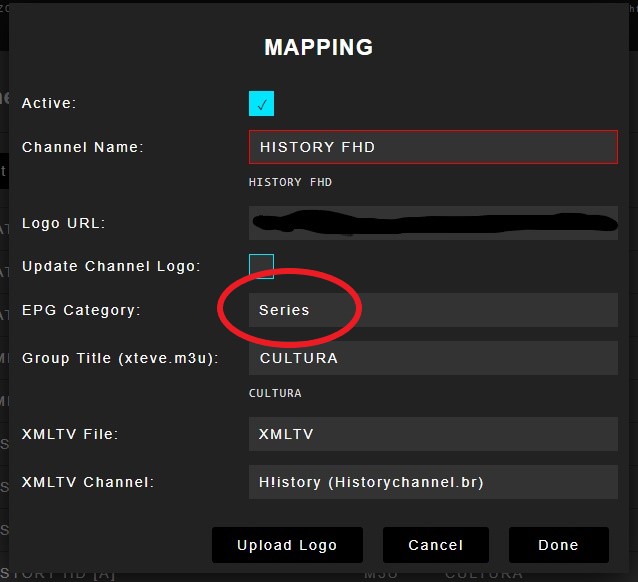
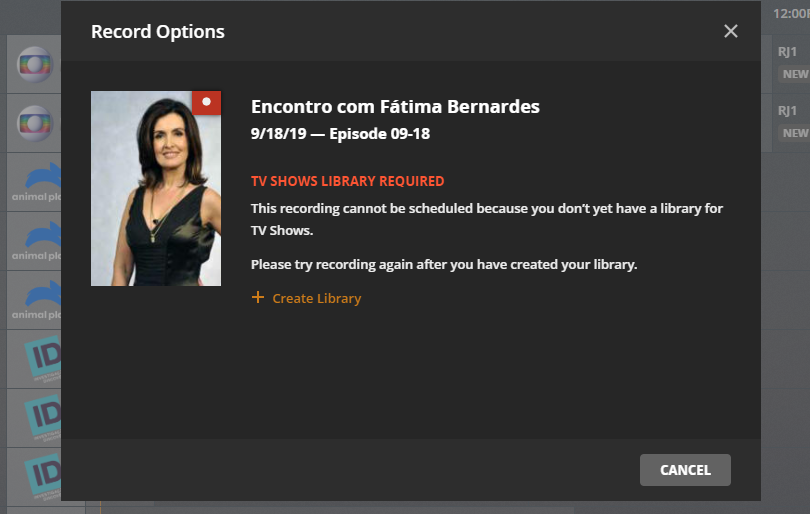
Please i need some help… I was able to set my xteve to work with plex . My IPTV provider has more than 480 channels so i was forced to edit the channel list in xteve. The problem consists that some TV channels that i set as “Series” in the EPG Category did not “get” this setup.
Funny thing is that some channels get the right EPG category and some not!?
See images:
xteve setup:
Plex LiveTV message:

Plex asks me to create a movie library not a TV Series library. How can i fix it?
Here an example that is ok:
Any help will be well aprreciatted!
THX,
Braz.
I CANNOT for the life of me get it to work through the web app. Using Plex 1.17.0.1709 and xTeVe 2.0.3
Every time I click a channel, I see the following in my xTeVe log:
2019-09-18 14:00:33 [xTeVe] Buffer: true
2019-09-18 14:00:33 [xTeVe] Buffer Size: 1024 KB
2019-09-18 14:00:33 [xTeVe] Channel Name: KCTV
2019-09-18 14:00:33 [xTeVe] Client User-Agent: Lavf/58.27.103
2019-09-18 14:00:34 [xTeVe] Streaming Status: Playlist: xTeVe Proxy - Tuner: 1 / 1
2019-09-18 14:00:34 [xTeVe] Streaming Type: [TS]
2019-09-18 14:00:34 [xTeVe] Streaming URL: MY URL BLOCKED OUT
2019-09-18 14:00:38 [xTeVe] Streaming Status: HTTP Response Status [200] OK
2019-09-18 14:00:38 [xTeVe] Content Type: video/mp2t
However it just spins on plex, according to my browser it is playing as I see a play symbol next to the plex tab. But the web player just sits there with a loading circle.
Working fine on my Shield TV…
Any thoughts?
I have the same issue…I believe plex broke the web player with this new release
The app is working however its very choppy
I just upgrade to the latest version 1709 and got the same issue.
I think for now we have to downgrade or just wait for a new release from Plex.
I hope somemoe from plex can see this message and forward to the devs.
THX,
Braz.
I rolled back to prior version and it is working as before.
Which version did you use?
Version 1.16.6.1592
I just spent the last hour banging my head against the wall - but a downgrade indeed fixed it.
Was seeing XML parsing issues with the M3U file - even pairing the Xteve M3U with Plex’s own fetched EPG data (super wrong, but enough to initiate a stream) generated the same errors.
(For those not aware, at least for Windows, there’s a Plex update/agent cache in your PMS appdata directory. Keeps installers for each server upgrade - I merely uninstalled and installed 1.16.6)
Clearly a Plex issue - rolled back and everything via the web works fine.
I just made some tests and here are my toughts about my original post:
I see that even if i use xteve to create a custom m3u file with the selected channels and apply the category on it, what defines where plex should save the file (recorded tv) is the EPG file… so If the EPG does not have the the episode number plex see this as movie file.
Plex live TV and PlexDVR are vey nice features but I think it can be improved.
Here some ideias:
Devs should give the users the option to manually change the category. My EPG sucks so most of my recorded TV is identify as movie file. Also it should be able to add manually the file name that plex will save the file. Can be under advanced settings. I meam i now understand how plexDVR woks and its fine but think if user could be able to change whatever he needs to record a TV program? It could be fantastic!
THX,
Braz.
Has anyone used this on OpenMediaVault? Im trying to run the xteve using the linux instructions
root@openmediavault:/sharedfolders/OpenMediaVault# sudo chmod +x xteve
root@openmediavault:/sharedfolders/OpenMediaVault# sudo ./xteve
sudo: unable to execute ./xteve: Permission denied
root@openmediavault:/sharedfolders/OpenMediaVault#  ls -l  | grep xteve
-rwxrwxr-x+   1 root   users    9147552 Sep  7 12:41 xteve
-rw-rwxr--+   1 nobody users    3448538 Sep 26 21:05 xteve_linux_arm64.zip
root@openmediavault:/sharedfolders/OpenMediaVault#

does anyone know how to fix this? every time I add the IP of xteve and set the URL for the guide I get this error. The only way to overwrite the settings is if I change the IP address, I used all IP’s I had in my server.
How can I delete the old DVR Settings and XMLTV cache? I removed the tv.plex.providers.epg.xmltv folder but it still didn’t fix the issue.
xteve and plex are both running in docker
You cant use a URL for the for the guide. It needs to be a physical location of the file
How much EPG data do you have? There is an issue loading an XMLTV file over 20mb. Look at Xteve folder and see how large the xmltv file is… If large try loading 1 day of guide data and see if it works.
Hi, it’s all sorted now. I am using a path to the file instead of using the url. Thanks!
No problem
This seems like the right place to post this. I am having an EPG offset issue that I cannot seem to understand:
- My EPG is 2 hours ahead of what is actually airing on said channel tried multiple to be sure
- The vendor supplied XML file for the EPG, I can see that its set to UTC. Here is an example of this with some data removed
“programme channel=”[removed data]" start=“20191003170000 +0000” stop=“20191003180000 +0000”
title lang=“en”>[removed data]/title
desc lang=“en”>[removed data]/desc"
Now this particular show is suppose to air at 11AM EST but it shows in the guide as airing at 1PM. The feed itself is an east coast feed.
Now this could be poor EPG data from the vendor or incorrect channel data. Every channel I try this with seem to be offset by 2 hours all the time. I can only verify this by tuning to a channel that I can confirm what is playing and compare it versus the guide of course. Its driving me crazy but could this be a Plex, xteve and/or vendor issue or worse a combination of all of them  I might have answered by own question on this one in the sense that the airtimes in the EPG do not appear correct for an East Coast airing time… Almost looks like Mountain Time EPG…
