In order to use this feature you have to have Plex Pass. Once you have it you can set up the Live TV & DVR feature in Plex. If you have done this then depending on what OS (Windows, Linux… for example) you can run Xteve.
Thanks for your answer, and yes I just bought the Plex Pass. I am just finishing to setup my libraries and I will take a look inside PLEX to see any difference.
Thanks!
maybe it has been talked but just want to ask for a quick answer
does it really make sense to use ffmpeg for a better buffering, performance for plex
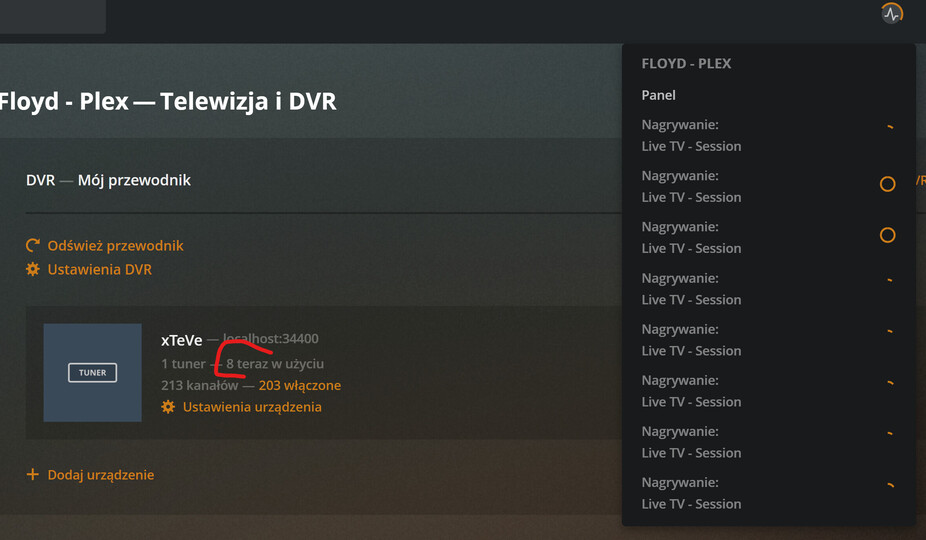
I know it was asked before, but I did not see any answer. I am also in the same boat. I have 3 different accounts from the same provider but with different usename and password. Is there any possibility to run multiple instance of xteve to have 3 different xteve tuner running simultaneously? If yes, can you describe the process?
Thanks, Claude
I am trying to run my hauppage tuners through xteve but I can’t figure out how to work out what port they are running on. Any ideas on how to do this?
I’ve searched here, but I didn’t find any solution, so let me ask again, and forgive if I’m asking something already answered.
I have a 3 connection subscription, but I cannot stream more than just one stream at once. I’ve configured Xteve on Jellyfin, and it works just fine. If I start a fourth stream, then the xteve logo appears with a messtage telling me there are no more free streams, which I find very cool.
So, both xteve and my provider are working properly, is just plex doing something weird or I need to set up anything else?
I would rather prefer to use plex because it can detect and delete commercials, but it is critical to see all my streams…
you create a folder for each subscription with xteve inside and you launch xteve from a .bat
xteve.exe -config=xteve.exe -config=C:\IPTV\Xteve1 -port=“3700” -port=“3700”
Also for each folder you change the port and the folder in the -config to point to the right folder…
and you have a xteve for your xml…
So if you have 3 subscriptions from your provider …
you need 3 xteve for your provider and an xteve for your xmltv
here is Xteve for 32 bit Raspberry Pi
It made sense for my use case. Because using ffmpeg allowed me to use all of the connections from my IPTV provider; but more importantly it helped me with channels that had no audio which I used to think it was an issue with my provider, but it wasn’t.

You need to edit your playlist entry to have 3 tuners and also go I to settings and set the number of tuners to 3 in there too.
I’m having a similar issue as well. I have the enhanced guide feature turned on but it’s still not downloading any posters for TV shows or movies. All I get is the channel logo. How can I force Plex to download posters?
Hey Guys,
I’m not sure whats happening but my EPG is +1 hour. I’m not sure if its xTeVe or PMS thats the issue.
I’m using a windows 10 PC and the time on that is correct, when I go on to the Live TV & DVR, then look at the guide its showing
BBC News (BBC One UK) is 18:20-18:35 however its actually on at 17:20-17:35, If I click on the BBC Channel now, its streaming the right programme, but the guide is basically +1hour on every single channel - I’m using the XEPG supplied by xTeVe (http://192.168.1.150:6100/xmltv/xteve.xml) so I wasn’t sure if I could change the time to get it to show BBC news on the guide at 17:20? (Maybe somekind of -time="-1" on the config files?)
It is an issue with the guide data times/zone that you are importing in to xteve or the time zone on the Windows machine.
Ah yes, actually I’ve just noticed the EPG is generated on a .ro server so they are +1, I’m assuming there isn’t a way to adjust it in either plex or xTeVe. I’ll have to look for an EPG based in the UK - then I’m guessing I’ll need to redo the channel mapping.
After the latest update of build .200 I’m seeing an issue where channels of similar names are defaulting to one. Example:
TNT =========== CH 245 (1080p)
TNT Backup ==== CH 245.1 (720p)
TNT Backup SD = CH 245.2 (240p)
Those channels are now all using the stream from the last listed option at 240p. I have deleted the channels from my m3u (as usual via iptveditor.com), re-added/updated into xTeve and nothing. I have now tried one by one, but they overwrite the existing one and my available channels increase but they are not visible in the Mapping. To note, each stream from my m3u list is a unique stream number (tested via VLC).
Any one else experiencing this? First issue since I started using xTeve in December '20.
somehow, after using xteve for months successfully, it has broken. i’ve removed it as a service. when i run it manually from a command prompt i get the following error:
“2021/04/11 09:19:37 [xTeVe] [ERROR] listen udp4 224.0.0.0:1900: bind: An attempt
was made to access a socket in a way forbidden by its access permissions. () -
EC: 0”
i’ve tried a few of the suggestions that i’ve found in numerous places, like the dlna issue and starting xteve prior to starting up the plex server. nothing seems to work. it gives me the same error even if my plex server is not running.
any help would be appreciated…
my xteve version is:
Version: 2.1.2 Build: 0121
Database Version: 2.1.0
Every two minutes my live tv session repeats the last 30 seconds. I am using xteve. Jellyfin plays flawlessly…
This happens on the web player and on the LG Web OS client. iOS isn’t affected by this. I gather it’s a player issue. I believe people have been reporting a similar issue in some android clients. Please address this
Hello,
I am new to configuring Xteve with Plex.
I managed to configure the Tuner in Xteve and add the French channels to my plex without problem.

But at the level of the mapping in Plex I cannot find all the channels for the mapping.
I would like to add the Portuguese channels but they do not appear at all in the list on Plex.

How to succeed and add them?
Thank you for you help
