2 WAN Connections

Assume I have 2 independent networks in my home, both with their own router and path to the internet. Both have a static WAN address and both have 32400 forwarded to the same plex server.

Ideally I want plex to round robin use both interfaces, spreading the upload over both ISP’s, should one connection reach its upper limit, start to use connection two.

Is this at all supported? Or is there a potential setup with reverse proxying that I can build for this. I do not mind hosting something on a VPS and then using two tunnels (one via each ISP) to my home if I know what I am doing.

OpenMPTCPRouter looked great, but with double NAT its not really usable for me.

I am doing it but both connections are in the same firewall…to step it up a notch, I even have two Plex servers.

Ultimately, your Plex server is only going to know one path to the Internet because it will only have one default-gateway setting. You cannot do two. So, it is only going to know the Internet is available in one path. This is why my two WAN connections exist on my firewall and I do not have a separate router on my LAN to each of those ISPs.

I would encourage you to get a multi-WAN router or firewall so that it makes the decision as to which Internet connection, which mine does. In fact, it monitors the connection and so long as my primary (AT&T) is having good numbers, it will stay on that (1GB up and down). However; once those numbers drop or if I fill up that 1GB connection, it will start using the Spectrum one.

Now, once you get that done, and I HIGHLY recommend you do. I am using a business grade firewall, I am a network architect/engineer so I have gone DEEP down the networking rabbit hole, but there are a lot of consumer multi-WAN routers out there that have this functionality.

One other thing I HIGHLY recommend you do once you get a multi-WAN router or firewall is have your Internet provider set up your modem into bridge or pass-through mode. This assumes you are not using them for WiFi (which I do not do). Your Multi-WAN Router/Firewall should be doing what they call Network Address Translation (NAT) and it should be your firewall, and I would recommend you get your own switch for wired connections behind the firewall as well as your own access points to handle wireless traffic. If your ISP does NAT and your multi-WAN firewall/router does NAT, you get into what they call double-NAT and that is a nightmare to solve, especially getting that tcp/32400 port port-forwarded to your Plex server. It sometimes will not work.

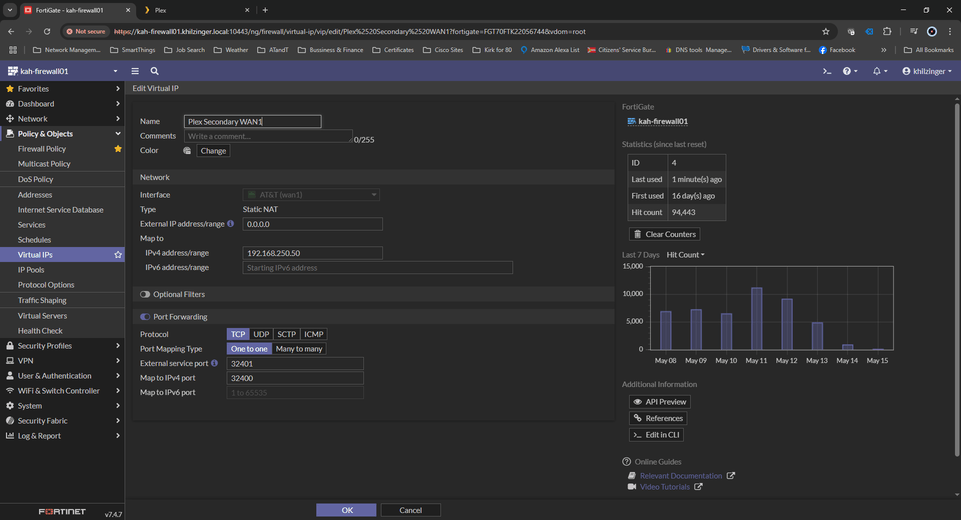
Once you get your WAN straightened out and connection to a multi-WAN firewall/router, then you do your port forward and for my equipment I had to do one for each WAN connection on my firewall…and with my secondary, I had to do one for that. I actually use tcp/32401 for that secondary Plex server which maps back to tcp/32400 on that server so ignore that and just concentrate on tcp/32400. What you are looking for on this is Plex Primary WAN1 and Plex Primary WAN2. This tells the Multi-WAN Firewall/Router that if you hear anything coming in on that WAN connection destined to port tcp/32400, you send it to the local IP Address of your Plex server. That is where your public IP Address from your ISP gets translated into a private IP on your local network.

Then, it is a matter of making sure you poke a hole for those WAN connections on TCP/32400 to allow traffic in, then through the port-forward sent to your Plex server.

You will have to consult your Multi-WAN Firewall/Router’s documentation as to how to do that.

For anyone wondering, this is a FortiGate firewall and how I did it on there in case anyone has one.

1 Like

Hey, I simplified my setup as normally don’t get a detailed response. I have a multi WAN router Mikrotik. I have setup 32400 on both WAN’s to the local single plex instance, but its a case of how does plex know (or the router?) which server to use.

From my understanding Plex will get the WAN to use by whatever the public IP is on the interface it is listening on, how then are you getting WAN2 used when bandwidth is coming up high on WAN1?

It is done in the Multi-WAN Firewall/Firewall. That is the decision maker as far as which WAN to use.

Looking at my firewall logs, Plex routinely sends up keep-alive packets to Plex’s cloud servers. That is how clients connected to your server outside of your home know which public IP Address to connect to. Very typical set up for IoT devices.

So its essentially load balancing based on the connection utilisation, are you doing that with your whole network or just the traffic coming from the plex server? Why do you run 2 servers independently?

Whole network.

Why do you run 2 servers? Same media?

Yep. I run Rsynch between the two so every 4 hours my primary pushes any changes to my backup server as far as content. I do have to make any manual overrides I did on my primary on the secondary It is as close to a redundant cluster as I could figure out. QNAP 1688 is my primary. Synology DS918+ with the expansion enclosure as my backup.

So you route traffic to both as well then?

They are named differently so you have a choice as far as which of my servers you want to use. As far as the outside, see above. I use tcp/34200 for my primary and tcp/34201 as my secondary (you cannot use the same port on your external connection, you need them to be different so the firewall routes the traffic to the appropriate server).

Lets say your WAN1 is 100mbps upload and WAN2 is 80, what happens if 5 users start to fill up WAN1, does the pushing of the outbound traffic for Plex1 down WAN2 then let Plex2 pick up?

Otherwise, surely at this point you are running 2 individual plex servers on 2 separate WAN IP’s and the user is then able to balance themselves by trying the other server?

On my firewall, I have told it what the bandwidth was for each circuit and the failover (they call it SD-WAN, which in the networking world, I disagree with that) is set when either packet loss is above 5%, latency goes above 110ms or the bandwidth on my primary WAN hits its limit and then WAN2 is used.

So you have 32400 and 32401 open on both WAN’s to handle Plex1 hitting Plex2? I understand the routing part, but I am struggling to understand how the two plex instances are OK to swap between both WANs.

However, this has answered the question which is why I marked as a solution, I understand that essentially under load the default route from plex to the internet gets changed to WAN2, and then at some point clients start using the new WAN2 route back home.

I wonder if there is a way to handle this at a VPS, e.g. have :443, and tunnel back over the IP with the lowest load via some kind of API from the router stats updated on say 5 second intervals. This would then not even disrupt traffic and be much more real time?

I may look at developing that

Here is the virtual IP, or port-forward in the firewall. Notice that Plex Primary is set for 32400 and Plex Secondary is set for 32401:

The primary server (KAH-NAS001) is set normally just as every other single Plex environment:

The second Plex server is where I changed its “public” port to 32401, which in the network translation sends it back to 32400

Plex configuration on the secondary (KAH-NAS02):

Here is where the port forward takes traffic for my secondary Plex server and listens on 32401 (External service port) but sends it on the inside network to my internal IP (192.168.250.50) and sends it to 32400 (Map to IPv4 port).

This topic was automatically closed 90 days after the last reply. New replies are no longer allowed.