I did try many ways to make it work since 3 weeks :
1-a] Direct plug to my NAS
The Pinnacle PCTV 73e USB Dongle is not detected by my Synology NAS (In Plex I use Settings > Manage > Live TV and Video Recorder).
This looks to be since the NAS is using DSM7 and this version of DSM disabled the possibility for Plex to manage external USB Dongle.
I tryed to reactivate USB management by running “modprobe usbserial” with root access to my NAS. But the dongle is still not recognized.
2-a] Using a Raspberry Pi on the same network.
I did plug the Pinnacle PCTV 73e USB Dongle to my raspberry and installed TVHeadend. The dongle is working, I can see live channels in the tvheadend web interface. (I am not very confident in the final result because streaming is slow with freezes when accessing via tvheadend web interface.) But I tryed anyway to make it discover by Plex (by giving the IP adress and port of tvheadend) but this is not successfull.
python tvhProxy.py
Traceback (most recent call last):
File “./tvhProxy.py”, line 1, in
from gevent import monkey; monkey.patch_all()
ImportError: No module named gevent
And it stops.
node index.js
if (channels?.response?.status === 403) { throw new Error(‘Username and password not accepted by Tvheadend’); }
It looks like it can’t connect while I did correctly configure config.yml
tvheadend_url: http://tvheadend_admin:My_Password@192.168.XX.XX:9981
antennas_url: http://192.168.XX.XX:5004
tuner_count: 1 # numbers of tuners in tvheadend
device_uuid: 2f70c0d7-90a3-4429-8275-cbeeee9cd605 #I didn’t change this default value
I tryed disabling password hash authentification in tvheadend wich seems not to be used by antennas. But still doesn’t work.
3] I didn’t try usind Plex pluggin => didn’t search / targeted any usefull
Please any help would be appreciate because I am getting crazy
I had a look to hdhomerun connect duo. It looks like it doesn’t exist anymore. Product is not sold anymore. Have a look on amazon or what ever better and more social website, you won’t find it.
Anyway I already bought my PCTV Nanostick I would prefer find a way to use it
I finaly found a way to use my 5€ Pinnacle PCTV 73e USB Dongle.
1/ I did forget about plugging the DVB tuner to the synology NAS since it does not manage USB dongles anymore. It was too complicated to try to make it detect
2/ Then I did focus on plugging it to my raspberry and share the streams to my Plex Media Server already installed on my NAS
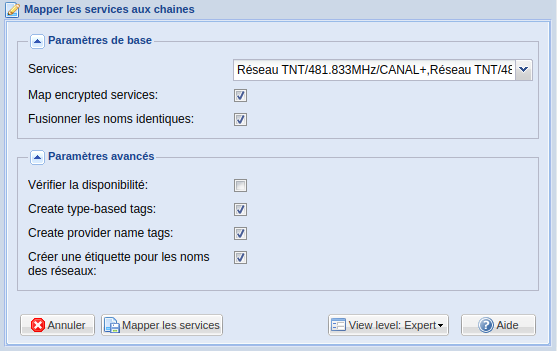
2/a) Install tvheadend on the raspberry pi.
2/ b) Configure tvheadend :
3/a) Install GitHub - jkaberg/tvhProxy: An small flask app to help Plex DVR connect with Tvheadend on the raspberry pi.
3/ b) Configure tvhproxy : nano tvhProxy.py
Here is my config (I get crazy because all configurations shows the use of “localhost” in TVH_URL … BUT what is not said is that this parameter is given to the PLex Media Server … AND because it is installed on my NAS, all the streamings were failing with an error like “Unable to tune channel”
    'bindAddr': os.environ.get('TVH_BINDADDR') or '',
    'tvhURL': os.environ.get('TVH_URL') or 'http://user_you_created_in_tvhead_end:password@YOUR_RASPBERRY_IP:9981',
    'tvhProxyURL': os.environ.get('TVH_PROXY_URL') or 'http://YOUR_RASPBERRY_IP:5004',
    'tunerCount': os.environ.get('TVH_TUNER_COUNT') or 1,  # number of tuners in tvheadend. I Have only one so it is possible to stream only one channel at a time
    'tvhWeight': os.environ.get('TVH_WEIGHT') or 300,  # subscription priority
    'chunkSize': os.environ.get('TVH_CHUNK_SIZE') or 1024*1024,  # usually you don't need to edit this
    'streamProfile': os.environ.get('TVH_PROFILE') or 'pass'  # specifiy a stream profile that you want to use for adhoc transcoding in tvh, e.g. mp4

 Any idea / track ?
  :
: