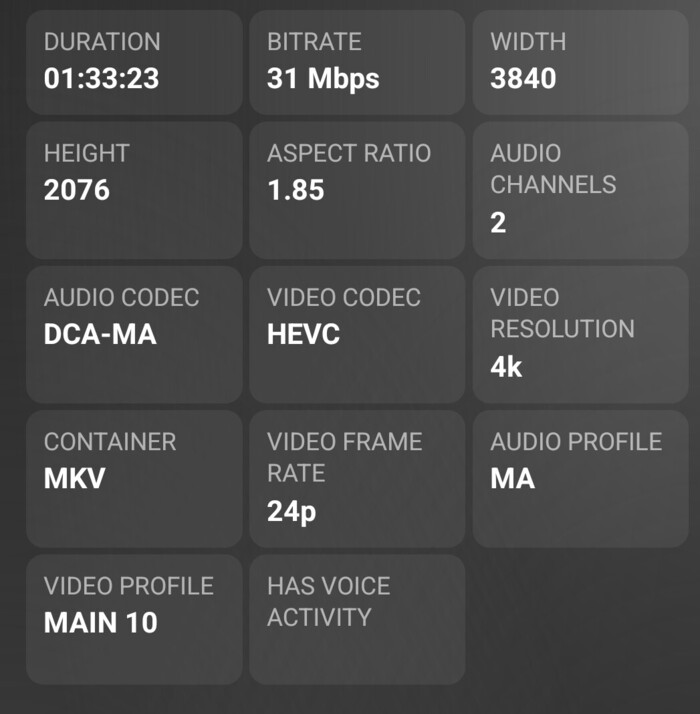
Original source was 31mbps HEVC 4K.
The i7-4790S CPU in your NAS is not powerful enough to transcode 4K video.
The integrated HD4600 Quick Sync graphics does not support transcoding 4K video.
Modifying server settings or changing transcoder directory locations will not change that.
You still have options:
-
Use clients that support 4K video.
-
Modify your system. Add a Nvidia GPU that supports 4K transcoding to the NAS (if supported by your NAS).
-
Use a new system. Leave media on the NAS and run PMS on a system capable of transcoding 4K video.
-
Pre-transcode media. Before placing the files on the NAS, transcode them to a format that will direct play / direct stream (use Handbrake or similar tools). Alternately, you could use Plex’s Optimize Media capability to create pre-transcoded versions.
To help you find the best path forward, please supply some additional information.
-
The OS and version running on the QNAP NAS - QTS/QuTS & version.
-
Which Plex clients and versions are you using? For example, Plex Web (Chrome/Firefox/etc.), Android/iOS mobile, Smart TV app (LG/Samsung/etc.).
-
The Plex XML Info for one or two of the 4K files that currently cause you difficulties. Save the information to a text file and upload to the thread. The forum does not accept .xml attachments, so zip the files before uploading.
1 and 4 was where I was steering the conversation. Short of a hardware upgrade (best option), pre-encode for lighter load on the server and/or use clients that do not require transcoding.
I will say that the dedicated SSD for transcoder cache made a big improvement for me, but my CPU was not the weakest link. I think it still has merit. Reading and writing from/to a single drive is always problematic in scale. Every device has a limit.
Another option is to have multiple versions of the 4k content that are pre-encoded at different resolutions.
In the end, a more powerful server is the answer.
and… 8k entered the chat 
Definitely best to use clients that support 4K if at all possible. Direct play/stream is easy and uses minimal server resources.
Upgrading the system is not difficult and not terribly expensive. Many people have added GPUs to their QNAP NAS. Something with a Pascal family chip (c. 2016) or later will work. This would provide the capability to transcode/tonemap 4K HDR. It also sets the system up for when Plex rolls out transcoding to HEVC.
Moving Plex to a new / different system can be reasonable. The N100 systems can handle 4K transcodes and can be found for $250 USD or less. Older model NUCs or other SFF PCs can sometimes be found on eBay for reasonable prices.
I went down the pre-transcode path when I first started with Plex. I spent a lot of time running DVD and BD rips through Handbrake to get around client and server limitations. Given how both Plex and hardware have evolved, I’m not sure that is still a good way to go.
A few years ago, I picked up a used PC on eBay that could handle Plex transcoding. Makes life a lot easier. I rip the disc, move it to my NAS, and enjoy. Plex transcodes if needed. I still use Handbrake, but only for video that is heavily interlaced, has compatibility problems, etc.
OS is QTS Version 5.2.2.2950 For Plex Media Server
Plex Clients Plex Web (Chrome), Smart TV TCL (Plex Latest Version)
XML Note Pad.txt (81.0 KB)
Thanks for the info.
That’s a 90 Mbps 4K HDR movie. Your QNAP is not capable of transcoding such media.
Recommendations remain: change clients, add a GPU to the QNAP, or move PMS to a server that can handle transcoding 4K HDR.
On a PC, use Plex Desktop instead of Plex Web.
You’ll have to check the capabilities of your TV and see if it can handle such media (you didn’t include the model number).
FYI, QNAP recalled 5.2.2.2950. AFAIK, it doesn’t affect Plex, but might affect system stability.
Plex Transcoding should still be avoided at all costs unfortunately.
The main reason for me is the unnecessary audio transcode that happens with nearly every video transcode breaking surround sound playback on most soundbars and via ARC or optical and drops Atmos metadata.
Because that’s unacceptable for me I still need to go the pre transcode route until Plex finally fixes that.
I preprocess most content to lower file size and bitrate. I encode it with passthrough audio, because me ears are better than my eyes these days. I put just a touch of compression on them (RF 18) and get between a 50% and 90% reduction in file size and 90-range bitrates down into the teens. It also greatly reduces server load when transcoding is needed, for example 4k content to a 1080p device. Those 90mbps bitrates use a lot of cpu to transcode. Getting them down to 10-15mbps with no discernable loss in quality (at least to me) makes a huge difference.
Agreed, though, it is a trade off. Compression is compression, and is not lossless.
Direct stream is always best. I almost believe the client is as important as the server.
Fun stuff. Always good to hear other’s experiences.
My old i7-3770 CPU works great Streaming 4K but I cheated and installed Nvidia Quadro P2200 card. The card is another option.
@Rickt1962 I Believe That is What I Will Do, Install a Nvidia Quadro P2200 Card.
Is That Best one to get for The QNAP TVS-871?

Now that one I can’t answer The QNAP TVS-871?
Maybe someone can chime in on using P2200 card. Mine is running on Windows 7 machine with zero trouble handling the 4K stream direct play or Transcoding.
