Server Version#: 1.41.2
Player Version#: 1.41.2.9200
My Video Quality is at Maximum 4k Movies Have Long Buffering Time to Start and Continue to Buffer every 10 Seconds. It Only Works when I Change The Video Setting in Plex to 720mb I have 1.2GB Download Speed and Powerful QNAP TVS-871 Server with 16Gb Ram and a CPU Intel I7 Processor 3200MHZ (4 cores, 8 threads).
Can Someone Help me with The Plex Settings so I Can Stream My 4k Movies?
Is it local or remote to the server (the Internet speed matters only when streaming remotely)?
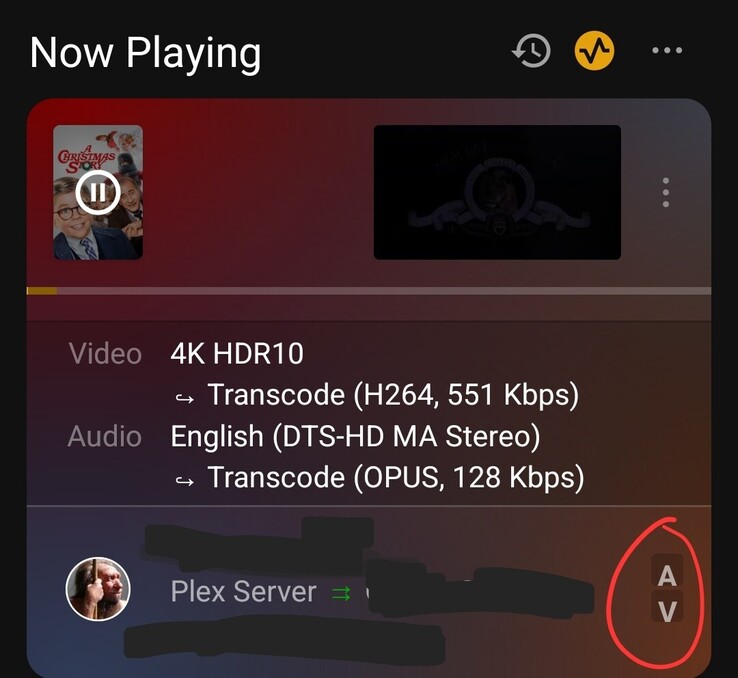
Monitor playback via Plex Dashboard → Now Playing + Expanded View.
Is the connection local, remote, or indirect?
Is the video transcoding?
If subtitles are enabled, are they being burned into the video stream?
The TVS-871 has i7-4790S CPU. It cannot use hardware acceleration to transcode HEVC video (4K HDR video is HEVC) and will struggle to do so using the CPU.
If the video is transcoding, you need to find a way for it to direct play or direct stream.
It struggles because it is a 10+ year old CPU and is not powerful enough to transcode 4K media.
Also, the Quick Sync graphics (the on-board GPU) does not support HEVC video, which is used for 4K HDR media.
To keep it from happening, find ways to eliminate transcoding. Use clients that support HDR media (or don’t watch HDR media).
Example: If watching on a PC, use Plex Desktop instead of a web browser.
Example: If watching on a Roku, do not enable PGS subtitles. Roku does not support them and Plex must transcode the video so they display onscreen.
You could also keep the files on the Qnap, but move Plex Media Server to a more modern system that can handle 4K HDR transcoding. If running Linux, you’ll want a 7th gen or later CPU. If running Windows, you’ll want an 11th gen or later Intel CPU.
Some QNAP NAS support adding a Nvidia GPU card. If yours does, that could also be an option.
The N100 (12th Gen, Alder Lake N) systems such as Beelink are popular. They’re relatively inexpensive, sip power, and have good graphics capabilities.
I picked up a used Lenovo i5-10500T system on eBay a couple years back and loaded Ubuntu. Works great.
The TVS-871 has a PCIe expansion slot. You might be able to fit an Nvidia GPU in there (I’m not familiar w/ QNAP hardware). You would want a Nvidia 1050 Ti or later.
I had a similar issue that took me a while to sort. I’m running a Windows 11 box with a 12th gen i7 processor, 64 GB of RAM and multiple separate (and dedicated/non-OS) SATA HDDs for content. I thought hardware transcoding was the way to go, but came to the realization this was the cause of my issues. My GPU was not up to the task. You need a really stout graphics processor to handle transcoding, and even then hardware transcoding can be problematic (search this forum).
I resolved my issue by disabling hardware transcoding, and installing a 2TB USB 3,0 SSD thumb drive for dedicated PMS transcode cache. This did two things. First, it moved that I/O off the SATA controller onto the USB controller. Second, the SSD is much faster than the 6GB/s SATA drives.
I’ve not had an issue since. The CPU has yet to exceed 40% even with multiple 4K transcodes going on simultaneously.
Another issue I experienced was subtitle support. I found a number of clients struggle with various subtitle formats. The solution was to transcode them into the stream, which of course increased the amount of transcoding my PMS was forced to perform. Again, though, after installation of the dedicated cache SSD there have been zero issues.
In-short, I found that hardware transcoding is not as cool as it sounds
Here is what I have set. Change “X;/PlexTranscode” to the drive/folder of the SSD once it’s installed on the NAS, Uncheck “Use Hardware Acceleration When Available”.
I Have Mirrored your Settings, Stopped and Restarted Plex Media Server, yet I am still getting Buffering with 4k. Am I Missing Something in The Settings?
Did it stop transcoding? The purpose of the settings change was to disable hardware transcoding to make PMS stop using the inferior GPU. If it’s showing just a V in Plex Dash it should be using the CPU for transcoding. You should also be able to see the CPU usage in Plex Dash. Trying to take it step by step to isolate the exact problem. Also, what is the client ?
My 12th gen i7 runs at about 40% CPU transcoding down a 4k for a remote connection to my cell phone. If you’re streaming to a 4k internal client the demands should be lower.
All my internal clients direct stream, as do my external 4k clients as long as they don’t choose subtitles (as explained above).
I reencode everyrhing to HEVC to lower the file size and bitrate, and use passthrough audio. Those “optimized” files seem to require less transcoding related to bandwidth, and less of the transcoder when it’s reqired.
It’s all a delicate balance, but primarily driven by server power. More is… more.