Server Version#: 1.18.7.2457 (Windows 7) Player Version#: 4.25.2 (Samsung Q85R 2019 Tizen 5.0 ) Network: WiFI ac near router. (Samsung Q85R ethernet port not is Gigabit …)
Hi,
I have a problem with Direct play 4K movie from my local server. At random some point the movie starts to do short jumps and hanging. After some seconds it plays normally again.
The movies are blu-ray remuxes about 50-70Gb,
Audio codec :Te HD
Video Codec: HEVC
frames Speed: 24p
VideoMail profle: 10
Container: MKV
is Direct play: true
Allows direct transmision video: true
Allows direct transmision audio: true
Max H264 Level: 5.1
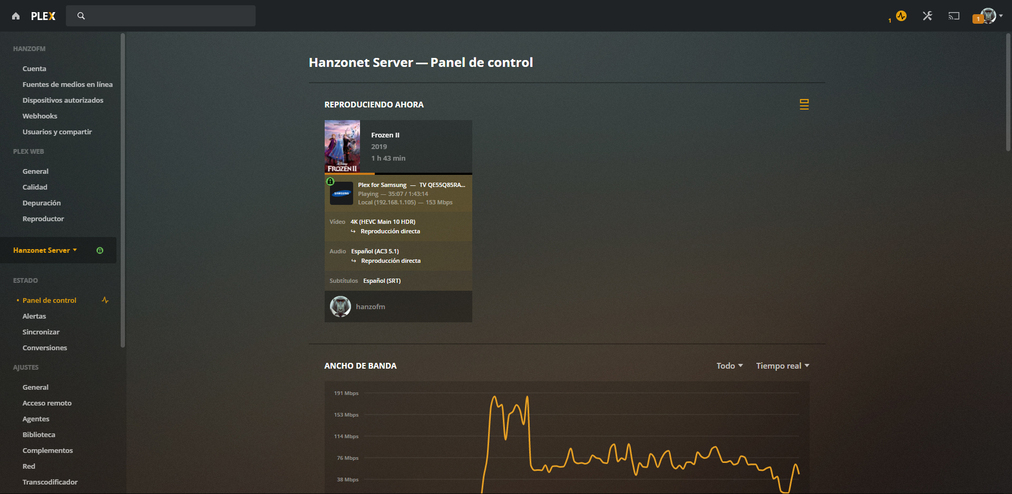
On a web browser go to https://app.plex.tv/desktop then navigate to Settings, under your SERVER NAME, click on Dashboard. Paste a screenshot of the Now Playing part.
The Sansung Q85R has a cheap ethernet port(100mb). Due to this, I connect the the TV via built in WiFi that is AC to an router AC that is bridged to main router via Gigabit port. This main router connect also the PMS via gigabit port.
This is usually because of a high bitrate section of the movie jumping over 80+ Mbit. Even if your connection is fast enough, the player on the device itself may not handle the high bitrate and cause the stuttering you see. You can use ffmpeg or a tool like this one to confirm if the sections you’re experiencing stuttering is the same approximate time where the high bitrates occur.
Yea its the nic. Wifi could possibly be a sollution. Your best bet will be to encode the files in a way that makes sure they never peak close to 100. I would say stay below 80. Disc remuxes will cause a lot of problems over wired.
Its unbelievable Samsung still ships with a 100 mbps nic in 2020 imo.
Hello,
I’m using a very fast Wifi ac connection (600 Mbps) to lower the network issue.
I’m experiencing the sames issues.
With some high files (more than 80 Mbps) the video blocks some time to time.
I’m using a sound bar that enable a direct play for video and audio.
I’ve changed also the hdmi cable to v2.1 and connection is eArc with all Sony material !
So i thing the plex software seems to have difficolties to handle high rate.
Can we lower the high amount of data ?