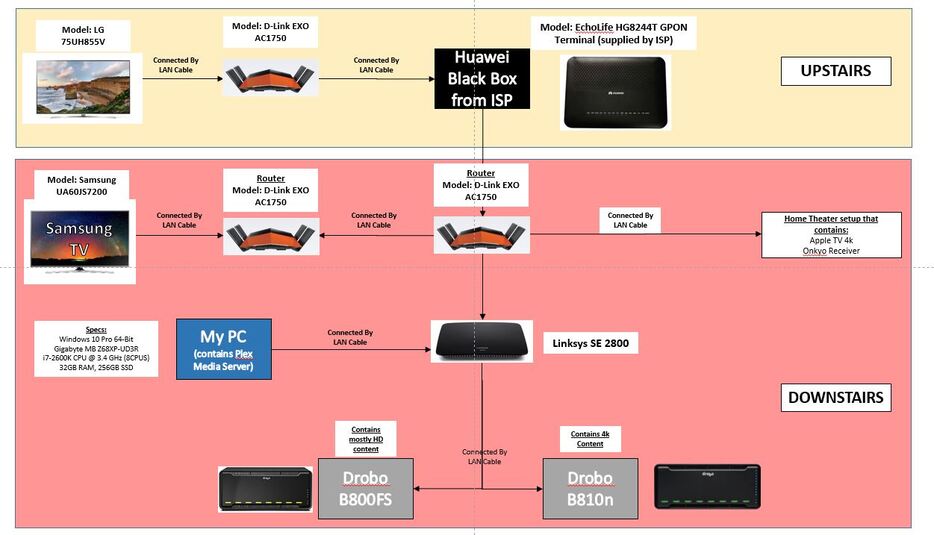
I cannot seem to determine why both the TVs have trouble playing 4k content. It seems from the testing I’ve done that there is a bottleneck somewhere which doesn’t allow for data to be transmitted fast enough. I’ve run a few documentaries in 4k which are 20 mins are 4-8GB and those seem to run fine. However, when I play a movie (which is significantly larger because of the sound as well), plex seems to buffer a LOT on both tvs. Please note that i use direct play and do not transcode.
Apologies if this is in the wrong section. I’d be very appreciative of any help I can get.
Hi. Yes unfortuantely a lot of routers. Its an old house that I don’t/can’t own so I can’t have in wall cabling done.
I believe 2 of the 3 routers act as extenders. None are APs though. There are 3 different wifi networks in my house for 3 different areas.
They’re all running stock firmware. No idea how to/what OpenWrt is, but i’m starting to read up on it.
I believe the drobos don’t use NFS, they use CFS, SMB and AFP. (B810N - Drobo)
I posted the question on reddit as well and I had a number of responses that I’m trying one by one. One thing that I have tried and that has reduced the buffering a lot is the activation of Jumbo packets! My sound is still being transcoded, so I’m working on disabling that.
The problem seems (so far) to be the TV’s LAN port being only 10/100. (or at least thats what I’m assuming. More and more things seem to point to it)
Wow, I’m amazed that’s working at all! I think before we start trying to figure out any problems with Plex it would be a good idea to maybe rejig that network a bit.
Is your Huawei box acting as the router?
As the routers are all hardwired they shouldn’t be operating as extenders or routers (so long as your Huawei box is handling routing). An extender typically uses one radio frequency as a backhaul to connect to another AP that’s supplying your Internet connection and uses another radio for clients to connect to.
Enabling Jumbo frames on the Drobo can help when transferring large amounts of data, but be aware that Plex specifically recommend it be turned off in some situations where you’re having issues with Remote Connection. Also, for it to be effective, it needs enabling on all segments of your network, so all those D-Link and Linksys boxes will need it enabling. Lastly, I’m afraid it’s very unlikely that your TVs will support jumbo frames as they only have 10/100 NICs. It may help connectivity between your Drobos and Windows PC, though.
Every D-Link or Linksys box in your network that isn’t doing any routing should be in AP mode and not doing any routing, NAT, firewall, DHCP or DNS tasks.
(This is irrelevant to your Plex issues, but unless you specifically want three different wireless networks to keep clients segregated, I’d recommend that all your APs have the same SSID and password for their wireless network. This will simplify connecting clients and also roaming as you move around your house.)
(This is irrelevant to your Plex issues, but unless you specifically want three different wireless networks to keep clients segregated, I’d recommend that all your APs have the same SSID and password for their wireless network. This will simplify connecting clients and also roaming as you move around your house.) <=== this was the dream. Unfortunately, coudn’t make it happen because I couldn’t find a tutorial. I use to be quite a noob but i’ve grown my understanding by reading tutorials. The huawei box does do all the firewalling and DHCP tasks. I do my port forwarding on it too to make my downloads work and it is the device that hands out IPs to my other devices. What it doesn’t do is transmit wi-fi which is why the d-link devices exist. I assumed once upon a time that if i gave all 3 routers the same wifi network name it would create a mesh network but i was mistaken. Devices would not automatically connect to the nearest device. I’d love to have 1 wi-fi network in the house but because of my heavy work hours I can’t research the how-to, which is why i’m turning to other plexians to help point me in the right direction.
I’m reading up more details to see if i can turn my d-link devices into APs but i’m scared. what if the lan ports stop working! so many devices are connected to it!
I’ve got a 50TB library i share with the house. I’m trying very hard to streamline stuff to make everything work smoother.
With regards to the jumbo packets, i read this thanks to someone linking me to it and I have enabled jumbo packets on the drobo and my network card (dont think the d link devices need it, but will check). The linksys switch has no settings. Its just plug and play. It only exists because i’ve connected both drobos to it with lan cables (to be able to transmit and transfer data quicker than usb).
I’m willing to rejig my network aggressively if it makes things smoother! Upon your suggestion i’m reading this online manual to see if i can create a single network that devices remain connected to when we’re roaming around.
Okay, that’s good to know. In this case none of your other network equipment (the D-Link and Linksys equipment) should be operating in router mode. If they are, you’re going to be adding multiple additional layers of NAT to your network and, more importantly, you’re going to be routing your streaming video packets as opposed to bridging them. This is much more CPU intensive for the router and that may be causing problems for you.
One SSID with the same password on all APs will allow devices to roam pretty seamlessly between networks and retain their IP address. Turning on 802.11r (fast roaming) may speed things up a bit if your APs and clients support it. But to get “real” mesh wireless you’ll need to pony up and buy Velop, Orbi, Google or similar kit. FWIW, investing in this sort of kit will likely solve all your problems, but it’s expensive. It’ll do the nice stuff like figuring out optimal signal strengths and channels, and steering clients from one AP to another based on signal strength, too.
Don’t worry, putting routers into AP mode just creates an ethernet bridge between the wired and wireless interfaces with no firewall or NATing.
“Size matters not. Look at me. Judge me by my size, do you? Hmm? Hmm.”
Jumbo frames needs to be enabled on every device in the network chain between two sending and receiving devices, and your SE 2800 doesn’t support it. It’s a layer 2 ethernet thing. If any one network segment has less 9000 byte frames enabled you will get packet fragmentation. This will further slow down your network. I don’t mean to sound dismissive, but jumbo frames is an enterprise network feature and you shouldn’t be enabling it unless you know what you’re doing. It could increase performance between your PMS and the Drobo storage back end but it won’t help with streaming to your clients (Plex’s packetiser almost certainly won’t take advantage of the Jumbo frame capability of the network).
If your cabling is in the right places I’d try to go for the following:
2x Drobos, PC, Home Theater, 2x TVs and Huawei router all connected to the Linksys SE 2800 switch
a second switch, hung off the remaining port on the SE 2800, with all your APs hung off it
don’t chain the D-Link APs connected to the second switch (like you have downstairs, with the Samsung TV at the end of the chain). Connect each D-Link AP to a separate port on the switch
This way none of your TVs or the Apple TV will be connecting through an AP/router, they’ll be directly connected via the Linksys switch. If you can’t put the D-Link EXO devices into AP mode at least this way they won’t affect your TV streaming devices. All bets are off for any wireless devices, though.
I have the Drobo B800fs, and experience has taught me that it’s not up to the task for streaming content with a high bitrate.
I would recommend performing a network throughput test to see what sorts of file transfer speeds you get there. The best I’ve ever seen from mine is 30mbps, and she will drop like a rock to 1mbps if I try doing anything more than one thing.
I can’t speak to the B800n, but I do have the 5n2, running two network interfaces in parity. There has never been an issue there, as it seems to be able to handle 100mbps read/writes at the same time.
I temporarily lost the 5n2, leaving me with only the B800fs, and I swiftly realized it couldn’t handle my watching needs. Sharing was out of the question.
Wow, there was something seriously wrong with your setup if you were seeing those sorts of speeds with a Drobo. In normal operation you should easily be able to get a steady 100MB/s out of them (that’s 100 megaBYTES per sec, not megaBITS). A few factors can affect this: general network congestion, file sharing protocol in use (NFS is faster than SMB is faster than AFP) and how full your volumes are. If you go over 80% capacity on the sort of RAID Drobo use you’ll start to see serious performance issues.
Running two network interfaces teamed requires a compatible teaming protocol (LACP or PAgP) to be implemented on the switch, which @ffhhkk’s doesn’t, unfortunately.
My B800fs is loaded with 4tb WD Reds. My experience with the speeds it provides is on point with most reviews of the unit. I welcome any way to make her move faster… but I don’t think she will. She’s just woefully underpowered. Way better serves as long term storage with low read/write needs. I use it mostly as backup to the 5n2.
The 5n2 though… that thing is a beast. Incredible multitasker.
If you are transcoding 4k, then that means your tv clients cannot direct play it.
if you are streaming to smart tv apps, then most likely the problem is the HD audio is not compatible, and/or you if you have subtitles enabled that can cause transcoding as well.
if your content is direct playing, that is good, but it means that its probably your network that can’t keep up and you need to figure out where the bottleneck(s) are and fix or remove them.