CPU is under 20% except for one spot where it hit 35% but it dropped right back down under 20%. Average is 8.98% it shows for PMS.
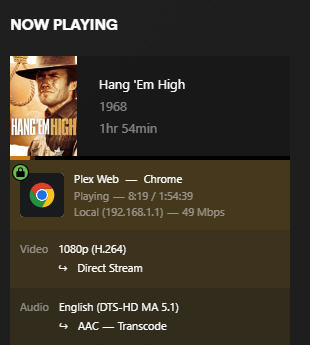
I don’t know how to tell if it is direct playing both audio and video other than clicking Details on Now Playing:
Is this what you’re looking for? Where else is this found?
I just brought up an episode from a TV series I ripped in early March, well before the migration, but not added until after migration and it is also skipping ahead in the video.
HOWEVER - I decided to do two things: 1) I logged into Synology on a different browser and launched Plex from there, and 2) I went to the media room and brought up the movie and TV episode on the Apple TV device and they both played fine in both scenarios.
It appears this might be a Chrome issue? But my Chrome is up to date so I’m not sure what to do at this point. Perhaps this is simply a browser issue??
Ok good. Now under home streaming, uncheck recommended and try 10. If that works, increase until it doesn’t or is pointless. If you don’t have a 4k monitor for example, don’t go that high.
I tried every level on that setting, all the way down to 480 and the video playback still skipped.
This is only on Chrome. I went into Firefox and left it on Maximum quality for Home Streaming (which is what I had it set to before this issue - and I believe was the default Plex put on as I don’t recall doing any settings here other than what was there) and it plays fine.
So if the video plays back fine outside of Plex, and plays fine in Firefox, that suggests that it’s a Chrome issue. My browser is up to date so there must be a setting inside Chrome and not Plex?
Here too, I already have/had that toggled on (but it’s graphics acceleration toggle, there is no hardware acceleration to toggle on or off). That said, here is what it shows when I type in chrome://gpu/
Every search I’ve seen on chrome hardware acceleration says to go to Settings / System / Use Hardware Acceleration when available. Problem is, my Chrome (which is up to date) offers no such option. Could it be a setting on my monitor itself perhaps??
This is very frustrating. Seems odd that I would need to do something specific with the monitor when it plays back fine everywhere else but in Plex using Chrome.
At least it plays back fine while watching in the media room on Roku or Apple TV devices.
Yes that’s it. It’s changed over the versions. Just needed to try and and see, it’s been responsible for other bugs over the years. Well, sorry, I have no further ideas as mine works fine and it’s not a common issue. At least it’s just your one browser. Just use firefox or whatever else to watch. It’s not a plex issue regardless.
Thank you so much for walking me through this. I just stumbled onto this in a post:
hey i found it! Its called"Graphics acceleration" now. Just search “Graphics” in the chrome settings and it will pop up. Who knows why they changed the name?!
I’ve seen two separate posts saying the same thing. Why do companies need to make it so hard? Why not say “graphics/hardware” or something to indicate it’s one in the same?