Quick question: What’s the best way to extend my current external storage to add an additional HDD to my Win10 NUC computer. I’m not really looking for a NAS type solution…yet.
I currently have an 8TB external/USB drive for movies and would like to add another. I already use the NUC’s internal SSD for TV content which has a much shorter lifespan.
What do I need to do in Plex? Just add the map to the new drive? Does Plex manage which files go to which drive, or spillover? Any manual efforts needed from me to split-up the current content?
You can go totally manual here.
Plug in the new drive.
It’ll get a new, separate drive letter.
Create some ‘general’ folders on it, for Movies, TV Shows, Music etc.
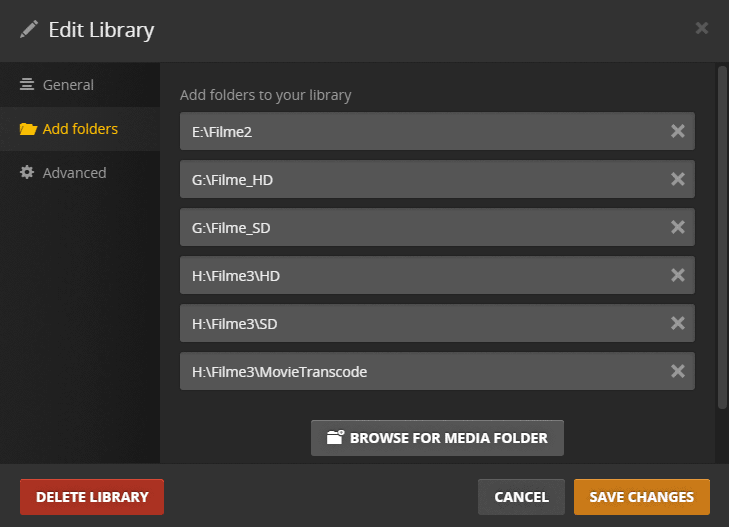
Now edit your libraries in Plex, go to the ‘Add Folders’ tab and add the drive letter and the folder name on the new drive to the existing library.
From now on, Plex will look at two locations when you tell it to ‘Scan Library Files’
Uhhhh, hmmm can you elaborate on this, because I have this exact situation, where a secondary path is now empty, and it might explain some weird issues I am having.
If a folder that has been added to a library is totally empty, then Plex assumes there is a temporary hardware issue. Erring on the safe side, Plex won’t mark items as deleted or include new items to the library.
If you have a folder which has only occasionally actual media files in it, add a small text file into it. So it is not totally empty.
No problem with the manual piece for the existing stuff. I am most curious how newly arriving content will be handled. Do I need to be explicit which drive to use, or does Plex manage this piece?
Take a look at the screenshot above. There I put in every drive letter and folder name, where I want Plex to scan for media files. And Plex will only look at these locations for media.
i.e. if you add another drive in a few month’s time, you need to edit your libraries again and add the new drive letter. https://support.plex.tv/articles/categories/plex-media-server/libraries/
Provided, that I adhere to the media naming guidelines close enough, Plex will scan the folders and find my media, fetch the appropriate metadata etc.
Hi Rick here. I had the same problem that MarkP99 had but was able to stumble upon the answer. Now that the Plex app on my controlling W7 laptop recognizes the second drive (for Movies), I cannot get the Plex app on my Roku (connected to my TV) to also see the new drive. Any help in that arena would be greatly appreciated.
Txs - Rick