I am new to Plex, and loving it. Have been curating and organizing. Everything is working pretty well except I am having trouble organizing my documentaries. I like to have them in a separate library, so I created one called “Documentaries”. I used a library type of TV Shows, which works well for most documentaries, for example the Ken Burns series, and most of Attenborough’s. However, some documentaries will only match if I put them in my Movies library (library type Movies). Examples of these are “Deep Blue, 2003”, “Spitfire, 2018”, “Chasing Coral, 2017”, “Charles Darwin and the Tree of Life, 2009”, “Attenborough’s Paradise Birds, 2015”, and “Oceans: Our Blue Planet, 2018”.
I believe the main difference is the Agent in Movies includes the Plex Movie database, which the TV Shows libraries do not have. Likewise, the Movies database does not have TheTVDB, so if I move the files from Documetaries to Movies those won’t match. I suspect that my issues could be solved by adding all agents to all library types. Is this an option or can I suggest it as an enhancement? Thanks!
Plex does not support mixing of media types (e.g. tv shows vs. movies).
There’s been a feature request once but that got little traction.
Most users simply created a movie and tv-show libraries for those or found that some of the movie-only documentaries were also listed as specials for some tv shows.
When you say “Most users simply created a movie and tv-show libraries for those”, do you mean two separate libraries (like I am doing now)? Or is there a way to have a combined movie + TV library?
Yes, I have them all matched up nicely in my movies library. The issue is that’s not where I want them. I’d like them to be with my other documentaries, which would only match up in a “TV Shows” library type. Examples of these are Ken Burn’s “The War”, Blue Planet II, Attenborough’s “Life that Glows”. Thanks
Then you name and structure them like TV Shows/Fix Match/Search Options/Agent/Personal Media - then you hand edit each ‘Show’:
A TV Show Library/
.....Ken Burns The War/
..........Season 01/
.............Ken Burns The War - S01E01 - Bla Bla.xxx
............and so on....
Your options are extremely limited - as in that’s your only option.
If you want items to match online databases - you must name and structure them like the media type in that database - if that’s not what you want - you ‘Create’ what you want and Create all the Metadata for it - by hand.
I do it myself 'cause there are times when I want exactly what you want.
I don’t have any other options - neither do you.
You do have a ‘kind of’ other option:
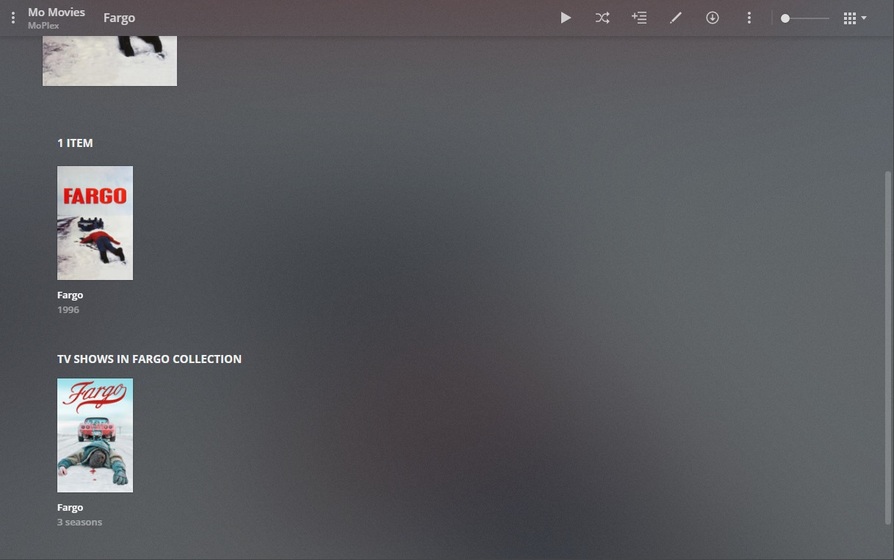
You Create a Documentary Collection in both TV Shows and Movies and you put your Documentaries in them. When viewing the Collection - you see all the Movies in the Collection - and also all the TV Shows (except on Roku - buggy - ATM):
There’s a reason I have Fargo in a Collection by itself - so the Collection will contain Fargo the TV Show as well. That’s the only way I know of to bring 'em both together under one roof and still have them match without manual intervention.
Here’s a Sci-Fi Collection of Hundreds of Movies - and also the Hundreds of Sci-Fi Shows - in the same Collection. Sure, it’s odd and clunky - but it works… until we find something else that works better.