Server Version#: Version 4.53.0
has anyone made a movie entry in the movies library that is not linked to a file but linked to a DVD/BR disk that is sitting on your shelf. A kind of dumb entry that provides all the metadata and information about the movie but requires one to play the physical disk if one wants to view it.??
Ideas? cheers
You can add “fake” entries if you wish. As long as they obey Plex naming requirements, Plex will add them to your system.
Pull a https://jell.yfish.us/ test file, name it like you would a movie, then add it to your system. Plex pulls the cover art, actor pictures, etc., just like for a “real” movie.
Pretty sure you can use an empty file as long as it has a mkv or mp4 extension. Of course, you’ll get an error if you try to play it. Edit: See OttoKerner’s note below for details.
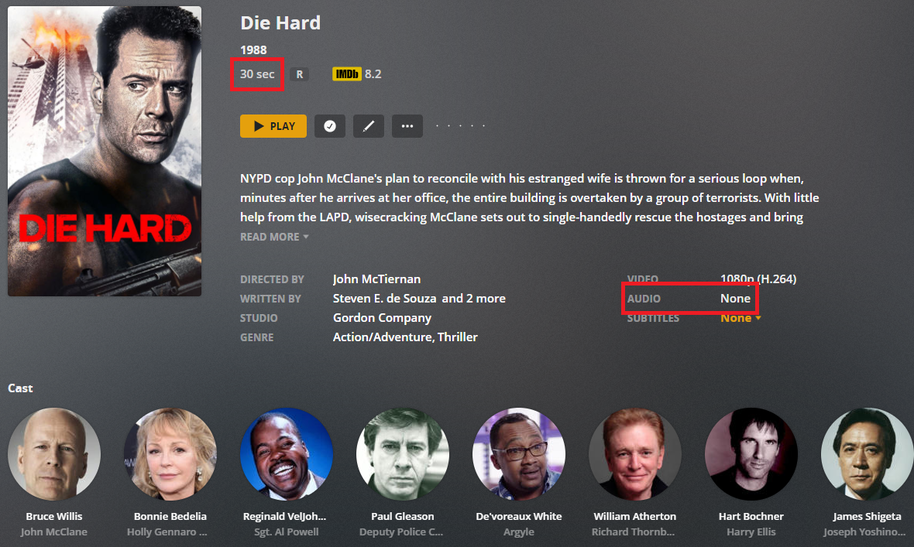
Screenshot below using one of the Jellyfish files, renamed to Die Hard (1988).mkv. Note the 30 sec duration and lack of audio.
If you want to get creative with file names, you could use something like Fake Die Hard {imdb-tt0095016}.mkv. The IMDB ID overrides the file name when matching. You must be using the new Plex Movie agent, not Plex Movie (Legacy). See Naming & Organizing Your Movie Files.
Hi there, thanks for the prompt reply. I’ll give that a go… cheers CD
You can also make do without video files at all.
Just make a text file and fill it with just the recommended file name of the movie (in order to make all those files unique).
- Create an empty text file. e.g.
Die Hard (1988).txt - Open this file in a text editor.
- Copy the file name and paste it into the editor window. Save.
- Change the file name extension from
.txtto.mkv - Profit.
3 Likes
This topic was automatically closed 90 days after the last reply. New replies are no longer allowed.
