I have reviewed instructions on the Plex documents but I still am not getting this to work. I have a TV series with three seasons. There is a bonus disc that is not related to a specific season, but rather, the show overall. How can I get Plex to get these imported? I’ve tried a number of different things but nothing is working. The seasons from the series are all fine in Plex.
What am I missing?
Do I need a Folder under the name of the series? I’ve tried several that I saw on the documentation but that didn’t work. I even tried doing it with a specific season where I created a folder there but it wouldn’t import to Plex from my Synology NAS either.
I only have about 7 bonus features so it’s not a major deal but I sure would like to get this working. I see with Movies it seems to work (though I personally didn’t try yet) but I can’t get TV bonus features into a specific folder that will reside with the TV series.
Use show-level TV extras, which should be available on most clients. This is probably a better fit for bonus content.
Name them like specials - i.e. name them like episodes from Season 0. If TVDB or TMDB (depending on the episode ordering you’re using using for your library/show) don’t have entries for your bonus content, you would have to give them an episode number that’s greater than the number of listed specials and fill out the metadata yourself.
For local extras, you may need to refresh metadata for the show, not just rescan the library/folder.
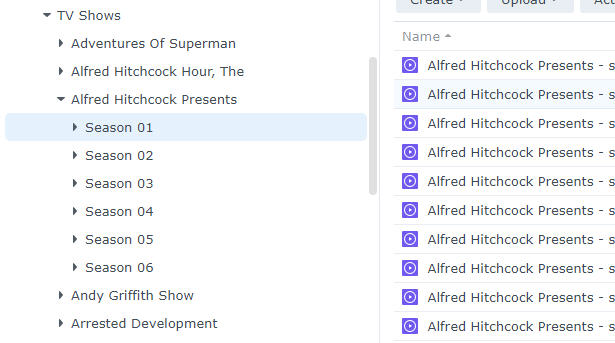
Thank you for your reply. Here is an example of what the folders look like under TV Shows in my Synology.
The episodes show up in the respective seasons in Plex just fine.
I tried creating a folder called Bonus Features, Behind The Scense, Extra_Directory_Type and even Featurettes.
I uploaded the file into said folder as I kept trying but when I did Scan File Library, it wouldn’t show up. The file I tried was called “Hanging With Batman-Extra_Type”.
I did a file scan in Plex and also did refresh metadata. Nothing is bring it in.
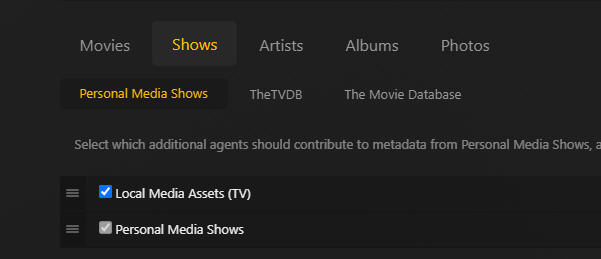
I have Local Media Assets for both Movies and TV shows checked and listed first under the Agents.
Make sure the files are properly named / organized. Some of the examples in your earlier post don’t match the official naming schema.
Plex Media Server can deal with local extras on all tiers of a show (show, season, episodes) — however not all clients can display all tiers at this point → the linked support article describes the naming schema and which clients support local extras for which tiers.
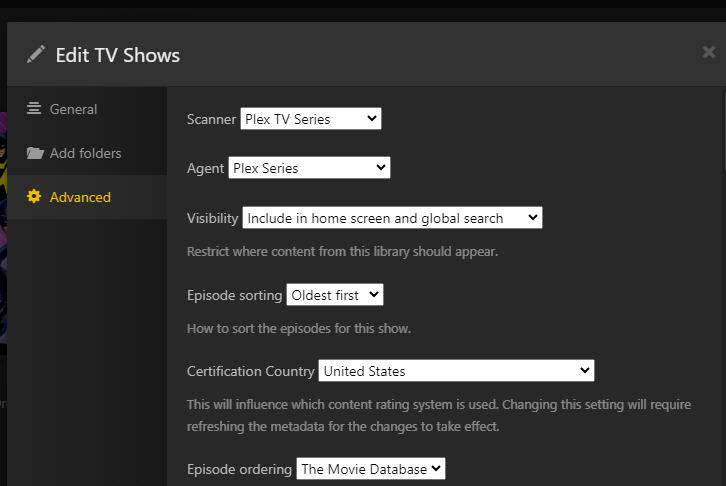
Last not least… local extras for tv shows require the Plex TV Series agent. This won’t work with legacy agents! Just mentioning this because you referred to the server-wide agent settings which only / mostly apply to the legacy agents. Current-generation agents are configured per library in that library‘s advanced preferences.
Using my capture as a guide, and a file named “Introducing Rarities.mkv”, how should I name it? I’m assuming the examples I tried as provided earlier aren’t correct?
Example
TV Shows / Game Of Thrones / Bonus Features / Game Of Thrones - Introducing Rarities-Extra_Type.mkv
As for local extras for tv shows requiring Plex TV Series agent, is that different than the attached?
Where do I find “…per library in that library’s advanced preferences?” I reviewed the link you sent but I’m not quite sure what to do or what is wrong in my current setup. I have library under settings for my Server, as well as Libraries under Manage. (When I click that, I see a list of all the folders on my NAS for Movies, TV shows, Photos, Music and so forth).
Any TV series of movies I add to my Synology and then gets added to Plex, works fine. Naming structure on episodes for example, come up fine. They match with what they should be. Naming structure such as:
Game Of Thrones / Season 01 / Game Of Thrones - s01e01 - Winter Is Coming.mkv"
Shouldn’t a folder such as below, work accordingly?
Game Of Thrones / Bonus Features / Game Of Thrones - Hanging With Batman.mkv
Or
Game Of Thrones / Bonus Features / Game Of Thrones - Hanging With Batman-Extra_Type.mkv
And if I scan library it won’t bring it in as a separate folder, nor will refresh metadata do it.
When you say "servers main page (not in Settings) - where exactly is that? What is the servers Main Page? Do you mean on my Synology? I don’t think you do. I do have “advanced” open on my Plex so I can see expanded content but I don’t see “Manage Library > Edit” I do see headings in Plex under my DS423+
Status
Settings
Manage
Under Settings I see “Library” as one of the options. (It is open to Advanced - so I can currently click Hide Advanced but I’m not doing that). I don’t see Edit.
Under Manage I see “Libraries” as one of the options. All I see is the list of folders in my Plex of various things such as Animation, Artist Concerts, Movies, Older Movies and so forth.
Sorry. I’m not grasping this at all. I’m not understanding your input. Sorry to say.
And should I change “Episode ordering” to The TVDb? Up to now, all the shows I’ve added (and there are quite a number, though far shy from a lot of users I’m sure), have worked great. Plex matches the right episode. On occasion I’ll notice it’s wrong, only to discover it was my mistake in naming the file.
So if I change to TVDb that won’t change my performance up to now and won’t affect movies since I only select TV Shows / Edit TV Shows will it?
Now, if that is updated properly per your input (thank you so much), I would sure appreciate the naming of folders and how to get Plex to see that. Here’s what I’d like to do again:
Add a folder under the TV Shows - Game Of Thrones series - and call it Bonus features?
Then the file I put in there to be named “Game Of Thrones - Batman.mkv” for example. Then scan library or refresh metadata?
Or am I still not understanding this part? I’m so sorry. I’ve learned a lot but still have a ways to go obviously. I really appreciate the input.
That’s really just relevant if you’re following a specific order and your episodes are recognized as a different episode.
No impact on performance or any other metadata. Changing this for a library will only apply to that library.
Side note… you can also switch the episode order for individual shows (usually those where you experience a particular mix-up / mismatch of episode names).
Naming should be
Subfolder mode
TV Shows  <- the folder linked to your tv-show library
  Game of Thrones
    Featurettes
      Game of Thrones - Batman.mkv
OR
Inline naming mode
TV Shows <- the folder linked to your tv-show library
  Game of Thrones
    Game of Thrones - Batman-featurette.mkv
Don’t mix the naming/organization of inline/subfolder modes!
Plex doesn’t have a concept of a folder called “Bonus Features”.
The only allowed options are – as listed in the support article:
Subfolder mode
Supported subfolder names in which Plex will look for local extras
Behind The Scenes
Deleted Scenes
Featurettes
Interviews
Scenes
Shorts
Trailers
Other
Inline naming mode
Plex will only recognize items with the following suffix as local extras
-behindthescenes
-deleted
-featurette
-interview
-scene
-short
-trailer
-other
Naming for episode-level extras is a bit more complicated (but also described in detail in the linked support article). For those, the base-name of a local extra must match / start with the exact base-name of the episode file.
I used the exact inline naming mode as you show above.
I put it under the TV Shows
Game Of Thrones folder I added the file “Game of Thrones - Batman-featurette.mkv” and it worked!
I did it for another series just to test so I added two bonus videos but this time to the Batman original series.
“Batman - Hanging with Batman-featurette.mkv”
Then did another “Batman - Holy Memorabillia Batman!-featurette.mkv”
I then refreshed the metadata once they finished uploaded to my Synology.
As you can see, they both show up now in the Batman series with the three seasons of the show episodes as well.