Use case: I have multiple libraries (one for music, one for TV shows, one for Movies). I read that collection allowed different types of media, however it seems my collections are contained within the library they were created from.
Question: is there a way to create collections that go across libraries (seems that playlists allow for that).
If the collection tag is identical on items in multiple libraries, the standard collection will show all of them together (Smart collections won’t work this way). For instance, this screenshot is from my “Harry Potter” collection, comprising movies, audiobooks, and soundtracks:
If I were to look at the Collections tag for any movie, book, or album, it looks like this:
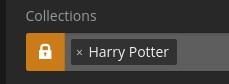
If I access this collection from the Movies library, the movies will be listed first, followed by the books and soundtracks. If I access it from the Music library, the soundtracks will be first, followed by the other two. If there were TV shows in the collection, the same would apply there.
You have to start a collection in each individual library named exactly the same in both libraries.
Say you have a Spider-Man movie collection and you want people to see any Spider-Man TV shows in the same collection.
You have to go into your TV library and create a collection named Spider-Man just like it exists in your Movie library
Now each library will show both the tv and movies in each collection
If you name it Spider Man without the dash it won’t link the two.
Thank you!
some follow-up questions:
- it doesn’t work for smart collections, correct? (ie. if I create one smart collection in each library and names it the same)
- for my use case, do you recommend collection or playlist?
No it doesn’t. Smart collections are actually just filters, and those only work inside one library.
What is your use case? I don’t think you mentioned it above.
My setting: I have 3 movie libraries (English, French, Italian), 2 tvshow libraries (English and French) and a Music library. I use labels to tag almost each media (eg. “17th century”, “story about a writer”, “story with a plot-twist”, “story with a strong female lead” etc). The kind of categories we can find on netflix.
My ideal state: Collections or playlists based on these tags that update dynamically across all libraries (and bucketing them by library of origin) so people can scroll down and ignore the language they don’t speak.
My current state: I have been tagging each item across all my libraries using labels, then create smart playlists based on the labels. These don’t go across libraries though. When it was really important to me to go across libraries, I’d filter by labels then bulk add the items to a new playlist in one library, then in the other library, filter by that same label and add to the same playlist. The issue is, these playlists are not dynamic so I have to regularly update them manually.
What next: The instructions provided by @JaysPlex have worked so I now have the option to either:
- keep my current setting (I create a “[fra/eng] topic” playlist) in one of the library and add to it from other libraries. The advantage that I have a lot less playlists so it’s easier to locate the one you are looking for.
- create an instance of a “topic” collection in each library and they will show as @Jayplex7 demonstrated. The downside of it is I have tons of collection so locating the ones I spent time curating (vs. the ones that are automatically created) is a little more tedious. The key advantage I see is better contextualized recommendations ie. for movies that are part of such a collection, I’d see the other movies in that collection as “Movies in {x} Collection” below (vs playlists would not do that).
Questions:
- which option do you recommend?
- are you planning to allow smart playlists/collections across libraries in the near future?
I think for your use case, Collections are better suited in any case. No matter whether you make “smart” or “dumb” ones.
Because you are not after a “play”-list which is then played in-order.
You are merely after pre-filtering your large library and then manually select something to watch from the reduced lineup.
I am not able to disclose any future plans.
Makes sense, collections it is, thank you!

