Adding hardware transcoding - Card found, but doesn't appear to be used?

Server Version#: 1.29.1.6316-f4cdfea9c
Player Version#: Web - Firefox

Now that prices are a bit less nuts I finally got a GPU and I’m trying to add hardware transcoding.

I believe I meet the requirements with Plex Pass (lifetime), nVidia GTX 1650, installed nVidia drivers, “Use hardware acceleration when available”, “Use hardware-accelerated video encoding”.

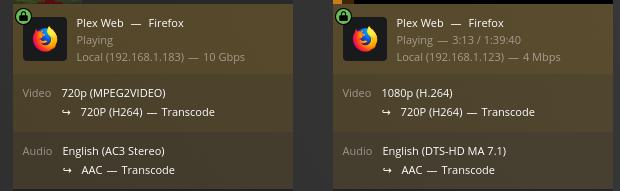
When I try and play something in a browser that will transcode, it doesn’t show the “hw” like the guides suggest:

image

The Plex Ubuntu install can see the card in lshw with driver=nvidia in the display hardware information:

$ sudo lshw -c display
  *-display
       description: VGA compatible controller
       product: TU117 [GeForce GTX 1650]
       vendor: NVIDIA Corporation
       physical id: 0
       bus info: pci@0000:09:00.0
       version: a1
       width: 64 bits
       clock: 33MHz
       capabilities: pm msi pciexpress vga_controller bus_master cap_list rom
       configuration: driver=nvidia latency=0
       resources: irq:22 memory:f8000000-f8ffffff memory:c0000000-cfffffff memory:d0000000-d1ffffff ioport:c000(size=128) memory:f9000000-f907ffff

Update install of Plex it says nVidia found:

Setting up plexmediaserver (1.29.1.6316-f4cdfea9c) ...
PlexMediaServer install: PlexMediaServer-1.29.1.6316-f4cdfea9c - Installation starting.
PlexMediaServer install: 
PlexMediaServer install: Now installing based on:
PlexMediaServer install:   Installation Type:   Update
PlexMediaServer install:   Process Control:     systemd
PlexMediaServer install:   Plex User:           plex
PlexMediaServer install:   Plex Group:          plex
PlexMediaServer install:   Video Group:         video
PlexMediaServer install:   Metadata Dir:        /var/lib/plexmediaserver/Library/Application Support
PlexMediaServer install:   Temp Directory:      /tmp 
PlexMediaServer install:   Lang Encoding:       en_US.UTF-8
PlexMediaServer install:   Processor:           Intel Core Processor (Skylake, IBRS)
PlexMediaServer install:   Intel i915 Hardware: Not found
PlexMediaServer install:   Nvidia GPU card:     Found
PlexMediaServer install:  
PlexMediaServer install: Completing final configuration.
PlexMediaServer install: Starting Plex Media Server.
PlexMediaServer install: PlexMediaServer-1.29.1.6316-f4cdfea9c - Installation successful.  Errors: 0, Warnings: 0
Processing triggers for mime-support (3.64ubuntu1) ...

The line “PlexMediaServer install: Nvidia GPU card: Found” makes me think it should be working, but it is not.

Any suggestions where to go from here? The guides I see make it sound like “magic happens” and “it just works”, but it isn’t aligning with what the guides say I should expect to see if its REALLY working properly?

Anyone have ideas?

Which nvidia drivers are installed?
What does nvidia-smi report?
What is listed in /dev/dri ?
Is plex a member of the group which owns the card nodes?

Ok, so I don’t know what all of that means but here’s the output of those:

~$ sudo nvidia-smi
Mon Oct 24 22:55:27 2022       
+-----------------------------------------------------------------------------+
| NVIDIA-SMI 515.76       Driver Version: 515.76       CUDA Version: 11.7     |
|-------------------------------+----------------------+----------------------+
| GPU  Name        Persistence-M| Bus-Id        Disp.A | Volatile Uncorr. ECC |
| Fan  Temp  Perf  Pwr:Usage/Cap|         Memory-Usage | GPU-Util  Compute M. |
|                               |                      |               MIG M. |
|===============================+======================+======================|
|   0  NVIDIA GeForce ...  Off  | 00000000:09:00.0 Off |                  N/A |
| 50%   30C    P8    N/A /  75W |     50MiB /  4096MiB |      0%      Default |
|                               |                      |                  N/A |
+-------------------------------+----------------------+----------------------+
                                                                               
+-----------------------------------------------------------------------------+
| Processes:                                                                  |
|  GPU   GI   CI        PID   Type   Process name                  GPU Memory |
|        ID   ID                                                   Usage      |
|=============================================================================|
|    0   N/A  N/A      6027      C   ...diaserver/Plex Transcoder       47MiB |
+-----------------------------------------------------------------------------+


~$ ls -lh /dev/dri
total 0
drwxr-xr-x 2 root root       100 Oct 23 13:48 by-path
crw-rw---- 1 root video 226,   0 Oct 23 13:48 card0
crw-rw---- 1 root video 226,   1 Oct 23 13:48 card1
crw-rw---- 1 root video 226, 128 Oct 23 13:48 renderD128


~$ id plex
uid=997(plex) gid=997(plex) groups=997(plex),44(video)

I don’t know what exactly you mean by “group which owns the card nodes”, but I can dig into permissions if you can help me find where to look. I’m decent with Linux administration, but I am new to setting up more than just having an X-display show on a video card.

I’m also a little confused it looks like it’s showing some process for Plex in the nvidia-smi, but Plex didn’t seem to show it as hw-transcoding and I don’t know how this may compare to what the expected output is.

Nvidia-smi is showing the transcoder as active.

|    0   N/A  N/A      6027      C   ...diaserver/Plex Transcoder 

Your Plex DEBUG logs will show nvenc and nvdec (encoder and decoder) being used with the transcoder (‘TPU’ in the logs)

If you go to activity and expand it, (refresh if needed) it will show ‘(hw)’

Still not seeing it show ‘hw’ when I expand the activity even after reloading the page.
image

I assume its the Plex Media Server log I’m looking for:

$ egrep -i 'nvenc|nvdec' Plex\ Media\ Server.log 
Oct 24, 2022 23:50:19.021 [0x7f69f8cfab38] DEBUG - [Req#323cc/Transcode] Codecs: testing h264_nvenc (encoder)
Oct 24, 2022 23:50:19.021 [0x7f69f8cfab38] DEBUG - [Req#323cc/Transcode] Codecs: hardware transcoding: testing API nvenc
Oct 24, 2022 23:50:19.129 [0x7f69f8cfab38] ERROR - [Req#323cc/Transcode] [FFMPEG] - The minimum required Nvidia driver for nvenc is 418.30 or newer
Oct 24, 2022 23:50:19.129 [0x7f69f8cfab38] WARN - [Req#323cc/Transcode] Codecs: avcodec_open2 returned -1 for encoder 'h264_nvenc'
Oct 24, 2022 23:50:19.152 [0x7f69f8cfab38] DEBUG - [Req#323cc/Transcode] Codecs: testing h264 (decoder) with hwdevice nvdec
Oct 24, 2022 23:50:19.152 [0x7f69f8cfab38] DEBUG - [Req#323cc/Transcode] Codecs: hardware transcoding: testing API nvdec
Oct 24, 2022 23:50:19.262 [0x7f69f8cfab38] DEBUG - [Req#323cc/Transcode] Codecs: testing h264_nvenc (encoder)
Oct 24, 2022 23:50:19.262 [0x7f69f8cfab38] DEBUG - [Req#323cc/Transcode] Codecs: hardware transcoding: testing API nvenc
Oct 24, 2022 23:50:19.370 [0x7f69f8cfab38] ERROR - [Req#323cc/Transcode] [FFMPEG] - The minimum required Nvidia driver for nvenc is 418.30 or newer
Oct 24, 2022 23:50:19.370 [0x7f69f8cfab38] WARN - [Req#323cc/Transcode] Codecs: avcodec_open2 returned -1 for encoder 'h264_nvenc'
Oct 24, 2022 23:50:19.404 [0x7f69f8cfab38] DEBUG - [Req#323cc/Transcode] Codecs: testing h264 (decoder) with hwdevice nvdec
Oct 24, 2022 23:50:19.404 [0x7f69f8cfab38] DEBUG - [Req#323cc/Transcode] Codecs: hardware transcoding: testing API nvdec
Oct 24, 2022 23:50:19.508 [0x7f69f8cfab38] DEBUG - [Req#323cc/Transcode] Codecs: testing h264_nvenc (encoder)
Oct 24, 2022 23:50:19.508 [0x7f69f8cfab38] DEBUG - [Req#323cc/Transcode] Codecs: hardware transcoding: testing API nvenc
Oct 24, 2022 23:50:19.586 [0x7f69f8cfab38] ERROR - [Req#323cc/Transcode] [FFMPEG] - The minimum required Nvidia driver for nvenc is 418.30 or newer
Oct 24, 2022 23:50:19.586 [0x7f69f8cfab38] WARN - [Req#323cc/Transcode] Codecs: avcodec_open2 returned -1 for encoder 'h264_nvenc'
Oct 24, 2022 23:50:19.606 [0x7f69f8cfab38] DEBUG - [Req#323cc/Transcode] Codecs: testing h264 (decoder) with hwdevice nvdec
Oct 24, 2022 23:50:19.606 [0x7f69f8cfab38] DEBUG - [Req#323cc/Transcode] Codecs: hardware transcoding: testing API nvdec
Oct 24, 2022 23:50:19.678 [0x7f69f8cfab38] DEBUG - [Req#323cc/Transcode] Codecs: testing h264_nvenc (encoder)
Oct 24, 2022 23:50:19.678 [0x7f69f8cfab38] DEBUG - [Req#323cc/Transcode] Codecs: hardware transcoding: testing API nvenc
Oct 24, 2022 23:50:19.733 [0x7f69f8cfab38] ERROR - [Req#323cc/Transcode] [FFMPEG] - The minimum required Nvidia driver for nvenc is 418.30 or newer
Oct 24, 2022 23:50:19.733 [0x7f69f8cfab38] WARN - [Req#323cc/Transcode] Codecs: avcodec_open2 returned -1 for encoder 'h264_nvenc'
Oct 24, 2022 23:50:19.751 [0x7f69f8cfab38] DEBUG - [Req#323cc/Transcode] Codecs: testing h264 (decoder) with hwdevice nvdec
Oct 24, 2022 23:50:19.751 [0x7f69f8cfab38] DEBUG - [Req#323cc/Transcode] Codecs: hardware transcoding: testing API nvdec
Oct 24, 2022 23:50:19.824 [0x7f69f8cfab38] DEBUG - [Req#323cc/Transcode] Codecs: testing h264_nvenc (encoder)
Oct 24, 2022 23:50:19.824 [0x7f69f8cfab38] DEBUG - [Req#323cc/Transcode] Codecs: hardware transcoding: testing API nvenc
Oct 24, 2022 23:50:19.894 [0x7f69f8cfab38] ERROR - [Req#323cc/Transcode] [FFMPEG] - The minimum required Nvidia driver for nvenc is 418.30 or newer
Oct 24, 2022 23:50:19.894 [0x7f69f8cfab38] WARN - [Req#323cc/Transcode] Codecs: avcodec_open2 returned -1 for encoder 'h264_nvenc'
Oct 24, 2022 23:50:19.921 [0x7f69f8cfab38] DEBUG - [Req#323cc/Transcode] Codecs: testing h264 (decoder) with hwdevice nvdec
Oct 24, 2022 23:50:19.921 [0x7f69f8cfab38] DEBUG - [Req#323cc/Transcode] Codecs: hardware transcoding: testing API nvdec
Oct 24, 2022 23:50:20.017 [0x7f69f8cfab38] DEBUG - [Req#323cc/Transcode] Codecs: testing h264_nvenc (encoder)
Oct 24, 2022 23:50:20.017 [0x7f69f8cfab38] DEBUG - [Req#323cc/Transcode] Codecs: hardware transcoding: testing API nvenc
Oct 24, 2022 23:50:20.085 [0x7f69f8cfab38] ERROR - [Req#323cc/Transcode] [FFMPEG] - The minimum required Nvidia driver for nvenc is 418.30 or newer
Oct 24, 2022 23:50:20.085 [0x7f69f8cfab38] WARN - [Req#323cc/Transcode] Codecs: avcodec_open2 returned -1 for encoder 'h264_nvenc'
Oct 24, 2022 23:50:20.134 [0x7f69f8cfab38] DEBUG - [Req#323cc/Transcode] Codecs: testing h264 (decoder) with hwdevice nvdec
Oct 24, 2022 23:50:20.134 [0x7f69f8cfab38] DEBUG - [Req#323cc/Transcode] Codecs: hardware transcoding: testing API nvdec
Oct 24, 2022 23:50:24.180 [0x7f69f910bb38] DEBUG - [Req#324ae/Transcode] TPU: hardware transcoding: using hardware decode accelerator nvdec
Oct 24, 2022 23:50:24.180 [0x7f69f910bb38] DEBUG - [Req#324ae/Transcode] TPU: hardware transcoding: final decoder: nvdec, final encoder: 
Oct 24, 2022 23:50:24.180 [0x7f69f910bb38] DEBUG - [Req#324ae/Transcode/JobRunner] Job running: CUDA_CACHE_PATH="/var/lib/plexmediaserver/Library/Application Support/Plex Media Server/Cache/Shaders/CUDA" FFMPEG_EXTERNAL_LIBS='/var/lib/plexmediaserver/Library/Application\ Support/Plex\ Media\ Server/Codecs/c4efa15-4387-linux-x86_64/' X_PLEX_TOKEN=xxxxxxxxxxxxxxxxxxxx4df1-9689-49ed9e9453a1 "/usr/lib/plexmediaserver/Plex Transcoder" -codec:0 h264 -hwaccel:0 nvdec -hwaccel_fallback_threshold:0 10 -threads:0 1 -hwaccel_device:0 cuda -codec:1 dca -analyzeduration 20000000 -probesize 20000000 -i "/mnt/plexmedia/movies/matt_sam/Turning Red HD.mkv" -filter_complex "[0:0]scale=w=1280:h=720:force_divisible_by=4[0];[0]format=pix_fmts=yuv420p|nv12[1]" -map "[1]" -metadata:s:0 language=eng -codec:0 libx264 -crf:0 23 -maxrate:0 3676k -bufsize:0 7352k -r:0 23.975999999999999 -preset:0 veryfast -x264opts:0 subme=0:me_range=4:rc_lookahead=10:me=dia:no_chroma_me:8x8dct=0:partitions=none -force_key_frames:0 "expr:gte(t,n_forced*3)" -filter_complex "[0:1] aresample=async=1:ocl='stereo':rematrix_maxval=0.000000dB:osr=48000[2]" -map "[2]" -metadata:s:1 language=eng -codec:1 aac -b:1 119k -f dash -seg_duration 3 -dash_segment_type mp4 -init_seg_name 'init-stream$RepresentationID$.m4s' -media_seg_name 'chunk-stream$RepresentationID$-$Number%05d$.m4s' -window_size 5 -delete_removed false -skip_to_segment 1 -time_delta 0.0625 -manifest_name "http://127.0.0.1:32400/video/:/transcode/session/qr1ekssydwbyi1tb0ccxqcx3/9704323b-f9f4-4c9e-a7cf-ae766d893ea0/manifest?X-Plex-Http-Pipeline=infinite" -avoid_negative_ts disabled -map_metadata -1 -map_chapters -1 dash -start_at_zero -copyts -vsync cfr -init_hw_device cuda=cuda: -filter_hw_device cuda -y -nostats -loglevel quiet -loglevel_plex error -progressurl http://127.0.0.1:32400/video/:/transcode/session/qr1ekssydwbyi1tb0ccxqcx3/9704323b-f9f4-4c9e-a7cf-ae766d893ea0/progress
Oct 24, 2022 23:55:50.866 [0x7f69ed488b38] DEBUG - [Req#34db3/Transcode] Codecs: testing h264_nvenc (encoder)
Oct 24, 2022 23:55:50.867 [0x7f69ed488b38] DEBUG - [Req#34db3/Transcode] Codecs: hardware transcoding: testing API nvenc
Oct 24, 2022 23:55:50.981 [0x7f69ed488b38] ERROR - [Req#34db3/Transcode] [FFMPEG] - The minimum required Nvidia driver for nvenc is 418.30 or newer
Oct 24, 2022 23:55:50.981 [0x7f69ed488b38] WARN - [Req#34db3/Transcode] Codecs: avcodec_open2 returned -1 for encoder 'h264_nvenc'
Oct 24, 2022 23:55:51.033 [0x7f69ed488b38] DEBUG - [Req#34db3/Transcode] Codecs: testing mpeg2video (decoder) with hwdevice nvdec
Oct 24, 2022 23:55:51.033 [0x7f69ed488b38] DEBUG - [Req#34db3/Transcode] Codecs: hardware transcoding: testing API nvdec
Oct 24, 2022 23:55:51.255 [0x7f69ed488b38] DEBUG - [Req#34db3/Transcode] Codecs: testing h264_nvenc (encoder)
Oct 24, 2022 23:55:51.255 [0x7f69ed488b38] DEBUG - [Req#34db3/Transcode] Codecs: hardware transcoding: testing API nvenc
Oct 24, 2022 23:55:51.340 [0x7f69ed488b38] ERROR - [Req#34db3/Transcode] [FFMPEG] - The minimum required Nvidia driver for nvenc is 418.30 or newer
Oct 24, 2022 23:55:51.340 [0x7f69ed488b38] WARN - [Req#34db3/Transcode] Codecs: avcodec_open2 returned -1 for encoder 'h264_nvenc'
Oct 24, 2022 23:55:51.363 [0x7f69ed488b38] DEBUG - [Req#34db3/Transcode] Codecs: testing mpeg2video (decoder) with hwdevice nvdec
Oct 24, 2022 23:55:51.363 [0x7f69ed488b38] DEBUG - [Req#34db3/Transcode] Codecs: hardware transcoding: testing API nvdec
Oct 24, 2022 23:55:51.526 [0x7f69ed285b38] DEBUG - [Req#34ddb/Transcode] TPU: hardware transcoding: using hardware decode accelerator nvdec
Oct 24, 2022 23:55:51.526 [0x7f69ed285b38] DEBUG - [Req#34ddb/Transcode] TPU: hardware transcoding: final decoder: nvdec, final encoder: 
Oct 24, 2022 23:55:51.526 [0x7f69ed285b38] DEBUG - [Req#34ddb/Transcode/JobRunner] Job running: CUDA_CACHE_PATH="/var/lib/plexmediaserver/Library/Application Support/Plex Media Server/Cache/Shaders/CUDA" FFMPEG_EXTERNAL_LIBS='/var/lib/plexmediaserver/Library/Application\ Support/Plex\ Media\ Server/Codecs/c4efa15-4387-linux-x86_64/' X_PLEX_TOKEN=xxxxxxxxxxxxxxxxxxxx4df1-9689-49ed9e9453a1 "/usr/lib/plexmediaserver/Plex Transcoder" -codec:0 mpeg2video -hwaccel:0 nvdec -hwaccel_fallback_threshold:0 10 -threads:0 1 -hwaccel_device:0 cuda -codec:1 ac3 -live_start_index 0 -probesize 20000000 -i "http://127.0.0.1:32400/livetv/sessions/d1d751bf-da71-4b6e-8f3f-8793284a4681/9b7sjzppv97d1ak0aeramj3e/index.m3u8?offset=12.771944&X-Plex-Incomplete-Segments=1&X-Plex-Token=xxxxxxxxxxxxxxxxxxxx" -filter_complex "[0:0]scale=w=1280:h=720:force_divisible_by=4[0];[0]format=pix_fmts=yuv420p|nv12[1]" -map "[1]" -codec:0 libx264 -crf:0 16 -r:0 59.939999999999998 -preset:0 veryfast -x264opts:0 subme=0:me_range=4:rc_lookahead=10:me=dia:no_chroma_me:8x8dct=0:partitions=none -force_key_frames:0 "expr:gte(t,n_forced*1)" -filter_complex "[0:1] aresample=async=1:ocl='stereo':rematrix_maxval=0.000000dB:osr=48000[2]" -map "[2]" -metadata:s:1 language=eng -codec:1 aac -b:1 256k -f dash -seg_duration 1 -dash_segment_type mp4 -init_seg_name 'init-stream$RepresentationID$.m4s' -media_seg_name 'chunk-stream$RepresentationID$-$Number%05d$.m4s' -window_size 5 -delete_removed false -time_delta 0.0625 -manifest_name "http://127.0.0.1:32400/video/:/transcode/session/8yz4g6yy99wilobc1np34ai3/cbb75e09-3908-44aa-bd87-942bb95a0f4a/manifest?X-Plex-Http-Pipeline=infinite" -map_metadata -1 -map_chapters -1 dash -init_hw_device cuda=cuda: -filter_hw_device cuda -y -nostats -loglevel quiet -loglevel_plex error -xioerror -progressurl http://127.0.0.1:32400/video/:/transcode/session/8yz4g6yy99wilobc1np34ai3/cbb75e09-3908-44aa-bd87-942bb95a0f4a/progress

But I installed the 515 driver, so that’s 418 or newer even though the error says it needs newer?

$ sudo nvidia-smi
Tue Oct 25 00:01:31 2022       
+-----------------------------------------------------------------------------+
| NVIDIA-SMI 515.76       Driver Version: 515.76       CUDA Version: 11.7     |
|-------------------------------+----------------------+----------------------+
| GPU  Name        Persistence-M| Bus-Id        Disp.A | Volatile Uncorr. ECC |
| Fan  Temp  Perf  Pwr:Usage/Cap|         Memory-Usage | GPU-Util  Compute M. |
|                               |                      |               MIG M. |
|===============================+======================+======================|
|   0  NVIDIA GeForce ...  Off  | 00000000:09:00.0 Off |                  N/A |
| 50%   30C    P8    N/A /  75W |     97MiB /  4096MiB |      0%      Default |
|                               |                      |                  N/A |
+-------------------------------+----------------------+----------------------+
                                                                               
+-----------------------------------------------------------------------------+
| Processes:                                                                  |
|  GPU   GI   CI        PID   Type   Process name                  GPU Memory |
|        ID   ID                                                   Usage      |
|=============================================================================|
|    0   N/A  N/A      6328      C   ...diaserver/Plex Transcoder       47MiB |
|    0   N/A  N/A      6421      C   ...diaserver/Plex Transcoder       47MiB |
+-----------------------------------------------------------------------------+
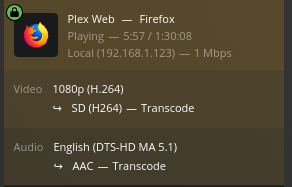
Here is a test file.

Create an Other Videos/Home videos library section for it.
I recommend playing at 1080p resolution in your browser

To confirm - All 3 of your transcoder settings for hardware are enabled ?
(Show Advanced)

One thing to be advised of. It will not show (hw) if you’re burning subtitles even though it will for part of the process.

This is why I’m sharing a file which is known to yield the desired results.

I think the settings are all enabled correctly under Settings > Transcoder.

Trying to run the test file transcoding to 1080P, it seems to be maxing out my low-power Xeon CPU and can’t keep up buffering a ton.

Also apparently with that testfile I see no process in the nvidia thing?

+-----------------------------------------------------------------------------+
| NVIDIA-SMI 515.76       Driver Version: 515.76       CUDA Version: 11.7     |
|-------------------------------+----------------------+----------------------+
| GPU  Name        Persistence-M| Bus-Id        Disp.A | Volatile Uncorr. ECC |
| Fan  Temp  Perf  Pwr:Usage/Cap|         Memory-Usage | GPU-Util  Compute M. |
|                               |                      |               MIG M. |
|===============================+======================+======================|
|   0  NVIDIA GeForce ...  Off  | 00000000:09:00.0 Off |                  N/A |
| 50%   30C    P8    N/A /  75W |      3MiB /  4096MiB |      0%      Default |
|                               |                      |                  N/A |
+-------------------------------+----------------------+----------------------+
                                                                               
+-----------------------------------------------------------------------------+
| Processes:                                                                  |
|  GPU   GI   CI        PID   Type   Process name                  GPU Memory |
|        ID   ID                                                   Usage      |
|=============================================================================|
|  No running processes found                                                 |
+-----------------------------------------------------------------------------+
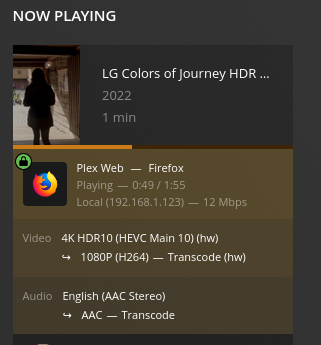
Though I’ve read some things claiming the GTX1650 may not support 4K transcoding too, so maybe for me that’s a bad test. I’m not sure I own anything capable of 4K playback and I know I don’t own anything capable of reading a 4K disc and I don’t own any 4K media.

The other ones I’ve posted as tests have been 1080P BluRay rips (like Turning Red) from my DVD/BluRay collection and/or Live TV with a HDHomeRun.

It is supported:

I am using version 510 of the Nvidia libraries.

Are you using the new opensource drivers which released as of version 515 ?

Those are an unknown to me. I know the proprietary drivers work.

The package was Ubuntu “nvidia-headless-515” on Ubuntu 20.04.5 LTS (Focal Fossa).

$ apt list --installed | grep nvidia

WARNING: apt does not have a stable CLI interface. Use with caution in scripts.

libnvidia-cfg1-515/focal-updates,focal-security,now 515.76-0ubuntu0.20.04.1 amd64 [installed,automatic]
libnvidia-compute-515/focal-updates,focal-security,now 515.76-0ubuntu0.20.04.1 amd64 [installed,automatic]
nvidia-compute-utils-515/focal-updates,focal-security,now 515.76-0ubuntu0.20.04.1 amd64 [installed,automatic]
nvidia-dkms-515/focal-updates,focal-security,now 515.76-0ubuntu0.20.04.1 amd64 [installed,automatic]
nvidia-headless-515/focal-updates,focal-security,now 515.76-0ubuntu0.20.04.1 amd64 [installed]
nvidia-headless-no-dkms-515/focal-updates,focal-security,now 515.76-0ubuntu0.20.04.1 amd64 [installed,automatic]
nvidia-kernel-common-515/focal-updates,focal-security,now 515.76-0ubuntu0.20.04.1 amd64 [installed,automatic]
nvidia-kernel-source-515/focal-updates,focal-security,now 515.76-0ubuntu0.20.04.1 amd64 [installed,automatic]
nvidia-utils-515/focal-updates,focal-security,now 515.76-0ubuntu0.20.04.1 amd64 [installed]

I know there’s a different package with “open” in the name, but I don’t know the difference vs the one without “open” in the name.

I’ve also heard some claims the support matrix for the 1650 might be “wrong” though it seems vague. This is the specific card I got: https://www.amazon.com/gp/product/B0881YZJ45

Part of me wants to try a 1660 if I can find one small enough to fit my chassis (the linked one BARELY fit) and see if that makes some difference.

We have a GT1050 in our lab. That’s more than enough for HEVC HDR.
Your current card has plenty of power.
I use a P2200 and run out of upload long before I run out of GPU :slight_smile:

After installing the drivers, did you rebuild the initramfs and reboot the host?

I did reboot the host, I think (assume?) it rebuilt the initramfs as part of the auto package install. I did see it went from some generic “gfx” to “nvidia” when I look at lshw for what driver it lists being used, which lead me to believe it is working correctly.

Its actually a libvirt VM with PCIe passthru for direct exclusive access to the PCIe GPU card so I’m not opposed to doing a backup and trying to install a different driver, even if it all explodes its easy to restore the main disk image.

Did you get the drivers from nVidia’s site directly or a repository? I figured the ones in the repo ought to be okay. I see there is also a 510 driver offered I could try removing what I have and installing that instead.

I got my drivers from the Ubuntu repo. (I don’t like .run files)

Passing a GPU through to a VM is always tricky business. You have to make sure the host isn’t claiming it along the way.

I use ESXi and in my system, renderD128 and renderD129 are reversed.
Is that possible on your machine too?

I did have to manually configure the host so the PCIe device was attached to a “vfio-pci stub” driver and wouldn’t be claimed by the host (it wouldn’t permit attaching/passing until I did that) so I’m reasonably confident the host is not intercepting it. I also had to learn about IOMMU groups and move a USB card (unrelated VM) to a separate slot so I could pass thru just the GPU by itself, because apparently libvirt passes all slots in a “group” to the VM selected “all or nothing”.

I’ll have to learn what renderD128 and renderD129 are. Anything is possible for things I’ve not learned yet.

If there’s a good way to test GPU access/use separate from Plex I’d be up for that too, but I don’t know what else to try offhand as a sanity check. It wouldn’t be my first choice, but I could also put the VM image onto a separate disk and temporarily boot Plex Ubuntu directly on the bare metal as a test to prove it has nothing to do with virtualization.

these are the nodes in /dev/dri which the kernel enumerates when the card is seen and rendering device (the GPU card) established.

can you confirm the card is indeed coming through to the kernel?

[chuck@glockner pci:nvidia.2006]$ ls -la
total 0
drwxr-xr-x  2 root root    0 Oct 23 23:23 ./
drwxr-xr-x 34 root root    0 Oct 23 23:23 ../
lrwxrwxrwx  1 root root    0 Oct 23 23:23 0000:07:00.0 -> ../../../../devices/pci0000:00/0000:00:03.0/0000:07:00.0/
--w-------  1 root root 4096 Oct 24 21:14 bind
lrwxrwxrwx  1 root root    0 Oct 24 21:14 module -> ../../../../module/nvidia/
--w-------  1 root root 4096 Oct 24 21:14 new_id
--w-------  1 root root 4096 Oct 24 21:14 remove_id
--w-------  1 root root 4096 Oct 23 23:23 uevent
--w-------  1 root root 4096 Oct 24 21:14 unbind
[chuck@glockner pci:nvidia.2007]$ pwd
/sys/module/nvidia/drivers/pci:nvidia
[chuck@glockner pci:nvidia.2008]$

Looks like it.

matthew@plex:/sys/module/nvidia/drivers/pci:nvidia$ ls -la
total 0
drwxr-xr-x  2 root root    0 Oct 25 01:16 .
drwxr-xr-x 28 root root    0 Oct 25 01:16 ..
lrwxrwxrwx  1 root root    0 Oct 25 01:16 0000:09:00.0 -> ../../../../devices/pci0000:00/0000:00:02.7/0000:09:00.0
--w-------  1 root root 4096 Oct 25 01:16 bind
lrwxrwxrwx  1 root root    0 Oct 25 01:16 module -> ../../../../module/nvidia
--w-------  1 root root 4096 Oct 25 01:16 new_id
--w-------  1 root root 4096 Oct 25 01:16 remove_id
--w-------  1 root root 4096 Oct 25 01:16 uevent
--w-------  1 root root 4096 Oct 25 01:16 unbind

Restart PMS
Ensure DEBUG logging is enabled.
Start to play the video I gave you
After 30 seconds, stop playback
Download then attach the Logs ZIP file please

Debug=on
Verbose=off
Restarted PMS
Played 30 seconds into the sample LG 4K video (buffered ~2 times to total file is slightly longer) and then stopped.

Plex Media Server Logs_2022-10-25_01-59-40.zip (3.3 MB)

Glad to try any other ideas you have or learn what I’m missing.

This confirms the linkage isn’t working.

Oct 25, 2022 01:55:33.808 [0x7f17156e1b38] DEBUG - [Req#19d/Transcode] TPU: hardware transcoding: enabled, but no hardware decode accelerator found
Oct 25, 2022 01:55:33.809 [0x7f17156e1b38] DEBUG - [Req#19d/Transcode] [Universal] Using local file path instead of URL: /mnt/plexmedia/test_files/LG Colors of Journey HDR UHD 4K Demo.mkv
Oct 25, 2022 01:55:33.809 [0x7f17156e1b38] DEBUG - [Req#19d/Transcode] TPU: hardware transcoding: final decoder: , final encoder: 
Oct 25, 2022 01:55:33.809 [0x7f17156e1b38] DEBUG - [Req#19d/Transcode/JobRunner] Job running: FFMPEG_EXTERNAL_LIBS='/var/lib/plexmediaserver/Library/Application\ Support/Plex\ Media\ Server/Codecs/c4efa15-4387-linux-x86_64/'

Further, in your logs,

Oct 25, 2022 01:55:33.495 [0x7f17158e4b38] ERROR - [Req#18b/Transcode] [FFMPEG] - Cannot load libnvidia-encode.so.1
Oct 25, 2022 01:55:33.495 [0x7f17158e4b38] ERROR - [Req#18b/Transcode] [FFMPEG] - The minimum required Nvidia driver for nvenc is 418.30 or newer
Oct 25, 2022 01:55:33.495 [0x7f17158e4b38] WARN - [Req#18b/Transcode] Codecs: avcodec_open2 returned -1 for encoder 'h264_nvenc'
Oct 25, 2022 01:55:33.522 [0x7f17158e4b38] DEBUG - [Req#18b/Transcode] MDE: Cannot direct stream video stream due to profile or setting limitations
Oct 25, 2022 01:55:33.522 [0x7f17158e4b38] DEBUG - [Req#18b/Transcode] Codecs: testing hevc (decoder) with hwdevice vaapi
Oct 25, 2022 01:55:33.522 [0x7f17158e4b38] DEBUG - [Req#18b/Transcode] Codecs: hardware transcoding: testing API vaapi
Oct 25, 2022 01:55:33.523 [0x7f17158e4b38] ERROR - [Req#18b/Transcode] [FFMPEG] - Failed to initialise VAAPI connection: -1 (unknown libva error).
Oct 25, 2022 01:55:33.523 [0x7f17158e4b38] DEBUG - [Req#18b/Transcode] Codecs: hardware transcoding: opening hw device failed - probably not supported by this system, error: I/O error
Oct 25, 2022 01:55:33.523 [0x7f17158e4b38] DEBUG - [Req#18b/Transcode] Could not create hardware context for hevc
Oct 25, 2022 01:55:33.523 [0x7f17158e4b38] DEBUG - [Req#18b/Transcode] Codecs: testing hevc (decoder) with hwdevice nvdec
Oct 25, 2022 01:55:33.523 [0x7f17158e4b38] DEBUG - [Req#18b/Transcode] Codecs: hardware transcoding: testing API nvdec
Oct 25, 2022 01:55:33.523 [0x7f17158e4b38] DEBUG - [Req#18b/Transcode] [FFMPEG] - Loaded lib: libcuda.so.1
Oct 25, 2022 01:55:33.523 [0x7f17158e4b38] DEBUG - [Req#18b/Transcode] [FFMPEG] - Loaded sym: cuInit

One of the Nvidia modules you have is not correct or missing.
You do have something loaded because they did start.

Oct 25, 2022 01:55:33.523 [0x7f17158e4b38] DEBUG - [Req#18b/Transcode] Codecs: hardware transcoding: testing API nvdec
Oct 25, 2022 01:55:33.523 [0x7f17158e4b38] DEBUG - [Req#18b/Transcode] [FFMPEG] - Loaded lib: libcuda.so.1
Oct 25, 2022 01:55:33.523 [0x7f17158e4b38] DEBUG - [Req#18b/Transcode] [FFMPEG] - Loaded sym: cuInit
Oct 25, 2022 01:55:33.523 [0x7f17158e4b38] DEBUG - [Req#18b/Transcode] [FFMPEG] - Loaded sym: cuDeviceGetCount
Oct 25, 2022 01:55:33.523 [0x7f17158e4b38] DEBUG - [Req#18b/Transcode] [FFMPEG] - Loaded sym: cuDeviceGet
Oct 25, 2022 01:55:33.523 [0x7f17158e4b38] DEBUG - [Req#18b/Transcode] [FFMPEG] - Loaded sym: cuDeviceGetAttribute
Oct 25, 2022 01:55:33.523 [0x7f17158e4b38] DEBUG - [Req#18b/Transcode] [FFMPEG] - Loaded sym: cuDeviceGetName

Here is the complete Nvidia version 510 driver set I have installed.
I also have a few residual 470’s but have excluded them from the list.

Care to confirm you have 510 or 515 for each module I have listed here?
I’m not sure which module you’re missing.

[chuck@glockner ~.2002]$ dpkg -l | grep nvidia | grep -v 470
ii  libnvidia-cfg1-510-server:amd64       510.85.02-0ubuntu0.20.04.1        amd64        NVIDIA binary OpenGL/GLX configuration library
ii  libnvidia-common-510-server           510.85.02-0ubuntu0.20.04.1        all          Shared files used by the NVIDIA libraries
ii  libnvidia-compute-510-server:amd64    510.85.02-0ubuntu0.20.04.1        amd64        NVIDIA libcompute package
ii  libnvidia-decode-510-server:amd64     510.85.02-0ubuntu0.20.04.1        amd64        NVIDIA Video Decoding runtime libraries
ii  libnvidia-encode-510-server:amd64     510.85.02-0ubuntu0.20.04.1        amd64        NVENC Video Encoding runtime library
ii  libnvidia-extra-510-server:amd64      510.85.02-0ubuntu0.20.04.1        amd64        Extra libraries for the NVIDIA Server Driver
ii  libnvidia-fbc1-510-server:amd64       510.85.02-0ubuntu0.20.04.1        amd64        NVIDIA OpenGL-based Framebuffer Capture runtime library
ii  libnvidia-gl-510-server:amd64         510.85.02-0ubuntu0.20.04.1        amd64        NVIDIA OpenGL/GLX/EGL/GLES GLVND libraries and Vulkan ICD
ii  libnvidia-ml-dev                      10.1.243-3                        amd64        NVIDIA Management Library (NVML) development files
ii  nvidia-compute-utils-510-server       510.85.02-0ubuntu0.20.04.1        amd64        NVIDIA compute utilities
ii  nvidia-cuda-dev                       10.1.243-3                        amd64        NVIDIA CUDA development files
ii  nvidia-cuda-doc                       10.1.243-3                        all          NVIDIA CUDA and OpenCL documentation
ii  nvidia-cuda-gdb                       10.1.243-3                        amd64        NVIDIA CUDA Debugger (GDB)
ii  nvidia-cuda-toolkit                   10.1.243-3                        amd64        NVIDIA CUDA development toolkit
ii  nvidia-dkms-510-server                510.85.02-0ubuntu0.20.04.1        amd64        NVIDIA DKMS package
ii  nvidia-driver-510-server              510.85.02-0ubuntu0.20.04.1        amd64        NVIDIA Server Driver metapackage
ii  nvidia-kernel-common-510-server       510.85.02-0ubuntu0.20.04.1        amd64        Shared files used with the kernel module
ii  nvidia-kernel-source-510-server       510.85.02-0ubuntu0.20.04.1        amd64        NVIDIA kernel source package
ii  nvidia-opencl-dev:amd64               10.1.243-3                        amd64        NVIDIA OpenCL development files
ii  nvidia-profiler                       10.1.243-3                        amd64        NVIDIA Profiler for CUDA and OpenCL
ii  nvidia-utils-510-server               510.85.02-0ubuntu0.20.04.1        amd64        NVIDIA Server Driver support binaries
ii  nvidia-visual-profiler                10.1.243-3                        amd64        NVIDIA Visual Profiler for CUDA and OpenCL
ii  xserver-xorg-video-nvidia-510-server  510.85.02-0ubuntu0.20.04.1        amd64        NVIDIA binary Xorg driver
[chuck@glockner ~.2003]$

Personally, I would do the following:

  1. Create a test server on the host and avoid the VM.
  2. When the test (development) server works then migrate it into the VM

This way, you’ve avoided any complexity the VM introduces.

1 Like

AHA!

That’s a LOT more packages than I have for the 515 driver installed…and I bet that’s it. I probably just didn’t know which others I need. I don’t think I need most of them (gl is 3D stuff, dev is for building software, cuda is compute, xorg is for a desktop install normally) but I definitely needed the encoder/decoder libraries which apparently are not installed by default.

What I had:

~$ sudo dpkg -l | grep nvidia
ii  gpustat                               0.6.0-1                           all          pretty nvidia device monitor
ii  libnvidia-cfg1-515:amd64              515.76-0ubuntu0.20.04.1           amd64        NVIDIA binary OpenGL/GLX configuration library
ii  libnvidia-compute-515:amd64           515.76-0ubuntu0.20.04.1           amd64        NVIDIA libcompute package
ii  nvidia-compute-utils-515              515.76-0ubuntu0.20.04.1           amd64        NVIDIA compute utilities
ii  nvidia-dkms-515                       515.76-0ubuntu0.20.04.1           amd64        NVIDIA DKMS package
ii  nvidia-headless-515                   515.76-0ubuntu0.20.04.1           amd64        NVIDIA headless metapackage
ii  nvidia-headless-no-dkms-515           515.76-0ubuntu0.20.04.1           amd64        NVIDIA headless metapackage - no DKMS
ii  nvidia-kernel-common-515              515.76-0ubuntu0.20.04.1           amd64        Shared files used with the kernel module
ii  nvidia-kernel-source-515              515.76-0ubuntu0.20.04.1           amd64        NVIDIA kernel source package
ii  nvidia-utils-515                      515.76-0ubuntu0.20.04.1           amd64        NVIDIA driver support binaries

I think that gave me the magic missing critical libraries:

~$ sudo apt-get install libnvidia-decode-515 libnvidia-encode-515

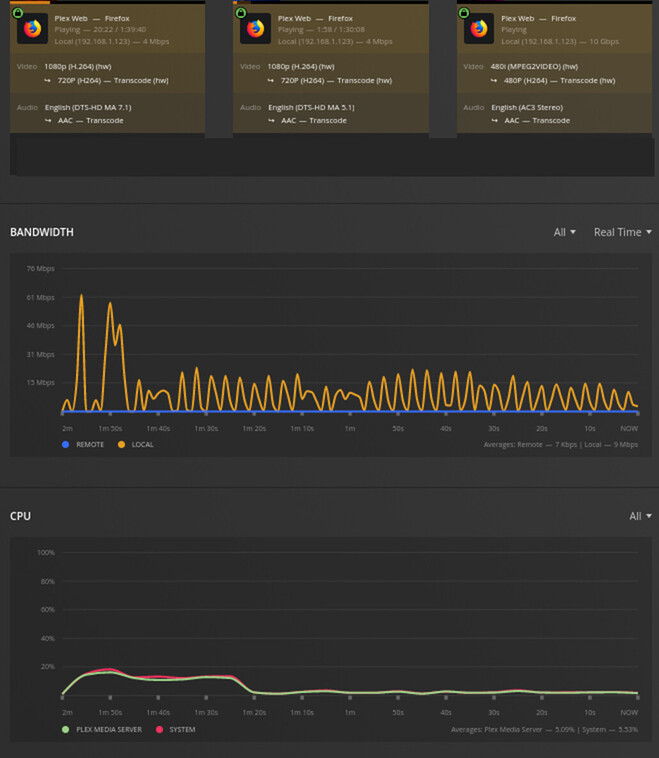
And now…it works as advertised!

Also now my CPU utilization is practically zero while transcoding even that 4K stream, and zero buffering!

I also tried 2 BluRays and a HDHomeRun TV stream, still only <20% peak CPU use!

Also nvidia-smi now shows more resources on the GPU being consumed

~$ nvidia-smi 
Tue Oct 25 03:41:08 2022       
+-----------------------------------------------------------------------------+
| NVIDIA-SMI 515.76       Driver Version: 515.76       CUDA Version: 11.7     |
|-------------------------------+----------------------+----------------------+
| GPU  Name        Persistence-M| Bus-Id        Disp.A | Volatile Uncorr. ECC |
| Fan  Temp  Perf  Pwr:Usage/Cap|         Memory-Usage | GPU-Util  Compute M. |
|                               |                      |               MIG M. |
|===============================+======================+======================|
|   0  NVIDIA GeForce ...  Off  | 00000000:09:00.0 Off |                  N/A |
| 50%   37C    P2    N/A /  75W |    473MiB /  4096MiB |      1%      Default |
|                               |                      |                  N/A |
+-------------------------------+----------------------+----------------------+
                                                                               
+-----------------------------------------------------------------------------+

| Processes:                                                                  |
|  GPU   GI   CI        PID   Type   Process name                  GPU Memory |
|        ID   ID                                                   Usage      |
|=============================================================================|
|    0   N/A  N/A      9952      C   ...diaserver/Plex Transcoder      189MiB |
|    0   N/A  N/A     10031      C   ...diaserver/Plex Transcoder      189MiB |
|    0   N/A  N/A     10062      C   ...diaserver/Plex Transcoder       90MiB |
+-----------------------------------------------------------------------------+

Thank you SO much!

This is almost tempting to try and see now if I can make the Intel CPU in the NAS at my parents’ house work for their Plex install now that I have learned so much more.