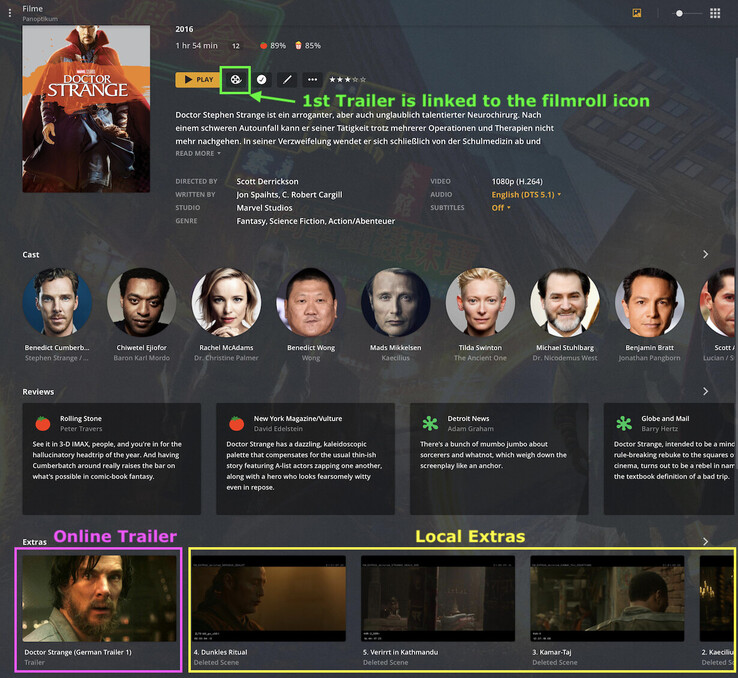
Hi, when i click on a movie thumbnail in plex, the movie main page comes up with all the info,actors, reviews ect. How do i get my trailers and extras to show on this page. Synology NAS as server.
ive seen this:
You can organize your local extras into specific subdirectories inside the main directory named for the movie. Extras will be detected and used if named and stored as follows:
There’s 2 ways to name/organize your extras so Plex can recognize them. Here’s an example that covers both.
Personally I prefer using the subfolder approach:
Movies    <- the folder linked to your movie library
  Doctor Strange (2016)
    Doctor Strange (2016).mkv
    cover.jpg
    Behind the Scenes
      Gag Reel.mkv
    Deleted Scenes
      1. Strange Meets Daniel Drumm.mkv
      2. Kaecilius Is Looking for Answers.mkv
      3. Kamar-Taj.mkv
      4. Dark Ritual.mkv
      6. Lost in Kathmandu.mkv
    Shorts
      Team Thor - Part 2.mkv
Alternatively you could organize those extras like this:
Movies    <- the folder linked to your movie library
  Doctor Strange (2016)
    Doctor Strange (2016).mkv
    cover.jpg
    Gag Reel-behind.mkv
    1. Strange Meets Daniel Drumm-deleted.mkv
    2. Kaecilius Is Looking for Answers-deleted.mkv
    3. Kamar-Taj-deleted.mkv
    4. Dark Ritual-deleted.mkv
    6. Lost in Kathmandu-deleted.mkv
    Team Thor - Part 2-short.mkv
You can mix both scenarios.
After adding your local extras you need to trigger Refresh Metadata on the item (or library) for Plex to pick them up.
Tom,
Thanks so much for your reply! I too would like to use the sub dir method because from what i understand, this method put the trailer on the movies main page along with the actors and reviews?. My problem is that i really dont understand the directories and sub dir’s when it relates to plex on a synology NAS. What ever directory is created for a movie i add, is done so by my simply dragging the movie file to the movies folder created by the plex app built for synology nas. i drop the mp4 in the folder and bingo, it show up on my plex movies page with all the correct info(providing i named it correctly etc). All suggestions for naming convetions for adding extras show all these foward slashes in the file name but i have nowhere in plex for synology where in can edit this info. I was hoping that naming the trailer in a certain way that begins with the same movie title plus some other keyword would create the subdirectory inside the movie folder and i would be done.
First off… you should under no circumstances use the Plex share on your Synology to store your media. Last time I used Plex on a Synology that folder was full of files in different languages asking you not to do that.
This share is hidden by default and on purpose so. It’s used to store the server’s data (not media) – adding your media there can cause some odd behavior.
Usually you’re best off either using the regular media shares of your Synology or create one for yourself.
As an example, I’ve created the following folder structure inside the default video share:
Schlumpfkino   <- my Syno name
  audio   <- custom share I use for soundtrack, audiobook or comedy libraries
  music   <- default Syno "music" share
  video   <- default Syno "video" share
    home-videos
    movies (de)
    movies (en)
    shorts (de)
    shorts (en)
    tv-shows (de)
    tv-shows (en)
Breaking down the folders inside the video folder by language is a habit of mine – you can do 100% without that
Inside Plex, my libraries are pointing to the following folders:
Library
Type
Folders
Movies
Movie
video/movies (de), video/movies (en)
Shorts
Movie
video/shorts (de), video/shorts (en)
TV Shows
TV
video/tv-shows (de), video/tv-shows (en)
Inside the video/movies (de) and video/movies (en) my files are organized as individual folders per movie, e.g.:
Schlumpfkino
  video
    movies (de)                     <- the movie library points to this folder
      Doctor Strange (2016)         <- movie folder
        Doctor Strange (2016).mkv   <- movie file
        ...
Where ... is a placeholder for the remaining example from my original response.
The forward slashes in the examples refer to the folder hierarchy. In my example I opted to use intended lines to reflect the folder structure. For Plex to pick up the local extras, each movie should be in their own movie folder. If you have all your movies stored in the same joint top-level folder Plex will not be able to associate a certain extras folder to a movie.
Hope this is making sense for you
Pink box → Online trailer (Plex Pass online extras) as I don’t have a local trailer for this movie
Yellow box → Local extras as showing in my example above (except they’re actually labelled by their German name.
Green: if a movie has trailers (online or local), the 1st trailer will be linked to the film-roll icon next to the play button
Extras have an automatically created 16:9 thumb from the video itself. The main name is the actual file name (minus the file extension) – extras are grouped by the extra type. There’s a known issue about the sequence of those extras not following any particular order (Deleted Scene 4 → Deleted Scene 5 → Deleted Scene 3 → Deleted Scene 2)