BigWheel, thanks so much for jumping in here. I’m happy to provide you with anything that would be helpful.
I can certainly try a small library. I will place some of the problematic albums in that library and load it then refresh the metadata and see if I can duplicate with a small sample (my libraries have about 750 albums).
Note though that the problem spans the server not just a single library, so for example, if I have “Let It Be (CD)” in one library and then I load “Let It Be (LP)” in another library then I might find the next day that the thumbnail is gone from “Let It Be (CD)” (those are simplified versions of my actual names to get the point across).
Therefore, it may be difficult to isolate this to a single library with simple examples but I will try. Furthermore, on one run an album may pass through the refresh and not revert to blank but then on another run later it will turn blank. It appears random from where I sit, although obviously there’s an underlying pattern or process causing the change in behavior.
For starters, how about I send a log of a single refresh on a single album that is blank and stays blank after the refresh while there are similarly named albums that are not blank in the same library? Maybe that would provide a clue where it’s trying and failing to get the cover art?
Where should I post the logs? As an attachment in this thread or email you directly?
You can attach to this topic would be best. But if you are concerned about that you can click on my username and hit message to send them to me. Make sure to let me know which album it is you refreshed.
Bigwheel, was there a fix put through for today’s version or something else related to metadata that may have addressed the problem?
To my surprise, things started to work fine after today’s PMS release for one of my two servers (both of which I updated as I usually do with each release).
Some additional information:
I noticed that my cover art was working 100% correctly on my CONDO server (I have two servers) but not my HOME server. Both servers had the same problem for about the last six months or so. Both servers were updated today.
This lead me to obviously look at the differences in the configuration settings for the two servers – there were none.
Which then lead me to compared the Synology NAS settings between my home and condo NAS machines. This time I found one a difference. The condo NAS had the following option turned OFF:
“Automatically redirect HTTP connections to HTTPS”
Whereas the home NAS had this turned ON.
I therefore turned it OFF on the home NAS and “refreshed all metadata” and eventually this server started to work at 100% cover art – I had to unmatch a few albums and refresh metadata on those on a one off basis and eventually I had a stable and correct 100% set of my own cover art.
So – apparently things are working!
I’m not sure why they started working today other than the PMS update may have addressed something which combined with the Synology setting above resolved the problem.
At least resolved it for this moment! Fingers crossed!
I’m happy to report that after I unmatched my problematic albums, they have all continued to display album art… so far. Has been about a week. I would like to be able to match them so I get lyrics and descriptions and all that.
Interconnect, I’m in the same exact boat. Additionally I turned off the scheduled processes that update Metadata.
I re-loaded my libraries and unmatched any albums that had the blank cover art problem and I have avoided running “Refresh All Metadata” altogether. This was about 10% of my library (I explain why I have so many below).
My cover art has been fine with those caveats, but like you, these albums should easily match (and they do for the similar album) so I would really like to see this get fixed.
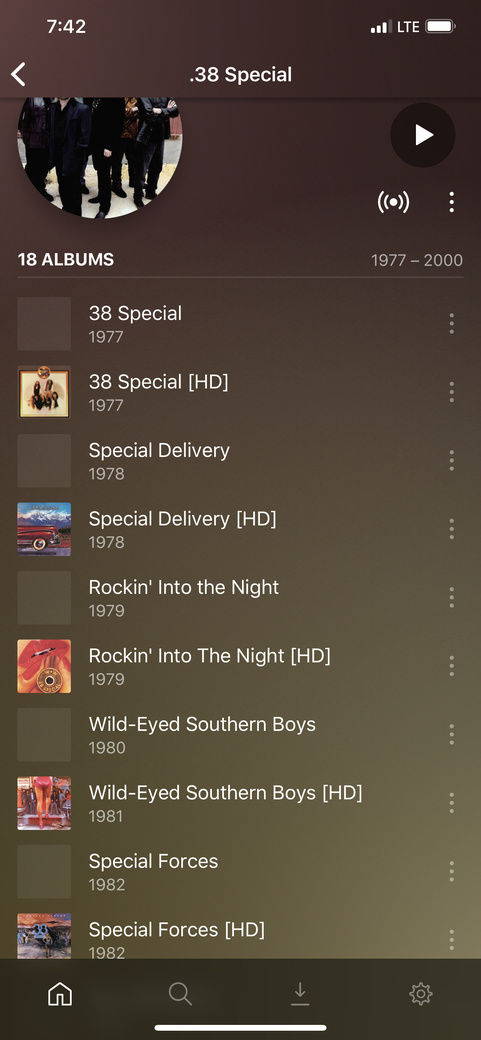
I can summarize the bug in this way – for albums that have the same match the cover art of one of the albums will often disappear and cannot be located. Sometimes it takes a few cycles of refreshing the metadata before the problem appears, making it tricky to pin it down to the simplest reproducible error.
This appears to me to be a caching problem to me because unmatching resolves the lost cover art problem but unfortunately results in an unmatched album that should easily match.
It’s very hard to duplicate the problem with a small number of albums – goodness knows I’ve tried – but the problem is very evident for a large library. Again, maybe suggesting a bug in the caching logic that is only evident was the cache grows.
In my case it affects about 10% of my albums because I use Plex to store all my vinyl rips and I have many different versions of the same the LP. (different LP masterings, CD version, etc…)
@BigWheel – is there any additional info I can provide you to help track this down?
I just uploaded a bunch (5) albums to my Plex server. And while all cover art show up on desktop clients without any issues, when I use Plexamp Android app and Plexamp macOS app, one of the cover art is missing.
I tried scanning again and refreshing metadata and restarted Plexamp, the issue persists.
Since all cover art are viewable on desktop clients, I know they are there. But it’s frustrating nonetheless.
Not to mention as Plex server owners we are all prone to a bit OCD.
Yep I had the same issue with that same album. Sometimes it would display in one place but not others. I think there’s caching going on, so try clearing your browser cache and/or wait a few days and you might see if disappear in Plex Web.
I believe it has something to do with The Fame and The Fame Monster having very similar names. And I figured out it has to do with the matching. Once I unmatched one of the albums, it found it and showed the art everywhere.
Definitely a bug in matching that needs to be addressed but is probably a moot point since there’s a new scanner, agent and metadata database coming as mentioned in the recent announcement.
This multiple versions of the same album, art missing issue is pissing me off. I have close to a 1000 different versions of various albums. It really makes Plex unusable for me as I’m a meticulous tagger and have completist issues.
I’ve seen an announcement about movie scanner and metadata, not music?
Agreed. After putting a lot of time and effort into this I basically gave up. If I really want to see the missing artwork I “unmatch” the album and it appears for me. It’s a pain though, because it keeps reverting to blanking them when scheduled meta data tasks are run. Although turning off the scheduled meta data tasks seems to help it still somehow happened to me again with the tasks off so I just gave up and turned the scheduled tasks back on.
I encourage you to complain about this issue — hopefully enough people speak up and Plex fixes this.
Some good news to report – it looks like something was fixed around version 1.20 or so, I’m no longer seeing the problem on the web app. I did have to do some amount of unmatching, refreshing all meta data, cleaning bundles, and deleting a couple squirly albums. BUT that said, for the first time I’m able to go a couple days without the random art flipping back to missing. Things are stable on the web app at the moment!
The problem does STILL persist the iOS app (I’m assuming for Apple TV as well), so maybe that’s a good data point for what has gone wrong and what needs to still be fixed so Apple devices can show proper artwork.
I’m curious if the others here are seeing a dramatic improvement and if anyone technical may have insight into what has been fixed by Plex and, relatedly, what needs to still be fixed in iOS
Fingers crossed that I can love Plex again like I did before last fall!
I would honestly give a week before getting your hopes up. I’ve had it go 3, 4 even 5 days or more and then all of a sudden it disappears. What makes you think there’s been a big improvement?
I guess I’m a little optimistic because I understand some agent work was done on the movie side, perhaps a change to the caching logic shook this up? — I’m guessing…
But mainly I’m optimistic because the last update got about 98% of my cover work right immediately upon the update. That caught my attention since my problem was running around 10% to 15%
In fact, prior to 1.20 the problem was worse than ever. And I had started to seriously look at alternatives to Plex but didn’t find anything suitable yet when 1.20 was released.
There’s a chance that the Mac OSX update or the Synology NAS update may have improved the situation , it’s hard to say since I was on vacation for a few weeks and came back and updated everything at once. I was not scientific about this particular problem and just updated everyone at once — including lots of unrelated stuff like JRiver. In fact, I was defeated with Plex and looking for alternatives.
So my hope is renewed that this could actually get fixed.
I’ll report back in 5 to 10 days to see if things are still working.
I have turned back on the meta data matching process to run overnight as well, which I think was the culprit for waking up to missing cover art. Perhaps that runs every 3 days or something so I will watch this over many days.
Checking in here – it’s been 5 days and 100% of my cover art has been correct in recent days. Nothing has reverted back to blank on the web application.
iOS app is still not working, about 5% of my cover art is missing.
I will check back in another 5 days or so, if things remain good on the web application but not iOS then I will open up a bug with the iOS app forum.
I thought perhaps it may be due to having identical albums in different libraries, albeit, different types.
That is i have a “hi res” library with FLAC at or higher than CD resolution…and I have an “iTunes” library with the same albums converted to 320kbps mp3.
I found this long thread and was hoping someone may have a solution…obviously not to be just yet.
Dmonds, in a nutshell yes that is the problem. I have different versions of the same album in the same library and across different libraries – I have different LP pressings of the same record whereby the title of the album is different but the match turns out to be the same wreaking havoc in the cover art. This happens as well with FLAC and mp3 copies. Or CD and LP rips of the same album that match to the same thing.
I’m surprised that many more folks are not having this issue. It’s been a problem for roughly 1 year now.
I wish there was a way to get some priority on fixing this problem – please help!



 I’ve had it go 3, 4 even 5 days or more and then all of a sudden it disappears. What makes you think there’s been a big improvement?
