All channels from HDHomeRun are very pixelated and choppy, but only with Plex

Server Version#: 4.147.1
Player Version#: 8.45
Tuner Make/Model: HDHomeRun Flex 4k
Guide/Lineup name: ???
Using XMLTV?: I don’t think so?
Channel number/Name: WKRN-Nashville 2-1

I just installed an HDHomeRun, and while using the HDHomeRun app for iOS, iPad OS, macOS, or Apple TV, I get nearly every channel crystal clear. I only notice the occasional blip when an airplane flies overhead.

However, on Plex it’s an entirely different matter. Not a single channel is viewable within Plex across all platforms - Web, Apple TV, iOS, you name it. Every channel will load the first frame, pause for 10-20 seconds, and when it eventually plays, it’s VERY pixelated, choppy, stopping for 10 seconds at a time, with barely any discernible audio. You would think I had terrible reception, but my HDHR disagrees.

I can put the same channel on the HDHomeRun app on my AppleTV and watch it crystal clear, but on Plex it’s a garbled mess.

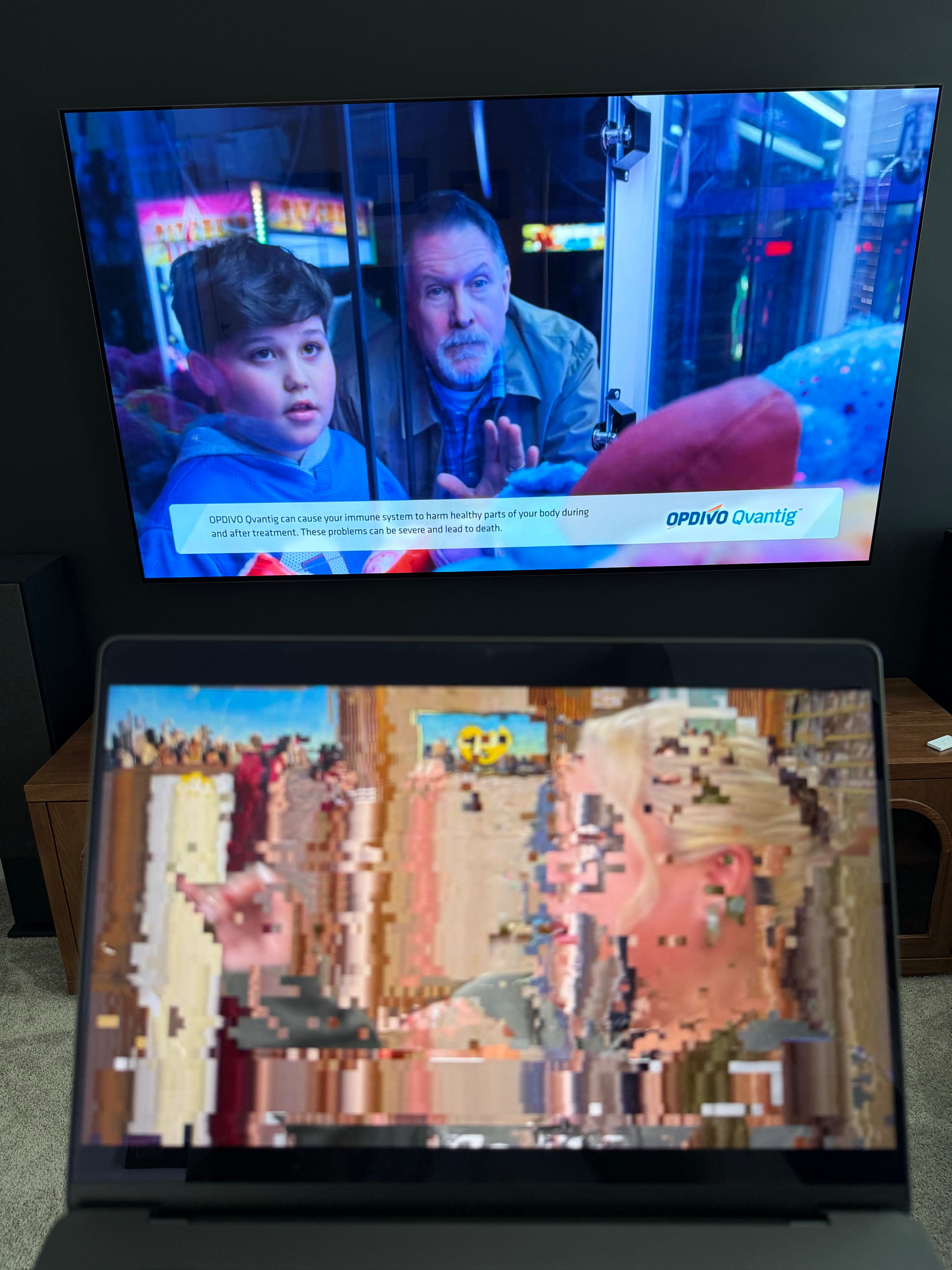
The picture below illustrates the problem. The TV (top) is tuned to my local ABC station and is being viewed through the HDHomeRun app. My laptop (bottom) is also tuned to my local ABC station, and is being viewed through Plex through the Web (doesn’t matter which Plex platform I choose, they all look like this).

Part of me wondered if my server just couldn’t handle the transcoding. I’m running PMS through Docker on a beefy, custom-built Linux server that does not have a dedicated video card. However, Plex on AppleTV indicates Direct Play, and even manually selecting transcoding of any quality hardly uses any CPU power. Besides, I’ve never had a problem transcoding with PMS on this server, so I don’t think that’s the problem.

I’m at a loss. I’d really like to use Plex’s DVR capabilities for college football tomorrow (thanks, Disney and Alphabet…), but I am not feeling optimistic about it.
Start playing a channel and then on another machine with browser go to: https://app.plex.tv/desktop/#!/settings/web/ Click on Dashboard and grab a screenshot of the “NOW PLAYING”.

Here you go, I grabbed the Now Playing, plus the server statistics.

The only visible indicator is that it is buffering which considering the direct stream and low cpu seems odd. Anything special with the networking?

Well, I’ve got a full UniFi setup. But the HDHR and the server are on the same subnet. The HDHR itself only has a 10/100 network port, but the rest of the devices are all gigabit and hardwired.

When you go to Server Name → Live TV & DVR and click the gear next to your tuner what do your “Device settings” show?

Mine for example:

I’m also running Plex in docker and have no issues. Are you’re running the container in Host mode?

My container uses a macvlan network interface so that it can have its own IP address separate from the server. (This was primarily for my other containers/services, but I just kept things consistent and used the same network for all containers.)

Well that would be special.

Afraid to ask, Is this Unraid? Anecdotally, I have had driver/kernel performance problems before with other OS’s that required tearing it all down and rebuilding.

Plex really needs to update their documentation on this. Back in April when they introduced the “Remote Watch Pass” came an implied “Your network will be a solitary RFC1918 compliant home network”. No Ad blocking, DNS filtering, Vlan’s or other modifications. Plex in Docker will be Host mode and router will allow DNS-Rebinding the IP wildcard cert to plex.direct. All this was done to reduce support threads but I think it has gone up 10 fold.

If you can, get the HDHomerun and the Server on the “same” network to avoid any routing. Plex will start pushing all traffic through the router if it fails to discover local devices and fails DNS lookups to plex.tv or plex.direct.

It is not Unraid, just a home-built Linux box running mostly Docker containers.

Perhaps my network is too customized for this. Plex had no trouble auto-discovering the HDHomeRun without me manually entering the IP.

In re: Ad blocking/DNS filtering, I definitely use Pi-hole. I queried plex.direct and am getting the 0.0.0.0 sinkhole IP, but I get that same result when querying outside my Pi-hole. Plex.tv is fine. What should I expect to return for plex.direct? Is it a local address being advertised by PMS?

You will have to modify the Pi-Hole for DNS-Rebinding. Lookup adding a custom domain exception depending on if you are using DNSmasq and/or unbound.

Unbound is:
Private Domain
server: private-domain: "plex.direct"

In the “Plex Media Server.log” should be lines to register the cert /CN=*.“CertificateUUID”.plex.direct

So it changes the .'s in the ip address to -'s address.certid.plex.direct:32400 for the internal IP and a second one for public ip with whichever port you specified for remote access.

ex: 192-168-0-1.xxxxxxxxxxxxxxxxxxxxxxxxxxxxxxxx.plex.direct:32400
