Server Version#: 1.20.3.3401 (plexinc/pms-docker:plexpass)
I recently migrated my Plex server from Windows to Plex in a Docker container running in WSL 2. I made all the necessary migrations to paths, settings, etc. I run Plex in Bridge mode because it seems like Host mode is actually not available for Docker using a WSL2 backend, so this is my only option.
Plex is actually functioning correctly. I can access it remotely from multiple different devices, it’s scanning everything correctly, playing, etc. The only thing I noticed was that the IP reported for all the streaming seemed to be coming as 172.20.0.1. My Docker subnet is 172.20.0.0/16, so it seems this IP is the Docker gateway. I can’t figure out how to get it to actually show the Real IP of the connection. Again, the connection itself works, just the IP is not displayed correctly.
Docker network settings
networks:
  default:
    driver: bridge
    name: ${COMPOSE_PROJECT_NAME}
    ipam:
      driver: default
      config:
        - subnet: 172.20.0.0/16
Plex Compose. The DNS is for Adguard. I tried turning that off, but it didn’t fix anything
  plex:
    image: plexinc/pms-docker:plexpass
    container_name: plex
    environment:
      - PLEX_UID=${PUID}
      - PLEX_GID=${PGID}
      - UMASK=${UMASK_SET}
      - TZ=${TZ}
    volumes:
      - ${CONFDIR}/plex:/config
      - ${CONFDIR}/plex/Certificates/ca.crt:/config/Library/Application Support/Plex Media Server/Cache/ca.crt
      - ${CONFDIR}/plex/Certificates/certificate.p12:/config/Library/Application Support/Plex Media Server/Cache/certificate.p12
      - ${CACHEDIR}/plex/transcodes:/transcode
      - ${CACHEDIR}/plex/cache:/config/Library/Application Support/Plex Media Server/Cache
      - ${CACHEDIR}/plex/codecs:/config/Library/Application Support/Plex Media Server/Codecs
      - ${CACHEDIR}/plex/plugins:/config/Library/Application Support/Plex Media Server/Plug-in Support/Caches
      - ${LOGDIR}/plex/logs:/config/Library/Application Support/Plex Media Server/Logs
      - ${LOGDIR}/plex/cashes:/config/Library/Application Support/Plex Media Server/Crash Reports
      - ${LOGDIR}/plex/diagnostics:/config/Library/Application Support/Plex Media Server/Diagnostics
      - ${MEDIADIR}:/mnt/media:ro
      - /etc/localtime:/etc/localtime:ro
    ports:
      - 32400:32400
      - 33400:33400
      - 32410:32410/udp
      - 32412:32412/udp
      - 32413:32413/udp
      - 32414:32414/udp
    depends_on:
      - adguard
    dns: 172.20.0.150
    restart: unless-stopped
Remote Access Settings (my host IP is 192.168.1.2)
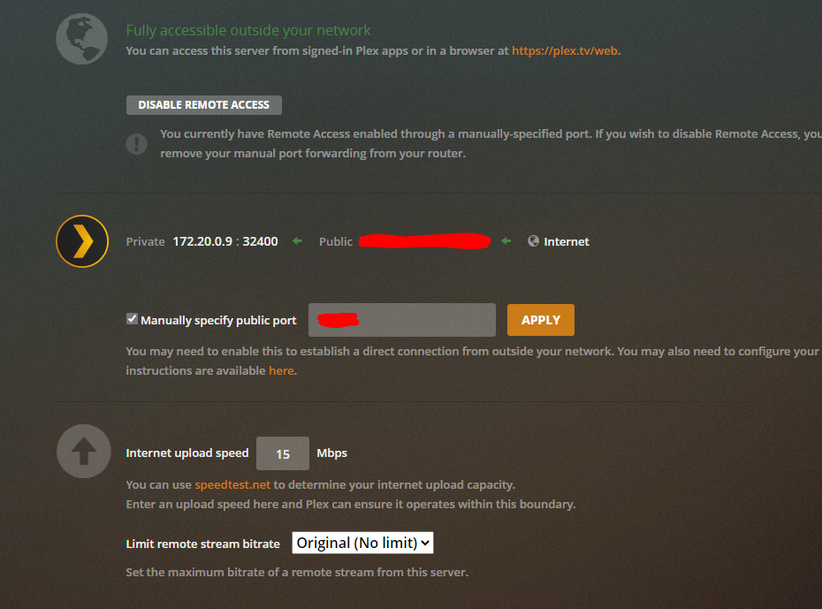
Network Settings


