Server Version#: 1.19.1.2645
Player Version#: 7.31.0.16802
TV Model#: XBR-55X810C
Plex Media Server Logs_2020-04-22_20-26-52.zip (5.1 MB)
Media Details.zip (2.5 KB)
Hello everyone,
Since I’ve had choppy playback of H265 content on my Sony Android TV, (quite possibly because of this issue Example of stuttering HEVC playback on Apple TV 4K - #50 by Buzzfly ) I’ve been forced to transcode it to H264.
When selecting Convert Automatically, I can see that the server has selected 1080p - 10.1 Mbps as it’s selection. This is perfect, as it does a good job of capturing the quality.

However, you’ll notice that in the quality options, 720p at 2 Mbps is the highest option I can manually select. If I try to use 720p, the quality drop is pretty massive. It’s possible that it’s limiting my options because the source file is only around 2 Mbps itself. Because of this I can’t set it as high as the Convert Automatically setting is doing. Why can I not set the quality to the level the server automatically chooses to use?
This would also not be a problem if Convert Automatically did not cause any issues. But after watching for a while on this setting, I also noticed a quality drop, and checked the setting again and found it had dropped.
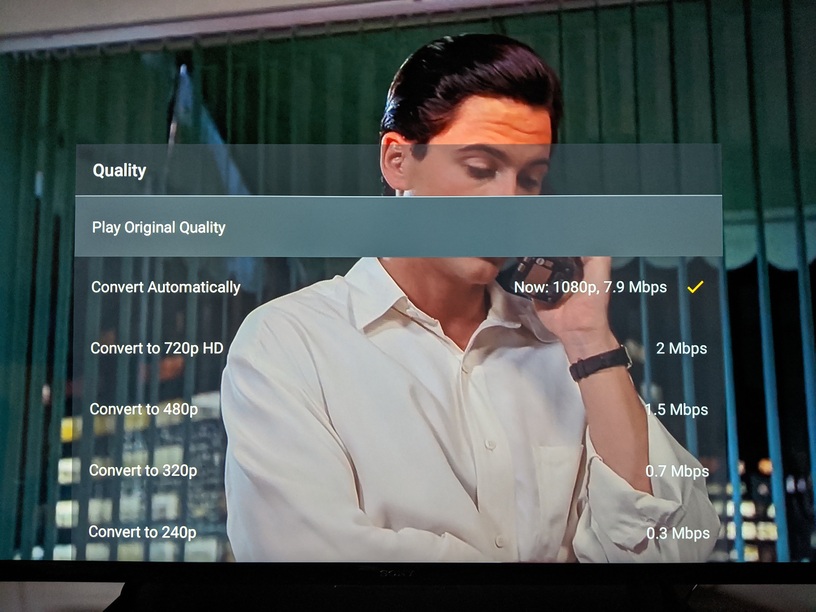
Now it’s dropped down to 7.9 Mbps, and as the movie continued, the rate continued to drop until it was around 1.5 Mbps.
My server has no lack of resources, and I have a fast local network, so I don’t see it being converted down due to any resource constraints.
I’ve attached Server Logs set to Debug, and XML data for the movie.
If there is any other details required to investigate this please let me know.
Thank you!
