This fix seriously needs to be pushed out ASAP. It’s a pain to use the app right now. Question may be solved, but the issue is not.
2 Likes
If you red the solution you would see that apparently the problem is now at Samsung we are waiting for them to push the app through their tv store or what they call it.
the other problem is not related so use a diff post for that
yes it is very annoying but I guess we can now only wait for samsung to push the app on their tv store
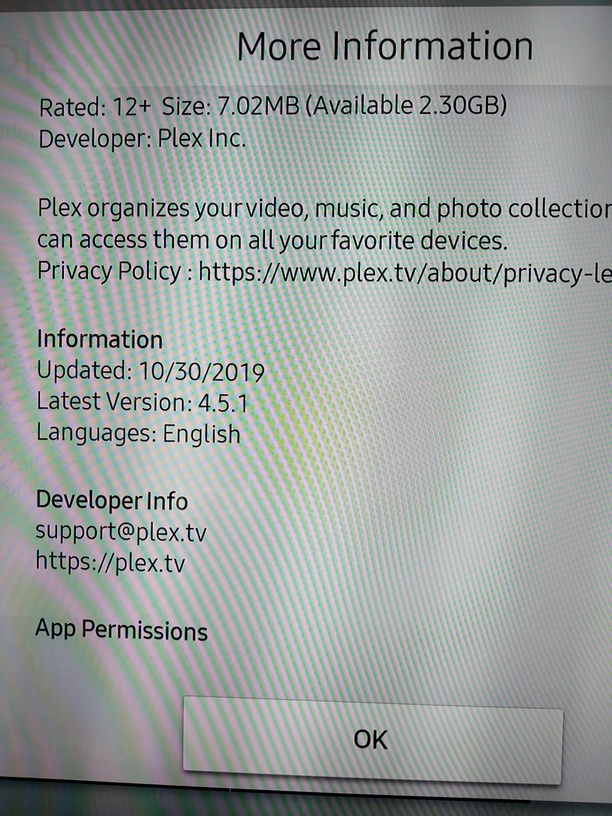
Except it’s not a ‘solution’, because claiming that it’s fixed in the 4.11.0 version isn’t actually fixed, nor is it verifiable that we really are waiting on Samsung. It seems the current Plex for Samsung is 4.5.1, so where is 4.6, 4.7, 4.8, 4.9, or 4.10? More importantly, if we’re all waiting on Samsung to push it out, the Plex devs should tell us how we can pressure Samsung collectively, so get them to push it. They have every incentive to do that, and none against.
Until they can substantively “pass the buck”, the issue isn’t solved.
I’m not trying to be stubborn, but marking it solved seems improper. I’d be happy to make some nose to Samsung, as I’m sure other would too.
1 Like
If samsung takes so long to approve new version, why not publish new versions as direct download for an usb install like emby does.
And I agree that issues arent fixed until the users confirm it. I dont know how the tizen app gets developed, but apparently the plex team doesnt actually own any tizen devices to test or doesnt spend more than the absolute minimum of time to test, otherwise the app should improve and not get worse over time.
1 Like
We’re not allowed to do that. It’s against Samsung’s Terms & Conditions.
The fix is in the Samsung release pipeline. We’re waiting on them to approve.
That makes sense to me. Is it against the terms to provide contact information for Samsung’s pipeline people?
If not, we’d all be happy to give them a buzz to speed things along.
1 Like
I think it’s not a samsung tv app bug, but a server one. I have access to several shares, and there is an older installation of a plex server, which has alphabet picker when I open the shared library, while the other up to date ones don’t have
Nope. I just confirmed. Plugging a Roku into the Samsung TV - Plex in the Roku shows the alphabet on the right, but the Samsung Plex app does not (same server). The alphabet is also available (by scrolling) on the android app, as well as from other devices. The same confirmation with the “Nothing to see here” issue with local user accounts on the Samsung TV app only.
1 Like
This seems to be the Samsung App developer page talking about how to push an update (“application version-up”).
https://developer.samsung.com/tv/distribute/seller-office/applications/application-update/#application-version-up
I’m assuming this already happened, and we’re waiting on Samsung to actually push the updated version to the devices themselves.
https://developer.samsung.com/tv/support/documentation-qa/distributing-applications-qa#application-update
1 Like
Hello,
Did anyone received an update from Samsung ?
Thanks!
1 Like
Getting fedup of this issue 
1 Like
This should be linked to this problem for Samsung Plex client app: “Nothing to see here” when browsing “All” movies?

thompsondc,
This is really a separate issue then ‘Nothing to see here’ and should not be linked. I see my movies but with 600 of them and no alphabet picker I cannot effectively navigate through the list at all. This was a sloppy mistake on the developer’s part and it should only take a couple of days to fix since all the other releases have the alphabet picker. Just put it back in! WHAT IS THE HOLD UP.
3 Likes
I disagree. Based upon all of the testing and information I’ve given the Plex devs, it’s clear that the problem exists with the Samsung smart TV app (version 4.5.1). Neither problem exists on other devices (such as the web app, Roku app, or Android app), accessing the same server. Others have reported the problem with the Samsung app, but with different server operating systems. Both problems seem to have developed with the October 2019 update (version 4.5.1), which is why I presume they’re connected.
Community members have claimed to have recieved info from the devs that they developed a newer app version with a fix (4.11.0), but are waiting for Samsung to push it out. When questioned why that version number is several later than the current one, or how to contact Samsung directly, there has been nothing but silence.
I agree the problem is with 4.5.1. However some of us are not experiencing the ‘Nothing to see’ error; while everyone is experiencing the missing alphabet picker. If ‘Nothing to see’ has been verified to be a 4.5.1 problem, which I have not seen verified to the best of my knowledge, then what you are saying above is sound. Still the missing alphabet picker was a sloppy developer error and Samsung should just put the component back in and push it out. What is their Hold Up.
Do you have a household account with restrictions on content rating? That’s where I see the “nothing to see here” problem. I do not see that problem present on either external (registered Plex user accounts) users or household users without restrictions. You are correct that the alphabet issue is present for all users.
While I concede that I can’t definitively say that 4.5.1 is the cause of the “nothing to see here” issue, I can confirm that it only arise as an issue at the same time as the alphabet issue - with the October 2019 update. It also seems limited to the Samsung app, just like the alphabet issue. Considering the correlation, I’m hoping that linking the problems helps the devs fix both concurrently, if possible.
As a Plex pass member, I would think my diligence in providing troubleshooting info would be appreciated by them.
FYI, for the devs; I just tried removing the restrictions, saving the changes to the account, then re-adding them again. The issue still remains.
1 Like
