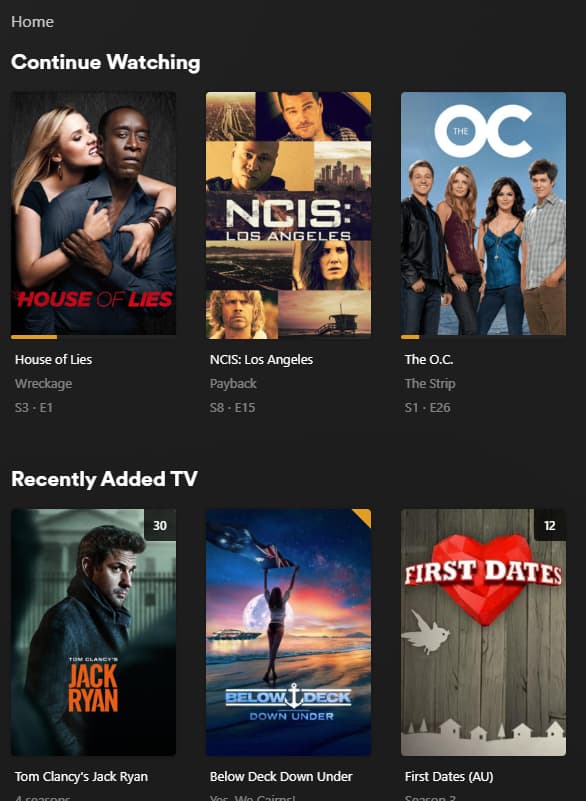
Plex keeps getting worse, and it’s probably time I abandon the platform despite paying for the lifetime PlexPass. I just tried to see what’s available instead of what’s on deck and noticed it’s mostly all advertising now. I don’t want that.
Specifically I detest:
The annoying ads for “What’s on Now” and the like that make it difficult to see what’s new, pushing TIDAL, etc.
The constant problems with “plex sync” / downloading content to a tablet before a trip
The security problems (initial sign in bypasses pin numbers and lands in the master account)
The random transcoding issues (sometimes a specific show will be bugged until a server reboot, sometimes audio sync is bad and i have to switch to original quality, inability to scrub through buffered video)
The worsening search result feature (again, trying to squeeze out revenue through ad sales)
“Live TV” support that’s little more than an advertisement for HD HomeRun
I remember there used to be an ‘original Xbox’ media player I used on it before plex that seemed like it would be easy to turn in to plex with out all the downsides. Anyone remember what that’s called or of any open source plex-like projects they can vouch for? The exploitation of the user base is far outpacing any maintenance or addition of useful features; if I had Plex server and the apps from 2 or 3 years ago I’d be running them now.
What else have you folks tried? What was your experience?
I agree with everything you’ve said. I want to get the hell out of plex land. It’s just a few skips and a jump to when the networks pay plex for all the information about what you have in your library and what you’re watching.
Jellyfin is getting there. AFAIK it’s the best alternative. I use it in my trailer when we go camping because it’s totally disconnected from the internet (obviously once you’ve imported everything) and lets devices stream from it too. All without internet.
I stumbled into the forums today because I’m getting all sorts of errors in the settings. I’m trying, from my server, go to to my account but it says error. I see it popup all the information then goes into spinning mode, probably trying to talk to some remote plex.tv site and dies. I can do it just fine on plex.tv directly… Stupid company.
I mean, they are just one of many handful of independently owned businesses that still wish to compete in the tuner business. I don’t have confidence that Tablo and TiVo devices are going to be great consumer friendly products anymore since Tablo is owned by a major broadcaster and may have bias and TiVo is a hot mess. I personally don’t take issue of the business contracts and bias that Plex has for HDHomeRun products considering they have been pretty successful at making good solid hardware.
The tv landscape is forever changing and will eventually might not be of importance in 15 to 20 years, if these major networks try to have their way. For now, I think it’s fine to support Plex DVR and SiliconDust’s partnerships.
You’d get better help with your errors if you took screenshots of what you see AT THAT EXACT MOMENT instead of being very vague and assuming some conspiracy theory about Plex sending your stuff to a mothership.
I’ve tried most alternatives, and for what I want Plex does it the best. Emby was second, JellyFin seemed unpolished and Kodi is a different animal requiring a different approach and not what I wanted. I’ve had Plex about 10-years now and it’s gotten better. I’ll try to respond to your detest individually:
Specifically I detest:
The annoying ads for “What’s on Now” and the like that make it difficult to see what’s new, pushing TIDAL, etc. I must have turned them off because I don’t see this
The constant problems with “plex sync” / downloading content to a tablet before a trip This works for me. Just used it on my laptop and iPad for a camping trip we took this summer
The security problems (initial sign in bypasses pin numbers and lands in the master account) You mean the person who entered the password was then presented with full control? I’m pretty sure that’s by design
The random transcoding issues (sometimes a specific show will be bugged until a server reboot, sometimes audio sync is bad and i have to switch to original quality, inability to scrub through buffered video) Never had this issue - but I can say transcoding requires specific hardware to run properly and not all devices are suitable for all streams. I stick to x264 or x265 since my Roku’s support both (HDR is a problem for my server, so I don’t use it - but that’s a hardware issue for me not a Plex issue)
The worsening search result feature (again, trying to squeeze out revenue through ad sales) Search works fine for me. I even like how it breaks them out by source, so I can also see what’s streaming in case it’s not in my library. This came in handy recently for me. All my Ip Man movies were subtitled, but the ones streaming for free on Plex were dubbed and I prefer that to reading the dialogue so watched those instead
“Live TV” support that’s little more than an advertisement for HD HomeRun I’ve had Plex for 10-years or so. Became a Plex Pass member when Live TV was added.
At first it was sketchy, now it just works as I expect. I record my shows, they show up in Plex. It even removes the commercials for me. I also use this feature to stream my local stations while camping.
I’d like to say, these forums are for support. Generally we’re all Plex enthusiast so when you come on here without real questions just a diss-track for Plex none of us are really impressed. We’re more or less thinking “Goodbye and Good riddance” when we hear you say you’re going to find a new media server. We don’t mind comparing the offerings, but just dissing to diss is kinda mean girl vibe.
Here’s the difference between using the web app on windows (clean, can see my content) vs. the windows app (settings is just the server settings, so I can’t find a way to disable the junk I don’t want)
Look through the forums. One of the issues I had requires disabling IPS on my firewall when trying to download content. Another is the random failure-for-no-reason-then-redownload behaviour I get when trying to load my iPhone. Last time I tried downloading media from my server on someone else’s account it didn’t work – it’s restricted to only the owner of the server. If I have a movie I filmed of me playing golf, and I want to share it, why can’t I? If Plex is presuming the content is illegal and pirated why draw any line at all?
If there’s a pin on the account (as silly as a 4 digit pin is) I don’t expect it to bypass asking for the pin number and dump me in to the admin account. If it ONLY happened when first setting up a device for the first time it wouldn’t be so bad. But sometimes the kids will end up with my account on their TV, which is bad. I don’t know if it happens after an app update or what triggers it, but it’s a huge problem because the admin always has access to all libraries so I can’t filter out inappropriate content on it.
I didn’t say “consistent transcoding issues”, I said “random”. It doesn’t happen often. But when it does, it’s frustrating because I have to restart the server. It’s like there’s a thread actively transcoding that get’s stuck in a loop or something, and you can’t rewind or fast forward, and you can’t restart your client and resume, the remote server just gets stuck on that one episode until the server is rebooted.
I guess some people like the ad-supported plex content, so it’s probably subjective. My biggest complaint is they add “features” I don’t want that makes my experience poorer, and don’t let me opt out or disable it. There’s an online sources configuration where you can opt in/out of stuff like netflix being included, and Plex isn’t one of them. That’s mandatory because it’s revenue. When lifetime money dries up, will my personal content have ads in it too?
I’ll admit I bought an HDHomerun dual tuner a couple years ago, tried it for a short period, and haven’t used it since so I don’t know what the current state is. But the initial rollout was so horrible I felt cheated – they were more interested in convincing me the feature works and I should buy hardware than having it work before I buy hardware. In Canada, over the air television is actually a pain to get in most places. Your antenna has to be large and high.
Set everything to “Disabled” (not “Disabled for Managed Users.”)
In the web client and/or desktop app, in the search box, select the settings selector at the far right. Uncheck “More Ways to Watch.”
If it still appears there for some reason, unpin the “Live TV” item from your sidebar on you clients’ home screens. The same applies for any other Plex sources which you don’t want to see.
Each client keeps track of which libraries (sources) are pinned to the left, and in what order. It’s unfortunate that this is not saved server-side, since it means customizing the side-bar every time I load Plex onto a new device (and then again as a managed user of my own server).
The good thing is that the majority of the screen (the non side-bar) is 99% predictable based on what you have pinned to the left, and in what order. Since you can declare what each pinned source is allowed to show on the “Home” menu (by going to Settings > Manage > Libraries and pointing at a library name and clicking Manage Recommendations), what you have pinned will only show that content.
You are seeing “ads” for “Live TV (On Plex)” in your Windows App because you are keeping the Plex “Live TV” free content source pinned to the top of your left-hand list. If you move that further down, or remove it entirely, you will never see the “ads” for Plex’s own free content. Even better, you can disable the free Plex offerings (I do) by doing as others have suggested and disabling it entirely in Online Media Sources in your server/account settings (Click the wrench, and click the second menu from the top left that says Online Media Sources).
I do not have this issue, but I don’t use it much. I think it’s one of those “if you have the issue, you have it” kinds of things, so I feel sorry that it happens to you.
I use multiple devices, and none of them watch on the admin account. So I have to swap over to the managed users all the time, and I have never had a device default back to using the admin account once. Did you specify on each device to “Automatically log in”, so it automatically logs the user into the previous managed user account?
Could be hardware related. I used to use the Synology server, which is decent-enough of a devices, but once I offloaded Plex onto a docker in Ubuntu, it has never been more stable. The only time I need to reboot the server is for updates (or power flickers). I think it would be good to investigate your hardware issues more in depth with logging in a separate post.
As other stated, you can eliminate online sources from being searched by a (bizarrely hidden) button in the search bar. However, my content always show first when searched by name, and only after that does it search Plex’s own offerings AND THEN the universal metadata entry for a show/movie.
Not sure what you are referring to here. “Live TV” refers to Plex’s own free TV-like scheduled airings, while “Live TV & DVR” requires your own TV Tuner device (such as HDHomeRun) to capture local OTA channels. I splurged on an HDHR because I did not wish to experiment with other potentially unsupported devices, and have had no issues since.
Closing: You are referring to Kodi (formerly XBMC, formerly XBMP) which is a FANTASTIC player program, and can accomplish everything Plex does and for free, but all metadata/images for your media are stored on the device itself, and must be done on every single device you own. I have a cheap FireTV that I tried to get working with Kodi, but quickly ran out of it’s pathetically small internal storage just scanning my (at the time) meager collection. To have to reproduce that on my iphone, Fire Tablet, parent’s phone/tablet, Shield, several computers would a LOT of work. With Plex, I now have the freedom to make one master metadata source, and small clients can connect remotely to the server to obtain the necessary info/posters/media.
If you do not have a need for that, then try out Kodi. A single device with no online requirement will work out great… if your device is capable of playing the media. For on-the-go, I’d recommend a Shield for maximum media playability/power.
Do you by chance have something entered in Settings → Network → “List of IP addresses and networks that are allowed without auth”? I’ve seen issues before where my kids were granted access to every library while still on their own accounts (despite being disallowed in their permissions), which was apparently related to a bug with that setting. People will suggest that you enter a range of IP addresses there to help bypass local authentication if the internet is down, but enabling that can also leave you wide open to some significant vulnerabilities on your local network along with issues of parental controls.
Emby or JellyFin would love you. Head on over, your Plex pass is probably well paid for by now so don’t worry about the $.04 a day it cost you at this point. It will help keep the Plex forum clutter free like the Plex UI.
I use Plex to consume my content and content that friends have shared w/ me. I also share my content w/ my friends & that’s pretty much the general idea.
I don’t use Plex for live TV unless I’m sitting in a waiting room and don’t want to count the holes in the ceiling tiles, but it does work well.
I have been searching for a Windows Media Center replacement for years. I have tried all of the alternatives you mentioned and none of the software alternatives completely cover all the bases. Neither Plex nor the alternative can play live TV from DRM protected channels from cable or OTA. (I think the CP flags should be banned by the FCC)
The Jellyfin interface is very similar to Emby but Emby adds sound to ATSC3.0 OTA channels, but that one feature doesn’t justify the membership cost for me. I have found the Jellyfin APPS to be rather quirky and unreliable, but it’s web player does work fine just w/ no surround sound, stereo only. I do run a Jellyfin server just for the download feature, it does work, though you can’t do a batch downloads (downloading an entire album for example) you must download one file at a time.
Kodi works fine and the actual player is fantastic. 4K HDR capable, frame rate & resolution switching and very good deinterlacing and detelicining, and is pretty responsive to remote inputs, but again not capable of watching any DRM protected content.
The closest I’ve come to a WMC7 replacement is a NVidia Shield. Not as a server but as a STB. I just lost my second WMC7 machine to a hardware failure, so I have only 1 left. The Shield does have some issues; With live TV, certain networks and studios seem to be using an MPEG encoder that does an absolutely horrid job with interlaced 1080i content. The image tears and combs on panning shots to the point it is almost unwatchable and the Shields decoder just can’t handling it properly. The WMC7 decoder on the other hand, didn’t make the image perfect, but it is much more watchable. The Shield runs on AndriodTV so you have tons of adds and “you might like this” on your home screen, but you can get all the major streaming apps if you want them (I don’t us them w/ the exception of Amazon video since I have prime but I only watch the free content). But the main advantage for me is that with the HDHR app installed you can watch live cable TV with channels that have DRM on them. With the Shield + HDHR app you also can watch OTA ATSC3.0 channels with sound however some broadcasters are enabling DRM that locks out their stream and you cannot watch it at all (also feel the FCC should ban that).
I have lifetime Plex as well and don’t plan on dumping it anytime soon since it is a great repository for all my stuff and more if the TV & cable channels have nothing but crap on.