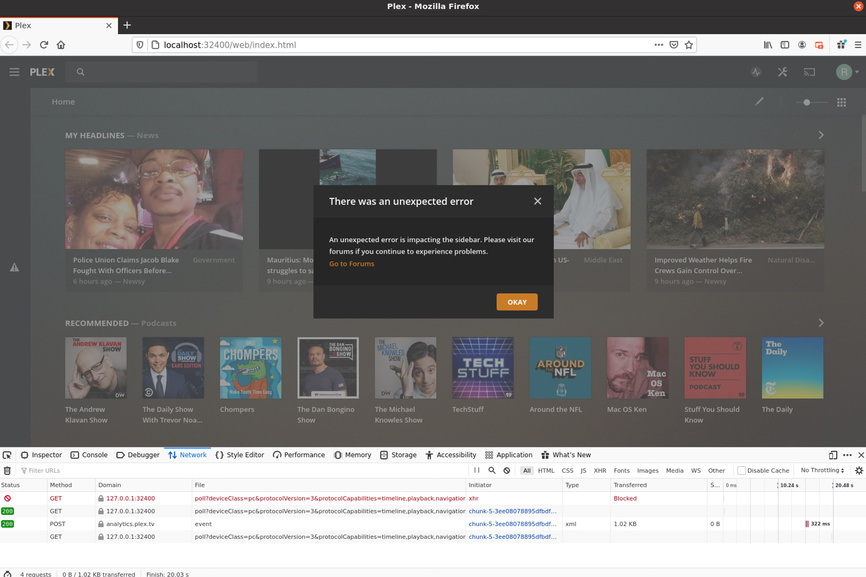
I suspect it’s the Web App logs we need, and not the server logs
Look Here: https://support.plex.tv/articles/201611836-plex-web-app-logs/
I suspect it’s the Web App logs we need, and not the server logs
Look Here: https://support.plex.tv/articles/201611836-plex-web-app-logs/
So, here is an ap log. I don’t know if it records the event, since the event is an on-going failure of a function to occur. Let me know if I should record this in another fashion.
Plex console log Hippler.txt (80.0 KB)
Thanks a heap @Hippler for your efforts here. You are right those logs won’t record the event as it is a completely unexpected error.
Can you please capture the console logs from the browser ?Plex Web App Logs | Plex Support
Once we have that hopefully I can decipher where it is occurring 
I had some trouble executing the copy command for the Chrome console log, but I tried twice and attach both logs. If they aren’t right, let me know.
My Firefox browser was also giving the same Plex menu problem (identical in appearance), so I made a copy of its console log as well. All 3 attached
app.plex.tv-1592926213464.log (782.9 KB) app.plex.tv-1592926648962.log (655.0 KB)
Plex console log Hippler.txt (80.0 KB)
I realize those Chrome logs are unformatted. Attached is another console log from my Chrome browser, hopefully easier to read.
Chrome log TXT formatted.txt (139.0 KB)
Thanks @Hippler for sharing!
Unfortunately we couldn’t track down the error as chrome omits the column number so we couldn’t be sure exactly where the error came from. Firefox might help us with that so if you can, could you please try capturing the console logs with Firefox ?
You said above it occurs sporadically. Can you elaborate on that a little ? Like is it 1 in 10 times you reload the page, or more like every 2nd time ?
If you open an incognito window, does that help at all, or does problem still persist ?
I think we have made progress. The incognito window in Chrome worked, but always requires a new sign-in into Plex. Less them convenient!. So I signed out of my plex account. and signed back in, in a regular Chrome window. Voila! The menu works normally. I re-booted and re-opened Chrome. The Plex tab opened signed into my account, and the plex menu displayed properly.
I am assuming it will continue to function properly. I still don’t know why the error occurred, but it seems to be easily fixable by the user.
I will let you know if this turns out wrong. If you need more info, let me know. Thank you for your attention and work on this.
The Firefox console log was previously sent (when Firefox gave problems). I attach it again
Thanks
Plex console log Hippler.txt (80.0 KB)
One addendum:
I suspect the conflict arises when there are, as in my case, multiple machines on the network accessing the same server, and the Plex menu has been customized on some of these machines, but not consistently between them. I note that signing out/into my account gives me a Plex menu, but returns the default menu
Thanks @Hippler for trying that. Has it remained ‘fixed’ over the past few days ?
We store structure of the sidebar in your browsers local storage and I am assuming that was corrupted somehow (best theory we have since using incognito or sign out fixed it).
If you see this again, please come back and let me know!
Here is the thing: I have 2 browsers on my server computer, and one Win 7 laptop, a mac laptop and several Android devices on my local network. Your theory requires us to understand that both browsers on the server and the Chrome server on the Win 7 laptop were all corrupted at the same time. While I was resetting the Plex menu in each of these three browsers, I experienced the error, at various times, in all three.(not in the Androids and not, I believe, in the Mac). If it makes sense to attribute these errors to corrupted local browser storage, then I the cause of that in all three needs to be understood.
In any event, all my Plex menus are the default version, and now all have been error-free for 3-4 days. I am happy to leave them in default view, as the price of being error-free.
I am willing to help, however, in any further investigation you may wish to conduct. Let me know if you want me to change any settings and report the result,
Thanks again
Thank you all so much, but especially you Hippler. I have been experiencing the exact same problems you have been running into, but with Windows 10 and MacOS. I appreciate you taking the time to tackle this along with the Plex team. I, also, was running into a little better sidebar performance with Firefox on my MacOS, but not today, prompting me to re-check this thread. Following your advice to sign in - incognito, then sign out/sign in seems to have worked. One note though, on by my MacOS server AND on the Windows 10 server, log out just about crashed the window. What I mean by that is when you prompt the pulldown menu to sign out, the window froze WITHIN the window “pane”. All the window buttons functioned, except for any plex coding within the window. I had to kill the windows and start anew, not knowing if I had actually signed out. (I had)
Cheers!
Here is another shot of the error in more detail, look like a resolution issue with the CSS?
[moderator edit: Never, ever post screenshots and log file extracts which contain the X-Plex-Token!]
I was having the same sidebar error. I disabled Adblock Plus in Chrome and the sidebar error seems to be fixed
It’s best practice to have a non default browser to launch Plex server for admin. Save Plex as a bookmark and have no Extensions in that Browser.
I use Firefox as my default Browser and Chrome for all my Plex server and Geo Restricted websites as I use a split Tunneling VPN solution that allows application exemptions. Example: Netflix, Catchup Tv, Online TV.
what I tried that just worked for me is
I went into settings, troubleshooting, optimize database and clean bundles. took a few mins and now the side bar shows up
I’m having the same problem. I’m running Windows 10 Pro and have reset the home screen and sidebar customizations.
Still disappears.
That worked.
For about 2 minutes.
Now it is collapsed again.
This topic was automatically closed 90 days after the last reply. New replies are no longer allowed.