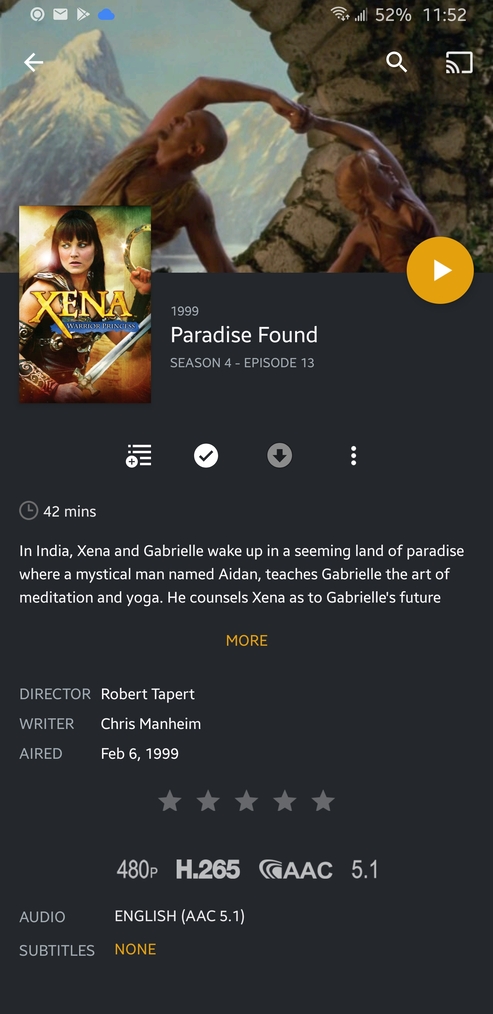
Right now, when you go to an episode’s “page” in the Plex android app, it just shows the backdrop image at the top of the screen. This seems like it’s not useful: I already know I’m watching Xena, Warrior Princess. What would be far more useful is to show me the image I’ve selected (usually I hand-make and personally select the exact episode poster image I want instead of using a metadata website!) as the episode poster, to jog my memory for who showed up in that episode or a particular cool/interesting scene.
The iOS app already does this. Can we get this great feature on Android, too please?
An example of what I mean. As beautiful as Lucy is in this photo, I’ve seen her dozens of times now. I’d rather see the specific episode image up there in the most-important position!!
OR, at least give us the option to choose what we want there, in the all-important “top spot” - some people might prefer the Backdrop image. But I feel like a lot of us (including all the iOS users who get the episode image by default in the “top spot”) might choose this. Choice is good
For comparison, here’s what the same episode page looks like on an iPhone. The dimmed background picture of Gabrielle and Aidan becomes sharp and clear while scrolling and it isn’t so dark. It would be great to see Android move closer to this appearance if possible!
I’m so pleased to report that at some point in the past 4-6 months, Plex Android devs heard my plea and fixed this issue, so that now both Android and iPhone show the episode’s background image on the top of the application screen. Thank you!
There’s still one thing that iOS has that Android does not - the ability to swipe left or right on an episode’s page, in order to go back or forward to the previous or next episode. Please add that! It’s a great feature from iOS that I’d love to see on Android as well!